
v0.4.0
language_pickers
It makes language select pickers for you in Flutter. You can use it freely in lots of ways.
16Likes 6230-day downloads160Pub points
Platforms unavailable
It makes language pickers for you in Flutter. You can use it freely in lots of ways.
English project snapshot. Visit GitHub for the latest content.



It's package for Dart and Flutter.
It makes language select pickers for you in Flutter. You can use it freely in lots of ways.
And specially thanks to Figen Güngör(@figengungor), who is opened the source code of 'country_pickers'. Lots of source codes are from country_pickers GitHub Repository, so works are very easy. Thanks again.
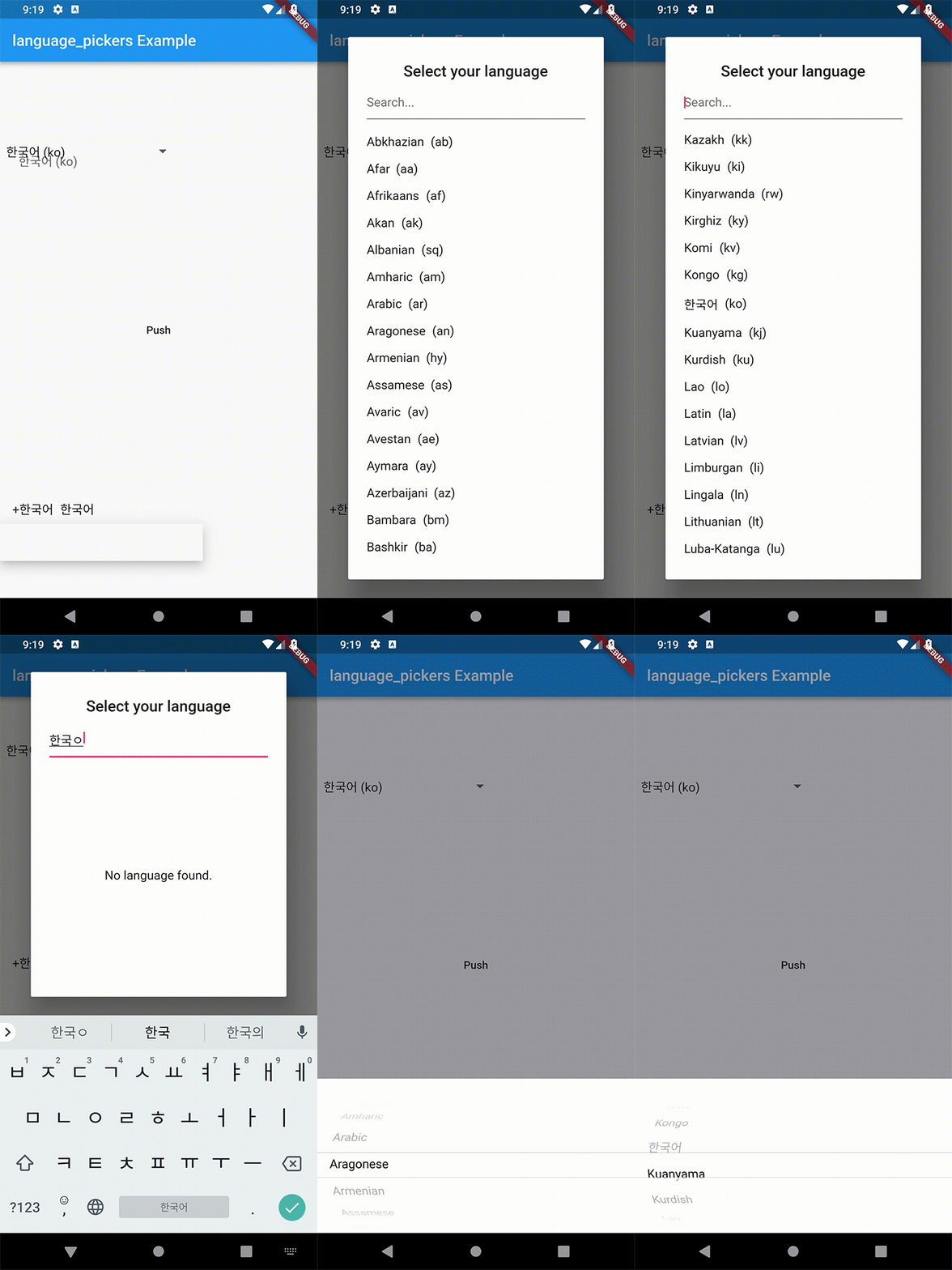
0.4.0 does not break your code. The old API still works, it only warns you. Here is what to move to:
| 0.3.x | 0.4.0 |
|---|---|
defaultLanguagesList (List<Map<String, String>>) |
Languages.defaultLanguages (List<Language>) |
languagesList: myMaps |
languages: myLanguages |
LanguagePickerUtils.getLanguageByIsoCode('ko') |
Language.fromIsoCode('ko') |
| — | Languages.korean, Languages.english, … |
One behaviour changed: an unknown ISO code now throws an ArgumentError
instead of an Exception. ArgumentError is an Error, so on Exception catch no longer catches it.
Every Language also has a nativeName now, and Language implements ==
and hashCode, so you can put it in a Set or use it as a Map key.
import 'package:language_pickers/language_pickers.dart';

Language _selectedDropdownLanguage = Language.fromIsoCode('ko');

// It's sample code of Dropdown Item.
// nativeName is the name written in the language itself, e.g. '한국어'.
Widget _buildDropdownItem(Language language) {
  return Row(
    children: <Widget>[
      SizedBox(
        width: 8.0,
      ),
      Text("${language.name} (${language.nativeName})"),
    ],
  );
}


// Builder
LanguagePickerDropdown(
                    initialValue: 'ko',
                    itemBuilder: _buildDropdownItem,
                    onValuePicked: (Language language) {
                      _selectedDropdownLanguage = language;
                      print(_selectedDropdownLanguage.name);
                      print(_selectedDropdownLanguage.isoCode);
                    },
                  ),
LanguagePickerDropdown(
  languages: const <Language>[
    Languages.korean,
    Languages.english,
    Languages.japanese,
  ],
),
The controller lets you read and change the selection from outside the picker.
final controller =
    LanguagePickerDropdownController(initialValue: Languages.korean);

@override
void dispose() {
  controller.dispose();
  super.dispose();
}

// Builder
LanguagePickerDropdown(controller: controller),

// Somewhere else
controller.selectIsoCode('ja');   // the dropdown follows
print(controller.value.name);     // reads the current selection
import 'package:language_pickers/language_pickers.dart';

Language _selectedDialogLanguage =
      Language.fromIsoCode('ko');

// It's sample code of Dialog Item.
Widget _buildDialogItem(Language language) => Row(
    children: <Widget>[
      Text(language.name),
      SizedBox(width: 8.0),
      Flexible(child: Text("(${language.isoCode})"))
    ],
  );

void _openLanguagePickerDialog() => showDialog(
    context: context,
    builder: (context) => Theme(
        data: Theme.of(context).copyWith(primaryColor: Colors.pink),
        child: LanguagePickerDialog(
            titlePadding: EdgeInsets.all(8.0),
            searchCursorColor: Colors.pinkAccent,
            searchInputDecoration: InputDecoration(hintText: 'Search...'),
            isSearchable: true,
            title: Text('Select your language'),
            onValuePicked: (Language language) => setState(() {
                  _selectedDialogLanguage = language;
                  print(_selectedDialogLanguage.name);
                  print(_selectedDialogLanguage.isoCode);
                }),
            itemBuilder: _buildDialogItem)),
  );
import 'package:language_pickers/language_pickers.dart';

Language _selectedCupertinoLanguage = Language.fromIsoCode('ko');

// It's sample code of Cupertino Item.
void _openCupertinoLanguagePicker() => showCupertinoModalPopup<void>(
  context: context,
  builder: (BuildContext context) {
    return LanguagePickerCupertino(
      pickerSheetHeight: 200.0,
      onValuePicked: (Language language) => setState(() {
            _selectedCupertinoLanguage = language;
            print(_selectedCupertinoLanguage.name);
            print(_selectedCupertinoLanguage.isoCode);
          }),
    );
  });

Widget _buildCupertinoItem(Language language) => Row(
    children: <Widget>[
      Text("+${language.name}"),
      SizedBox(width: 8.0),
      Flexible(child: Text(language.name))
    ],
  );
If a name or a native name is wrong, please make some issues on GitHub.
The names and the native names are based on the public ISO 639-1 code table. Where the table lists several native writings for one language, this package keeps one representative writing, so that it fits in a dropdown.

Dependency list 3 items
{"sdk":"flutter"}{"sdk":"flutter"}^3.0.0Start with your use case, compare repository activity, and check the original project before adopting it.
“A repository is the most basic element of GitHub.”
GitHub Docs — About repositories ↗