
css_text_for_flutter
This Flutter library allows you to use CSS to style your text

- Stars
- 56
- Forks
- 16
- Last push (UTC)
- May 26, 2023
- Project status
- Active
Original README
English project snapshot. Visit GitHub for the latest content.
CSS Text
This library makes it easy for you to convert HTML and CSS content into RichText widgets. It supports most CSS properties that are relevant to text content, except those related to text alignment.
Here's some sample HTML content with inline CSS styles:
<body>
<p style="font-size:2.5em;color:darkseagreen">This is a test</p>
<p style="font-size:1.8em;color:#ff3311">So is this</p>
<p style="font-size:45px;background:#3311ff;color:yellow">And this!</p>
<br/>
<br/>
<p style="font-size:1.5em">
Hello <b style="font-style:italic;color:#bb0000;background:#eeff00">World</b>!!
<br/>
How are you <span style="font-family:RobotoBlack;color:#ff0000;">today?</span>
<br/>
<b>But</b> why are you doing <a href="https://google.com">this?</a><br/>
<br/>
<span style="text-decoration: underline wavy; font-size:2em">Can you tell <del>me</del>?</span>
<br/>
Multiple <span style="font-weight:100">font</span>
<span style="font-weight:600">weights</span><br/><br/>
Please visit <a style="font-weight:bold;" href="https://docs.flutter.io">Flutter docs</a>
<br/>
<br/>
<span style="color:#990000ff;background:#4400ff00">
This text is slightly transparent, and has a slightly transparent background too.
</span>
</p>
</body>
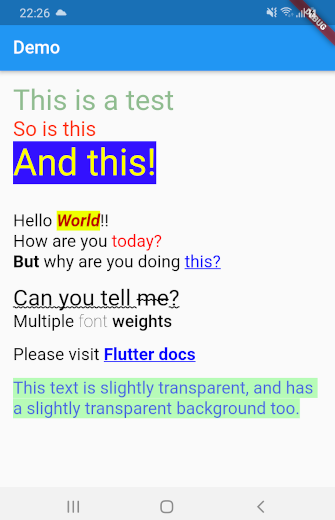
This library can automatically convert all the HTML content above into a TextSpan object or a RichText widget. Here's what the rendered HTML will look like:
Getting Started
Using css_text is extremely easy. First import the library in your Dart code:
import 'package:css_text/css_text.dart';
You can then create RichText widget from any HTML content by calling the HTML.toTextSpan() method.
String htmlContent = """
<p style="font-size:1.5em;color:#99ff0011">Hello <b>World</b>
""";

var myRichText = RichText(text: HTML.toTextSpan(context, htmlContent));
As a shortcut, you can also use the HTML.toRichText() method.
myRichText = HTML.toRichText(context, htmlContent);
Handling Links
Your HTML content can have links. To handle them, you must use the linksCallback optional parameter.
String htmlContent = """<span style="font-size:2em">
Please click <a href="https://pub.dartlang.org">here</a> or
<a href="https://old.reddit.com">here</a>.<br/>
<br/>
Go ahead! Try it.
</span>""";

var myRichText = HTML.toRichText(context, htmlContent, linksCallback: (link) {
    // You can now use the url_launcher library to open the link.
    // Or you can handle the link in your app itself. This gives you
    // complete control over your links.
    // For now, let's just print it
    print(link);
});

Ashraff Hathibelagal ↗
Categories
Dependencies used
Dependency list 2 items
- flutter
{"sdk":"flutter"} - xml
^6.3.0
How do I choose a repository?
Start with your use case, compare repository activity, and check the original project before adopting it.
- Search by repository name, owner or description, then narrow the results by topic.
- Compare stars, forks and recent pushes. Stars show community interest, not a guarantee of quality.
- Read the README, license and issues on GitHub before using a project.
Sources and maintenance
“A repository is the most basic element of GitHub.”
GitHub Docs — About repositories ↗