
scrollable_table_view
herbertamukhuma/scrollable_table_view open-source repository details.

- Stars
- 17
- Forks
- 8
- Last push (UTC)
- Nov 23, 2023
- Project status
- Active
Original README
English project snapshot. Visit GitHub for the latest content.
This is a multi axis scrollable data table, that allows you to scroll on both the vertical and horizontal axis, with the header remaining static on the vertical axis. Please look at the demo below.
Features
Demo
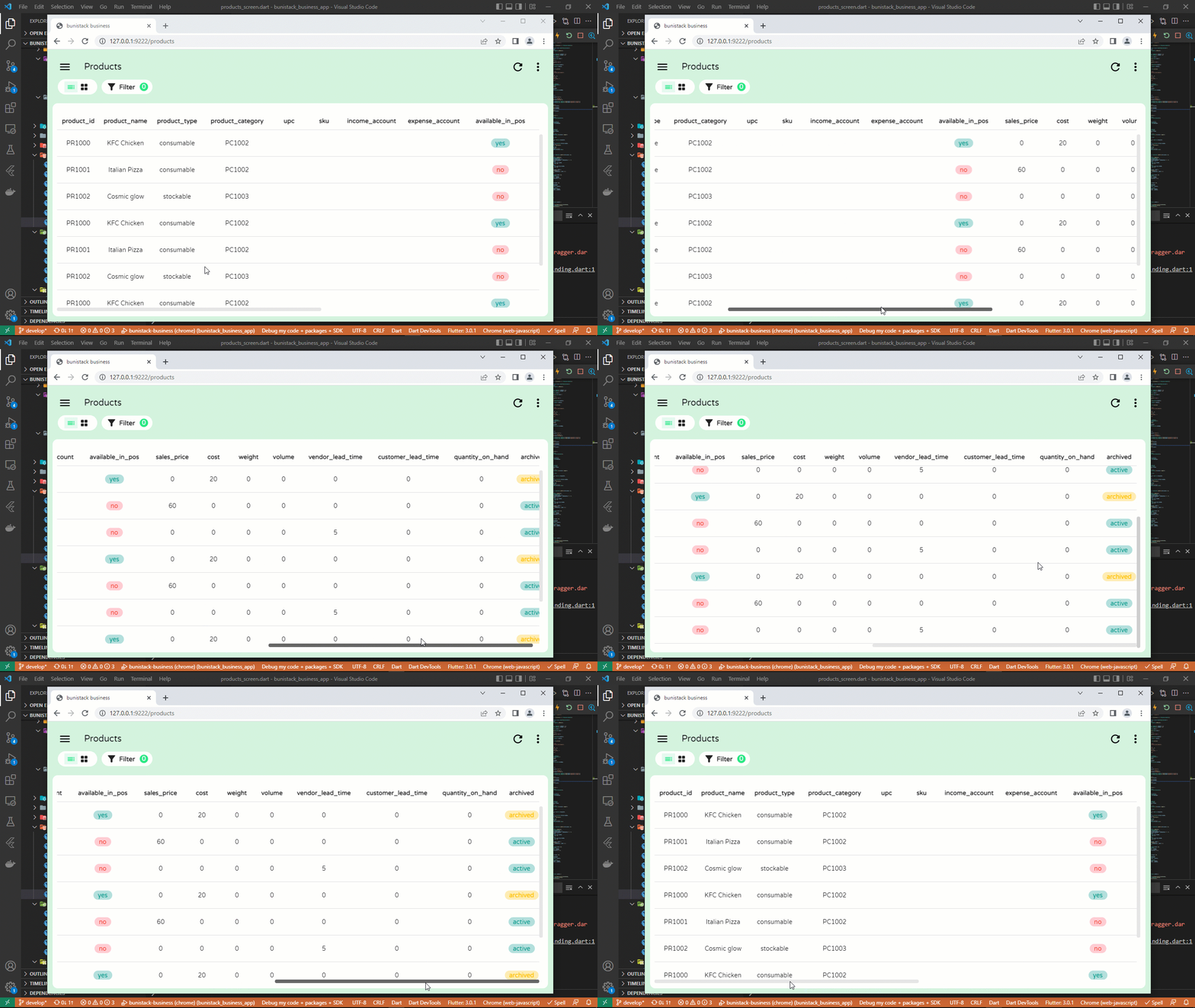
This widget serves the same purpose as a DataTable, with the advantage that it can scroll in both the horizontal and vertical axis, while maintaining the vertical position of the header.
Note
For more complex features like freezing columns and rows, kindly take a look at the data_table_2 package
Getting started
Simply add into your dependencies the following line.
dependencies:
  scrollable_table_view: <latest-version>
Usage
ScrollableTableView(
  headers: [
    "product_id",
    "product_name",
    "price",
  ].map((label) {
    return TableViewHeader(
      label: label,
    );
  }).toList(),
  rows: [
    ["PR1000", "Milk", "20.00"],
    ["PR1001", "Soap", "10.00"],
  ].map((record) {
    return TableViewRow(
      height: 60,
      cells: record.map((value) {
        return TableViewCell(
          child: Text(value),
        );
      }).toList(),
    );
  }).toList(),
);
Pagination
Pagination is supported from version 1.0.0-beta. First, initialize a PaginationController as follows:
final PaginationController paginationController = PaginationController(
    rowCount: many_products.length,
    rowsPerPage: 10,
  );
Next, initialize your table and pass the pagination controller to the paginationController parameter:
ScrollableTableView(
  paginationController: paginationController,
  headers: labels.map((label) {
    return TableViewHeader(
      label: label,
    );
  }).toList(),
  rows: many_products.map((product) {
    return TableViewRow(
      height: 60,
      cells: labels.map((label) {
        return TableViewCell(
          child: Text(product[label] ?? ""),
        );
      }).toList(),
    );
  }).toList(),
)
With the above setup, navigate forward and backwards using paginationController.next() and paginationController.backwards() respectively. To jump to a page directly, use paginationController.jumpTo(pageToJumpTo).
For the full example, go to the main.dart file in the example project.
Additional information
GitHub Repo: https://github.com/herbertamukhuma/scrollable_table_view Raise Issues and Feature requests: https://github.com/herbertamukhuma/scrollable_table_view/issues
Common Issues
- Loading too many records: From version 1.0.0-beta, pagination has been implemented. Kindly use this to avoid loading too many records at a time, which will inturn overwhelm your app.

Herbert Amukhuma ↗
Dependencies used
Dependency list 3 items
- flutter
{"sdk":"flutter"} - flutter_testDevelopment
{"sdk":"flutter"} - flutter_lintsDevelopment
^2.0.0
How do I choose a repository?
Start with your use case, compare repository activity, and check the original project before adopting it.
- Search by repository name, owner or description, then narrow the results by topic.
- Compare stars, forks and recent pushes. Stars show community interest, not a guarantee of quality.
- Read the README, license and issues on GitHub before using a project.
Sources and maintenance
“A repository is the most basic element of GitHub.”
GitHub Docs — About repositories ↗