Search packages, repositories and app categories

GitHub repositoryherowws/flutter_popup

flutter_popup

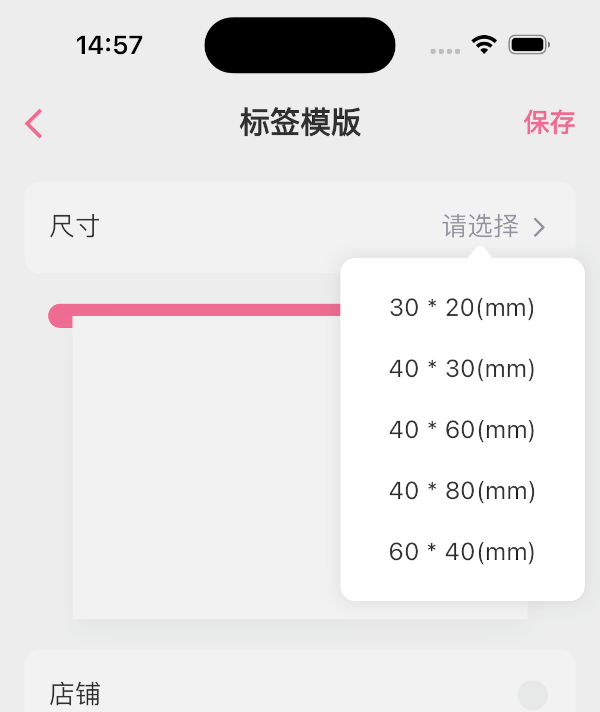
The flutter_popup package is a convenient tool that enables you to display a straightforward and customizable popup within your Flutter application

flutter_popup project cover
Stars
79
Forks
35
Last push (UTC)
Jun 14, 2025
Project status
Active

Original README

English project snapshot. Visit GitHub for the latest content.

flutter_popup

The flutter_popup package is a convenient tool that enables you to display a straightforward and customizable popup within your Flutter application. It offers a highlight feature that can be utilized to direct the user's attention to a specific area as needed.

Getting Started

image image image image

How to use

dependencies:
  flutter_popup: ^latest_version
import 'package:flutter_popup/flutter_popup.dart';
// easy to use
CustomPopup(
  content: Text('George says everything looks fine'),
  child: Icon(Icons.help),
),

CustomPopup(
  arrowColor: Colors.orange,
  barrierColor: Colors.green.withOpacity(0.1),
  backgroundColor: Colors.white,
  content: Text('George says everything looks fine'),
  child: Icon(Icons.help),
),

CustomPopup(
  content: _Slider(),
  position: PopupPosition.top,
  child:Text('slider'),
)

CustomPopup(
  content: Column(
  mainAxisSize: MainAxisSize.min,
    children: List.generate(5, (index) => Text('menu$index')),
  ),
  child: const Icon(Icons.add_circle_outline),
)

Container(
  decoration: BoxDecoration(color: Colors.white),
  padding: EdgeInsets.symmetric(vertical: 10),
  child: Row(
    mainAxisAlignment: MainAxisAlignment.spaceAround,
    children: [
      CustomPopup(
      showArrow: false,
      contentPadding:EdgeInsets.symmetric(horizontal: 30, vertical: 10),
      barrierColor: Colors.transparent,
      contentDecoration: BoxDecoration(color: Colors.white),
      content: SizedBox(
        width: double.infinity,
        child: Column(
          mainAxisSize: MainAxisSize.min,
          crossAxisAlignment: CrossAxisAlignment.start,
          children: List.generate(4,(index) => Text('item$index'),),),),
            child: Text('filter1'),
          ),
              Text('filter2'),
              Text('filter3'),
        ],
  ),
)

// Show the popup programmatically
final popupKey = GlobalKey<CustomPopupState>();
// ...
CustomPopup(
  key: popupKey,
  content: Text('George says everything looks fine'),
  child: Icon(Icons.help),
);
// ...
popupKey.currentState?.show();

last

Our full-stack freelance team is opening to new projects

If you have any questions about Flutter, or if you need me to customize a Flutter application for you, please feel free to contact me: QQ: 965471570 Gmail: herowws90@gmail.com

如果您有任何关于Flutter的问题,或者需要我为您定制一个Flutter应用程序,请联系我: QQ:965471570 Gmail:herowws90@gmail.com

herowws GitHub avatar
GitHub author

herowws ↗

LanguagesDartKotlinRubySwiftJavaObjective-C

Packages published by this repository

Dependencies used

Dependency list 4 items

  • flutter{"sdk":"flutter"}
  • exampleDevelopment{"path":"example"}
  • flutter_lintsDevelopment^1.0.0
  • flutter_testDevelopment{"sdk":"flutter"}

How do I choose a repository?

Start with your use case, compare repository activity, and check the original project before adopting it.

  1. Search by repository name, owner or description, then narrow the results by topic.
  2. Compare stars, forks and recent pushes. Stars show community interest, not a guarantee of quality.
  3. Read the README, license and issues on GitHub before using a project.

Sources and maintenance

“A repository is the most basic element of GitHub.”

GitHub Docs — About repositories ↗