


v2.2.0
file_picker_writable
Flutter plugin to allow users to open files/documents which can be read, and written back at a later time as well as creating new files on external media.
14Likes 25230-day downloads160Pub points
AndroidiOSmacOS
Flutter plugin to choose files which can be read, referenced and written back at a later time.

English project snapshot. Visit GitHub for the latest content.
Flutter plugin to choose files which can be read, referenced and written back at a later time (persistent permissions on android, secure bookmarks on iOS).
It also offers handlers for open intents when the user wants to open associated files from other apps. In the same way it will also handle arbitrary URLs and pass them back to dart.
 <key>UISupportsDocumentBrowser</key>
 <false/>
 <key>LSSupportsOpeningDocumentsInPlace</key>
 <true/>
            <intent-filter>
                <action android:name="android.intent.action.VIEW"  />
                <category android:name="android.intent.category.DEFAULT" />
                <category android:name="android.intent.category.BROWSABLE" />
                <data android:scheme="file" />
                <data android:scheme="content" />
                <data android:host="*"  />
                <data android:mimeType="*/*" />
                <!-- https://stackoverflow.com/a/52384331/109219 ?? -->
                <data android:pathPattern=".*\\.codeux" />
                <data android:pathPattern=".*\\..*\\.codeux" />
                <data android:pathPattern=".*\\..*\\..*\\.codeux" />
                <data android:pathPattern=".*\\..*\\..*\\..*\\.codeux" />
                <data android:pathPattern=".*\\..*\\..*\\..*\\..*\\.codeux" />
                <data android:pathPattern=".*\\..*\\..*\\..*\\.*\\..*\\.codeux" />
            </intent-filter>
Is currently not supported. The only thing the plugin will do is listen for URL Events and pass them through to the dart side.
See the example on how to implement it in a simple application.
Future<void> readFile() async {
  final fileInfo = await FilePickerWritable().openFile((fileInfo, file) async {
    _logger.fine('Got picker result: $fileInfo');

    // now do something useful with the selected file...
    _logger.info('Got file contents in temporary file: $file');
    _logger.info('fileName: ${fileInfo.fileName}');
    _logger.info('Identifier which can be persisted for later retrieval:'
        '${fileInfo.identifier}');
    return fileInfo;
  });
  if (fileInfo == null) {
    _logger.info('User canceled.');
    return;
  }
}
The returned fileInfo.identifier can be used later to write or read from the data,
even after an app restart.
Future<void> persistChanges(FileInfo fileInfo, Uint8List newContent) async {
  // tell FilePickerWritable plugin to write the new contents over the user selected file
  await FilePickerWritable().writeFile(
      identifier: fileInfo.identifier,
      writer: (file) async {
        // write new content into the temporary file.
        await file.writeBytes(newContent);
      });
}
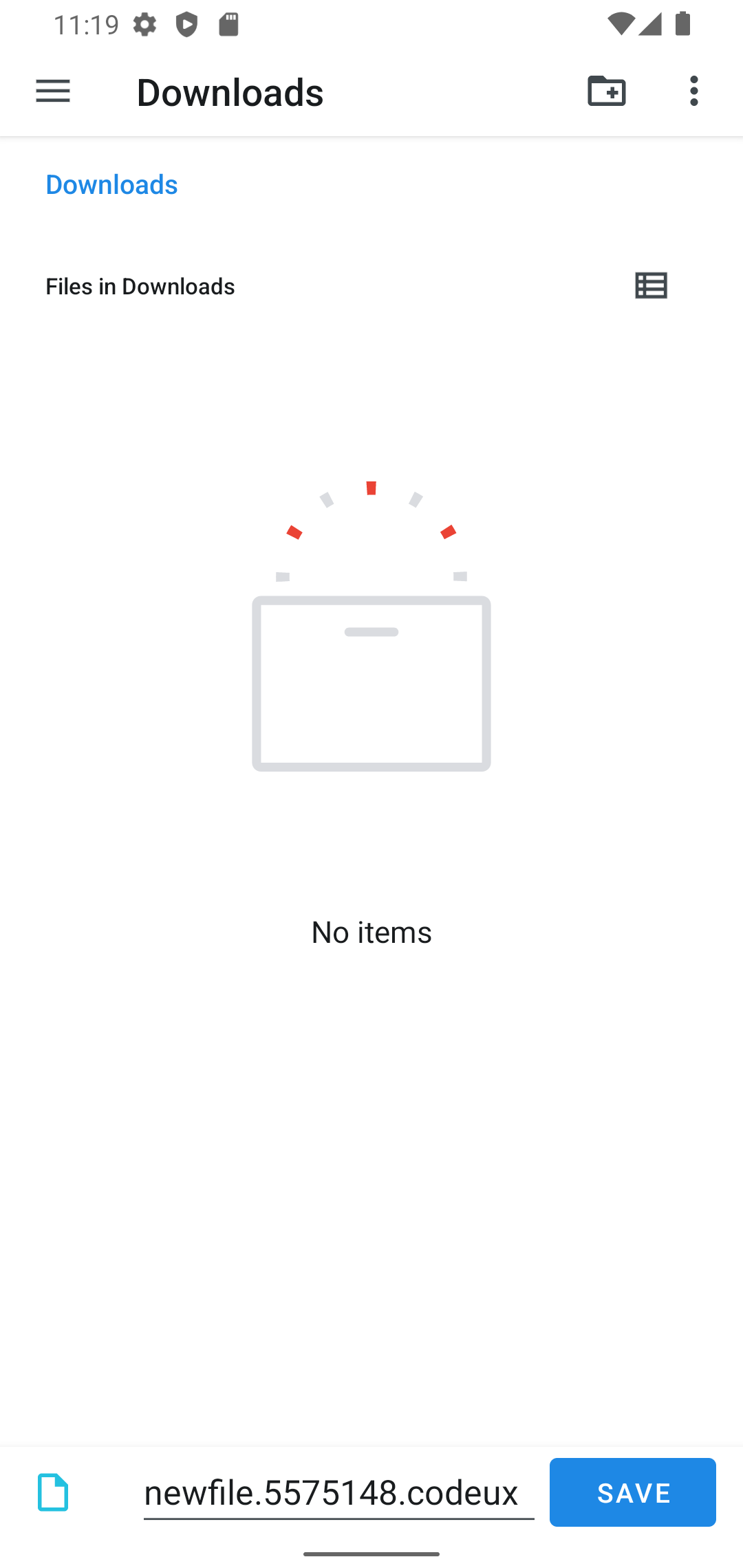
Create a new file by letting the user choose a directory and file name:
final rand = Random().nextInt(10000000);
final fileInfo = await FilePickerWritable().openFileForCreate(
  fileName: 'newfile.$rand.codeux',
  writer: (file) async {
    final content = 'File created at ${DateTime.now()}\n\n';
    await file.writeAsString(content);
  },
);
if (fileInfo == null) {
  _logger.info('User canceled.');
  return;
}
final data = await _appDataBloc.store.load();
await _appDataBloc.store
    .save(data.copyWith(files: data.files + [fileInfo]));
}
This will open the following screen on Android:
Dependency list 9 items
{"sdk":"flutter"}>=1.0.0 <2.0.0^3.0.0^3.0.0>=2.0.0 <3.0.0^1.8.0>=3.0.0 <4.0.0{"sdk":"flutter"}^6.0.0Start with your use case, compare repository activity, and check the original project before adopting it.
“A repository is the most basic element of GitHub.”
GitHub Docs — About repositories ↗