
 v0.1.1
awesome_datetime_picker
A customizable date-time picker package supporting all platforms (ios, android, web, desktop, ...).
12Likes 10730-day downloads150Pub points
AndroidiOSWebmacOSWindowsLinux
inesachour/awesome_datetime_picker open-source repository details.

{"sdk":"flutter"}{"sdk":"flutter"}^3.0.0English project snapshot. Visit GitHub for the latest content.
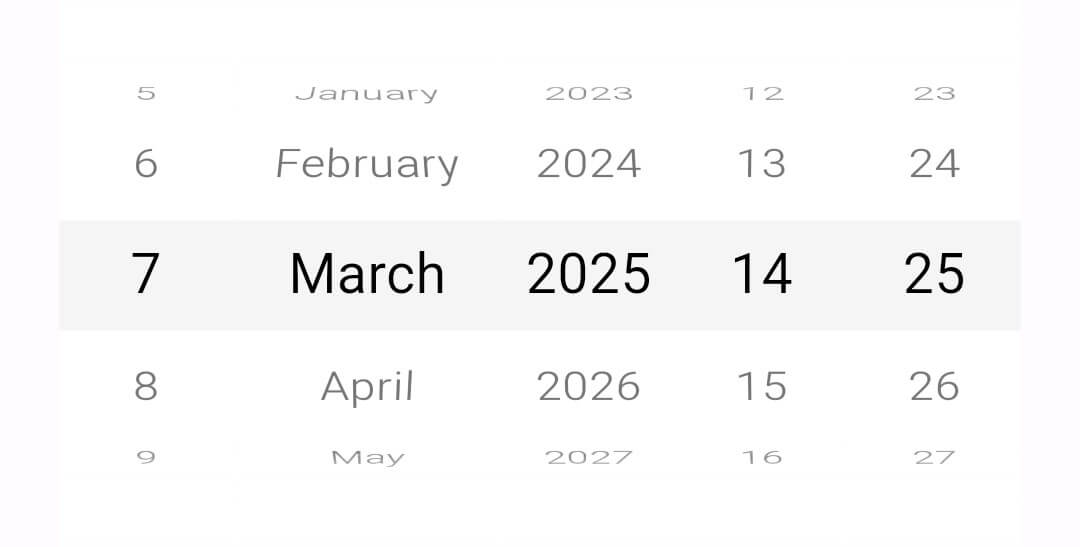
The "Awesome DateTime Picker" is a Flutter package that offers customizable date, time, and date-time wheel pickers widgets with a sliding style inspired by the "CupertinoDatePicker".
https://github.com/inesachour/awesome_datetime_picker/blob/master/images/date_picker.jpg?raw=true
AwesomeDatePicker(
    AwesomeDate? minDate; // The minimum selectable date.
    AwesomeDate? maxDate; // The maximum selectable date.
    AwesomeDate? initialDate; // The initially selected date.
    LocaleType locale; // The locale used for date formatting.
    AwesomeDateFormat dateFormat; // The format for displaying the date.
    AwesomeDatePickerTheme? theme; // Custom theme for the date picker.
    final ValueChanged<AwesomeDate>? onChanged; // Callback triggered when the date is changed.
    Color? backgroundColor; // Background color of the picker.
    Color? selectorColor; // Color of the selected item indicator.
    bool? fadeEffect; // Whether to apply a fade effect on non-selected items.
    TextStyle? selectedTextStyle; // Text style for the selected item.
    TextStyle? unselectedTextStyle; // Text style for unselected items.
    int? visibleItemCount; // Number of items visible at a time in the picker.
    double? itemHeight; // Height of each item in the picker.
    double? itemWidth; // Width of each item in the picker.
)
https://github.com/inesachour/awesome_datetime_picker/blob/master/images/time_picker.jpg?raw=true
AwesomeTimePicker(
    AwesomeTime? minTime; // The minimum selectable time.
    AwesomeTime? maxTime; // The maximum selectable time.
    AwesomeTime? initialTime; // The initially selected time.
    AwesomeTimeFormat timeFormat; // The format for displaying the time (12-hour or 24-hour).
    AwesomeTimePickerTheme? theme; // Custom theme for the time picker.
    final ValueChanged<AwesomeTime>? onChanged; // Callback triggered when the time is changed.
    Color? backgroundColor; // Background color of the picker.
    Color? selectorColor; // Color of the selected item indicator.
    bool? fadeEffect; // Whether to apply a fade effect on non-selected items.
    TextStyle? selectedTextStyle; // Text style for the selected item.
    TextStyle? unselectedTextStyle; // Text style for unselected items.
    int? visibleItemCount; // Number of items visible at a time in the picker.
    double? itemHeight; // Height of each item in the picker.
    double? itemWidth; // Width of each item in the picker.
)
https://github.com/inesachour/awesome_datetime_picker/blob/master/images/datetime_picker.jpg?raw=true
AwesomeDateTimePicker(
    AwesomeDateTime? minDateTime; // The minimum selectable date and time.
    AwesomeDateTime? maxDateTime; // The maximum selectable date and time.
    AwesomeDateTime? initialDateTime; // The initially selected date and time.
    LocaleType locale; // The locale used for date and time formatting.
    AwesomeDateFormat dateFormat; // The format for displaying the date.
    AwesomeTimeFormat timeFormat; // The format for displaying the time.
    AwesomeDateTimePickerTheme? theme; // Custom theme for the picker.
    final ValueChanged<AwesomeDateTime>? onChanged; // Callback triggered when the date/time is changed.
    Color? backgroundColor; // Background color of the picker.
    Color? selectorColor; // Color of the selected item indicator.
    bool? fadeEffect; // Whether to apply a fade effect on non-selected items.
    TextStyle? selectedTextStyle; // Text style for the selected item.
    TextStyle? unselectedTextStyle; // Text style for unselected items.
    int? visibleItemCount; // Number of items visible at a time in the picker.
    double? itemHeight; // Height of each item in the picker.
    double? itemWidth; // Width of each item in the picker.
)
The following table lists the currently supported locales for the date and datetimer pickers:
| Locale Code | Language |
|---|---|
| en | English |
| fr | French |
| es | Spanish |
| de | German |
| it | Italian |
| ar | Arabic |
To use a locale, set it as follows:
locale: LocaleType.en
The following date format values are only for the display of the date and do not affect the returned value from the date or datetime picker (which stays as the default):
| Date Format | Example |
|---|---|
| dMy | 1/1/2025 |
| dMMy | 1 January 2025 |
| yMd | 2025/1/1 |
| yMMd | 2025 January 1 |
To use a date format, set it as follows:
dateFormat: AwesomeDateFormat.dMMy,
The following time format values are only for the display of the time and do not affect the returned value from the timr or datetime picker (which stays as the default):
| Time Format | Example |
|---|---|
| Hm | 13:00 |
| hm | 1:00 PM |
To use a date format, set it as follows:
timeFormat: AwesomeTimeFormat.Hm,
Themes can customize the pickers by setting specific properties for the picker elements (year, month, day, hour, and minute).
class AwesomeDatePickerTheme {
    ItemTheme? yearTheme; // Theme for the year picker element.
    ItemTheme? monthTheme; // Theme for the month picker element.
    ItemTheme? dayTheme; // Theme for the day picker element.
}
class AwesomeTimePickerTheme {
    ItemTheme? hourTheme; // Theme for the hour picker element.
    ItemTheme? minuteTheme;  // Theme for the minute picker element.
}
class AwesomeDateTimePickerTheme {
    AwesomeDatePickerTheme? datePickerTheme; // Theme for the date picker element.
    AwesomeTimePickerTheme? timePickerTheme; // Theme for the time picker element.
}
The ItemTheme class specifies the theme properties for each item in the picker (year, month, day, hour, and minute).
class ItemTheme {
    double? width;
    double? height;
    Color? backgroundColor;
    TextStyle? selectedTextStyle;
    TextStyle? unselectedTextStyle;
    Widget? title;
    EdgeInsets? padding;
    EdgeInsets? margin;
}