Search packages, repositories and app categories

GitHub repositoryjagritjkh/blur

blur

Flutter package for blurring the child widget provided to it.

blur project cover
Stars
38
Forks
12
Last push (UTC)
Apr 6, 2025
Project status
Active

Original README

English project snapshot. Visit GitHub for the latest content.

blur

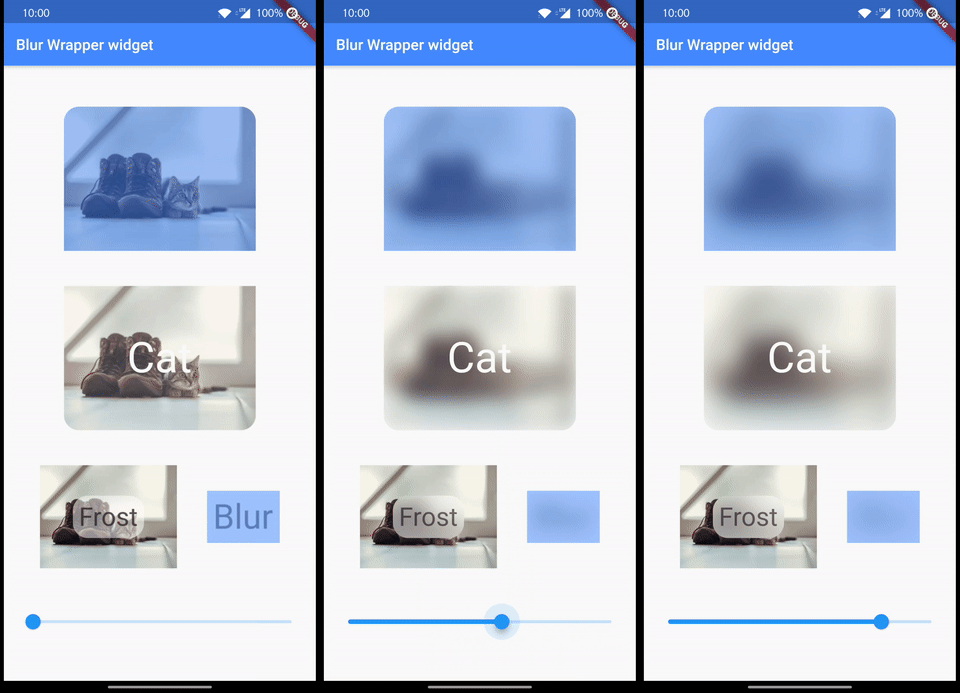
Blur is a wrapper widget that blur it's child. There are ImageBlur.asset and ImageBlur.network that blur the image. Frost is another wrapper which blurs the background.

Getting Started

To use this package, add blur as a dependency in your pubspec.yaml file.

blur

Add dependency

dependencies:
  blur: ^4.0.0

Import

import 'package:blur/blur.dart'

Usage

Blur(
  blur: 2.5,
  blurColor: Theme.of(context).primaryColor,
  child: Padding(
    padding: EdgeInsets.all(8.0),
    child: Text(
      'Blur',
      style: Theme.of(context).textTheme.headline3,
    ),
  ),
),

Output

blur_text

Normal Image

normal_image

Using extensions

Input

 Image.asset('assets/cat.png').blurred(
     colorOpacity: 0.2,
     borderRadius: BorderRadius.horizontal(right: Radius.circular(20)),
     blur: blurValue,
     overlay: Text(
       'Cat',
       style: theme.textTheme.headline2!.copyWith(color: theme.scaffoldBackgroundColor),
     ),
   ),

Output

blur_image

Frost

Stack(
  alignment: Alignment.center,
  children: [
    Image.asset(
      'assets/cat.png',
      scale: 3.5,
    ),
    Text(
      'Frost',
      style: theme.textTheme.headline4,
    ).frosted(
       blur: blurValue,
       borderRadius: BorderRadius.circular(20),
       padding: EdgeInsets.all(8),
     ),
  ],
),

frost_image

Jagrit GitHub avatar
GitHub author

Jagrit ↗

Full Stack FE: Flutter BE: Java Springboot

LanguagesDartSwiftKotlinObjective-C

Categories

Packages published by this repository

Dependencies used

Dependency list 3 items

  • flutter{"sdk":"flutter"}
  • flutter_lintsDevelopment^5.0.0
  • flutter_testDevelopment{"sdk":"flutter"}

How do I choose a repository?

Start with your use case, compare repository activity, and check the original project before adopting it.

  1. Search by repository name, owner or description, then narrow the results by topic.
  2. Compare stars, forks and recent pushes. Stars show community interest, not a guarantee of quality.
  3. Read the README, license and issues on GitHub before using a project.

Sources and maintenance

“A repository is the most basic element of GitHub.”

GitHub Docs — About repositories ↗