

 v0.6.0
segment_display
Segment display widget for Flutter. Supports multiple types of segment displays and segment customization.
28Likes 56930-day downloads160Pub points
AndroidiOSWebmacOSWindowsLinux
Segment display widget for Flutter
English project snapshot. Visit GitHub for the latest content.
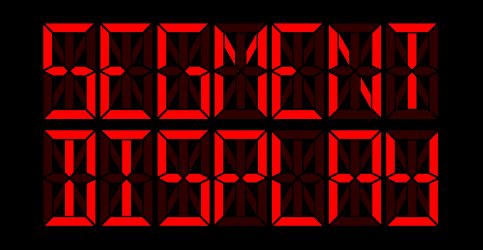


Segment display widget for Flutter. Supports multiple types of segment displays and segment customization.
. (decimal point) and : (colon) charactersshowDisabledDividers)customCharacterMap)See WEB DEMO.
Add this to your package's pubspec.yaml file:
dependencies:
  segment_display: ^0.6.0
You can install packages from the command line:
$ flutter pub get
Now in your Dart code, you can use:
import 'package:segment_display/segment_display.dart';
Example:
SevenSegmentDisplay(
  value: "123",
  size: 12.0,
)
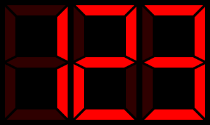
Example:
FourteenSegmentDisplay(
  value: "123",
  size: 12.0,
)
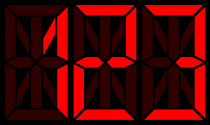
Example:
SixteenSegmentDisplay(
  value: "123",
  size: 12.0,
)
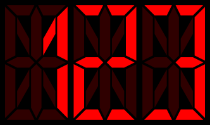
You can customize segment display with:
characterSpacing - space between individual charactersbackgroundColor - display background colorsegmentStyle - style for segments (shape, color,...), see segment styleshowDisabledDividers - always show a decimal point after each digit (dim unless . is present in value)customCharacterMap - add or override character-to-bitmask entriesExample:
SevenSegmentDisplay(
  value: "123",
  size: 12.0,
  characterSpacing: 10.0,
  backgroundColor: Colors.transparent,
  segmentStyle: HexSegmentStyle(
    enabledColor: Colors.red,
    disabledColor: Colors.red.withValues(alpha: 0.15),
  ),
)
Set showDisabledDividers: true to always show a decimal point after each digit — dim when not in value, lit when . follows the character:
SevenSegmentDisplay(
  value: "12.3",
  size: 12.0,
  showDisabledDividers: true,  // dots visible after all digits
)
Use customCharacterMap to add characters not in the built-in map, or override existing ones, by supplying a char → bitmask map:
// 7-segment: bit 0 = G (middle), bit 6 = A (top), etc.
SevenSegmentDisplay(
  value: "~",
  size: 12.0,
  customCharacterMap: {'~': 0x63},
)
To change segment color, size or shape, use segment style.
There are following segment styles:
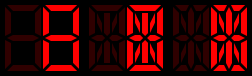
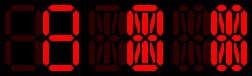
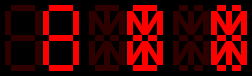
and you can also create your own style (shape) - see custom segment styles
Example:
SevenSegmentDisplay(
  value: "13:37",
  size: 12.0,
  segmentStyle: HexSegmentStyle(
    enabledColor: const Color(0xFF00FF00),
    disabledColor: const Color(0xFF00FF00).withValues(alpha: 0.15),
    segmentBaseSize: const Size(1.0, 2.0),
  ),
)
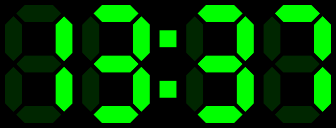
enabledColor - color of enabled segmentsdisabledColor - color of disabled segmentssegmentBaseSize - size ratio for segments; Size(1.0, 2.0) basically means that ratio will be 1:2 (width:length)NOTE:
SegmentStyle.segmentBaseSize*SegmentDisplay.size= segmentSize
To create your own segment style (shape), extend SegmentStyle and implement
createHorizontalPath, createVerticalPath, createDiagonalBackwardPath and createDiagonalForwardPath.
class CustomSegmentStyle extends SegmentStyle {

  const CustomSegmentStyle({
    super.segmentBaseSize,
    super.enabledColor,
    super.disabledColor,
  });

  @override
  Path createHorizontalPath(SegmentPosition position, Size segmentSize) {
    // ...
  }

  @override
  Path createVerticalPath(SegmentPosition position, Size segmentSize) {
    // ...
  }

  @override
  Path createDiagonalBackwardPath(SegmentPosition position, Size segmentSize) {
    // ...
  }

  @override
  Path createDiagonalForwardPath(SegmentPosition position, Size segmentSize) {
    // ...
  }
}
You can also customize the shape for individual segments by overriding createPath** methods.
For 7-segment display, there are createPath7* methods, for 14-segment display createPath14* and so on.
Example: if you want to change the shape of the top segment in 7-segment display, you just have to override createPath7A method.
class CustomSegmentStyle extends SegmentStyle {

  // ..

  @override
  Path createPath7A(Size segmentSize, double padding) {
    // ...
  }

  // ...

}
NOTE:
createPath**methods usecreateHorizontalPath/createVerticalPath/createDiagonalBackwardPath/createDiagonalForwardPathby default so you don't have to override allcreatePath7*methods.
Please file feature requests and bugs at the issue tracker.

Dependency list 3 items
{"sdk":"flutter"}{"sdk":"flutter"}>=5.0.0 <7.0.0Start with your use case, compare repository activity, and check the original project before adopting it.
“A repository is the most basic element of GitHub.”
GitHub Docs — About repositories ↗