
flutter_datapersistence
Muestra el uso de la persistencia de datos local, usando shared prefences

- Stars
- 1
- Forks
- 0
- Last push (UTC)
- Jan 21, 2022
- Project status
- Active
Original README
English project snapshot. Visit GitHub for the latest content.
flutter datapersistence
Este proyecto muestra la forma más fácil de hacer uso de la persistencia de dato local usando SharedPreferences. Aunque el proyecto en principio es solo mostrar el uso SharedPreferences cabe mencionar que esta bien estructurado y que maneja un modelo de dato Json para intectaractual con los datos. A todo esto, muestra como crear un custom Widget con parámetros y eventos mostrando así la reutilización de código. Espero que les gustes..:smile:

Demo
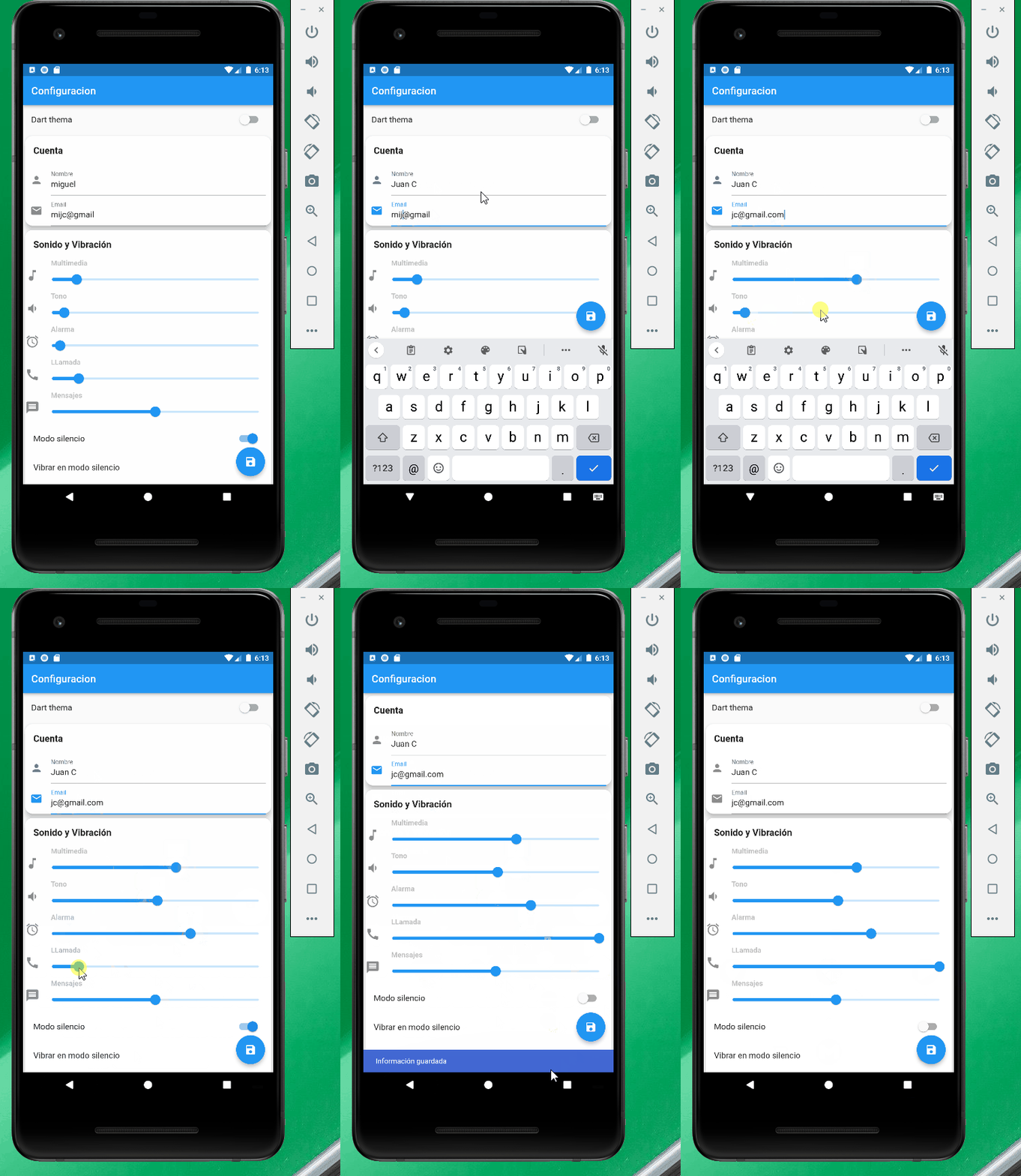
Widget Personalizado
  ///Método para obtener el valor que tenemos guardado en el localStored

import 'package:flutter/material.dart';

class SliderWidget extends StatelessWidget {
  final ValueChanged<double>? onChanged;
  final String title;
  final double value;
  final IconData? icon;

  const SliderWidget(
      {Key? key, this.title = "", this.value = 50.0, this.icon, this.onChanged})
      : super(key: key);

  @override
  Widget build(BuildContext context) {
    double _value = value;

    return Row(
      mainAxisAlignment: MainAxisAlignment.start,
      children: [
         Icon(icon,
          size: 28,
          color: Colors.black45,
        ),
        Expanded(
            child: Column(
          crossAxisAlignment: CrossAxisAlignment.start,
          children: <Widget>[
            Container(
              margin: const EdgeInsets.only(left: 22),
              child: Text(title,
                  style: const TextStyle(
                      fontWeight: FontWeight.bold, color: Colors.black26)),
            ),
            Slider(
              //slider volumen multimedia
              value: _value,
              max: 100,
              divisions: 100,
              label: _value.round().toString(),
              onChanged: (double value) {
                _value = value;
                onChanged!(value);
              },
            ),
          ],
        )),
      ],
    );
  }
}
Llamada del Widget Personalizado
     SliderWidget(
                  title: "Multimedia",
                  icon: Icons.music_note,
                  value: _volumentMultimedia,
                  onChanged: (value) {
                    setState(() {
                      _volumentMultimedia = value;
                    });
                  },
                ),
Uso del shared_preferences para guardar y obtener los valores
import 'package:shared_preferences/shared_preferences.dart';
Método para obtener los datos
  ///Método para obtener el valor que tenemos guardado
 void onGetPreferences() async {
    try {
      Settings _settings = Settings();

      SharedPreferences _spref = await SharedPreferences.getInstance();
      String jsonString = _spref.getString('settings') ?? '';

      if (jsonString.isNotEmpty) {
        Map<String, dynamic> json = jsonDecode(jsonString);
        _settings = Settings.fromJson(json);
        _emailController.text = _settings.email;
        _isDarkThema = _settings.darkThema;
        _volumentMultimedia = _settings.volumeMultimedia;
        _nameController.text = _settings.name;
        _volumentTono = _settings.volumeTono;
        _volumentAlarma = _settings.volumeAlarma;
        _volumentLlamada = _settings.volumeLlamada;
        _modoSilencio = _settings.modoSilencio;
        _noMolestar = _settings.noMolestar;
        _volumentMensaje = _settings.volumentMensaje;
        _vibrarModoSilencio = _settings.vibrarModoSilencio;
        onSetState();
      }
    } catch (e) {
      throw Exception("Not implementation error");
      print(e);
    }
  }
Método para guardar
  ///Método para guardar el valor
  Future onSavePreferences() async {
    try {
      Settings _stetting = Settings(
          email: _emailController.text,
          name: _nameController.text,
          darkThema: _isDarkThema,
          volumeMultimedia: _volumentMultimedia,
          volumeTono: _volumentTono,
          volumeAlarma: _volumentAlarma,
          volumeLlamada: _volumentLlamada,
          modoSilencio: _modoSilencio,
          noMolestar: _noMolestar,
          volumentMensaje: _volumentMensaje,
          vibrarModoSilencio: _vibrarModoSilencio);

      SharedPreferences _sPref = await SharedPreferences.getInstance();
      String user = jsonEncode(Settings.fromJson(_stetting.toJson()));
      _sPref.setString('settings', user);

      ScaffoldMessenger.of(context).showSnackBar(
        const SnackBar(
          content: Text("Información guardada"),
          duration: Duration(milliseconds: 1500),
          backgroundColor: Color(0xFF4268D3),
        ),
      );
    } catch (error) {
      throw Exception("Not implement error");
    }
  }
Nota
Las execciones no estan probadas, no recomiendo su uso sin probar. de hechon esta no es la forma de implementar execciones en flutter, lo mas sano es crear un Widget personalizado, el cual al pasar el error este se encargue de mostrarlo y de limpiar la execcion.

Juan Carlos Mezquita ↗
Categories
Dependencies used
Dependency list 7 items
- flutter
{"sdk":"flutter"} - cupertino_icons
^1.0.2 - shared_preferences
^2.0.11 - provider
^5.0.0 - flutter_testDevelopment
{"sdk":"flutter"} - flutter_lintsDevelopment
^1.0.0 - httpDevelopment
—
How do I choose a repository?
Start with your use case, compare repository activity, and check the original project before adopting it.
- Search by repository name, owner or description, then narrow the results by topic.
- Compare stars, forks and recent pushes. Stars show community interest, not a guarantee of quality.
- Read the README, license and issues on GitHub before using a project.
Sources and maintenance
“A repository is the most basic element of GitHub.”
GitHub Docs — About repositories ↗