


 v4.4.0
mapbox_search
A Flutter package for place search using MapBox Api and for Static map image
96Likes 21.6K30-day downloads140Pub points
AndroidiOSWebmacOSWindowsLinux
A Flutter package for place search using MapBox Api and for Static map image

English project snapshot. Visit GitHub for the latest content.
getPlaces and getAddress since both of them are using the same API.ApiResponse Record which can be either Success or Failure and can be handled using fold method.(lat: double, long: doube) whereever possible.This package provides easy api calls to MapBox Search API.
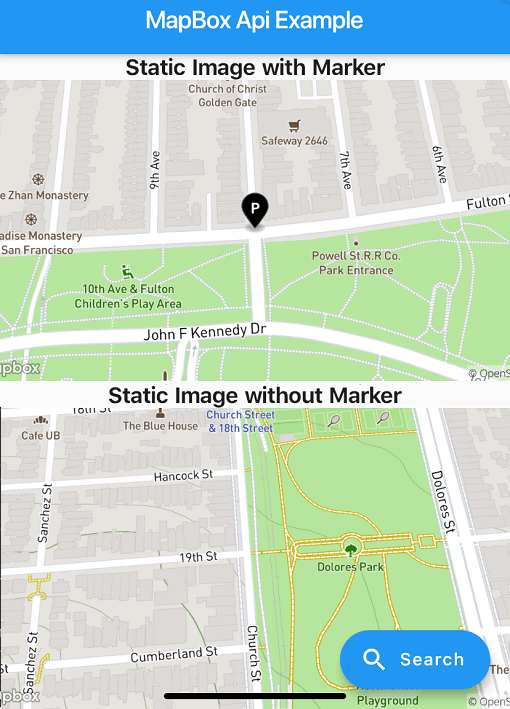
Also, it contains an static map image generator.
Maki Icons can be used now in marker icon
As this package doesn't depend on Flutter SDK you cannot use the Colors class anymore on you Flutter project.
Instead use map_box_search's Color.rgb constructor, passing the values as parameters:
var myColor = Colors.redAccent; //Flutter's Color class
var mapBoxColor = Color.rgb( myColor.red, myColor.green, myColor.blue);
First of all you must acquire an API key on the MapBox website https://www.mapbox.com/
Then, add the following to your pubspec.yaml file:
dependencies:
  mapbox_search: any
Now you can setup the API key for whole app by calling MapBoxSearch.init('API KEY') in your main() function, this way you don't have to pass the API key to every class that uses the package.
ApiResponsefinal ApiResponse<List<MapBoxPlace>> addresses = await getAddress();
addresses.fold(
(success) => // Do something with success data,
(failure) => // Do something with failure data,
);
SearchBoxAPI search = SearchBoxAPI(
      apiKey: 'API Key', // dont pass if you have set it in MapBoxSearch.init('API KEY')
      limit: 6,
);
ApiResponse<SuggestionResponse> searchPlace = await search.getSuggestions(
    "central",
  );
String mapboxId = searchPlace.suggestions[0].mapboxId;
ApiResponse<RetrieveResonse> searchPlace = await search.getPlace(mapboxId);
var reverseGeoCoding = GeoCoding(
    apiKey: 'API Key', // dont pass if you have set it in MapBoxSearch.init('API KEY')
    limit: 5,
);

Future<ApiResponse<List<MapBoxPlace>>> getAddress() =>
  reverseGeoCoding.getAddress(
    Location(lat: 72.0, lng: 76.00),
);
var geocoding = GeoCoding(
    apiKey: 'API Key', // dont pass if you have set it in MapBoxSearch.init('API KEY')
    country: "BR",
    limit: 5,
    types: [PlaceType.address, PlaceType.place],
);

Future<ApiResponse<List<MapBoxPlace>>> getPlaces() =>
  geocoding.getPlaces(
      "central park",
      proximity: Location(
        lat: -19.984634,
        lng: -43.9502958,
      ),
    );
Perform multiple geocoding queries (forward, reverse, or structured) in a single request.
var geocoding = GeoCodingApiV6(
    apiKey: 'API Key', // or use MapBoxSearch.init('API KEY')
    limit: 5,
);

Future<ApiResponse<BatchGeocodingResponse>> getBatch() =>
  geocoding.batch([
    ForwardQuery(query: "Eiffel Tower", limit: 1),
    ReverseQuery(location: (lat: 40.6892, long: -74.0445), limit: 1),
  ]);
StaticImage staticImage = StaticImage(
    apiKey: 'API Key', // or use MapBoxSearch.init('API KEY')
  );
    String getStaticImageWithPolyline() => staticImage.getStaticUrlWithPolyline(
      point1: (lat: 37.77343, long: -122.46589),
      point2: (lat: 37.75965, long: -122.42816),
      marker1: MapBoxMarker( markerColor: const RgbColor(0, 0, 0),
          markerLetter: 'p',
          markerSize: MarkerSize.LARGE),
      marker2: MapBoxMarker(
          markerColor: const RgbColor(244, 67, 54),
          markerLetter: 'q',
          markerSize: MarkerSize.SMALL),
      height: 300,
      width: 600,
      zoomLevel: 15.5,
      style: MapBoxStyle.Dark,
      path: MapBoxPath(pathColor: const RgbColor(255, 0, 0), pathOpacity: 0.5, pathWidth: 5, pathPolyline: "%7DrpeFxbnjVsFwdAvr%40cHgFor%40jEmAlFmEMwM_FuItCkOi%40wc%40bg%40wBSgM"),
      render2x: true,
      center: (lat: 37.766541503617475, long: -122.44702324243272), // Required when auto is false
      // auto: true, // Alternatively, use auto: true to automatically fit markers and path
    );
String getStaticImageWithMarker() => staticImage.getStaticUrlWithMarker(
  center: (lat: 37.77343, long: -122.46589),
  marker: MapBoxMarker(
      markerColor: const RgbColor(0, 0, 0), markerLetter: 'p', markerSize: MarkerSize.LARGE),
  height: 300,
  width: 600,
  zoomLevel: 16,
  style: MapBoxStyle.Streets,
  render2x: true,
);
String getStaticImageWithoutMarker() => staticImage.getStaticUrlWithoutMarker(
    center: (lat: 37.75965, long: -122.42816),
    height: 300,
    width: 600,
    zoomLevel: 16,
    style: MapBoxStyle.Outdoors,
    render2x: true,
  );
Check out the example/ directory for a complete Flutter application demonstrating:
Dependency list 11 items
^1.1.0^4.9.0^4.5.1^3.0.0^5.8.0+1^1.11.1^1.24.6^1.16.0^3.2.2^6.9.3^2.4.14Start with your use case, compare repository activity, and check the original project before adopting it.
“A repository is the most basic element of GitHub.”
GitHub Docs — About repositories ↗