

v1.0.2
use_optimistic
An easy-to-use hook to optimistically update generic state and then resolve it later asynchronously by `accept`, `acceptAs`, or `reject`-ing.
5Likes 1030-day downloads160Pub points
AndroidiOSWebmacOSWindowsLinux
🪝 A port of React's useOptimistic hook.

English project snapshot. Visit GitHub for the latest content.
useOptimistic 🪝An easy-to-use hook to optimistically update generic state and then resolve it later (async or sync) by accept, acceptAs, or reject-ing.
Documentation is largely found in the package itself via doc-comments (i.e. hover over package functions in your editor and it'll tell you what they do). First, however, view the above full example to get started.
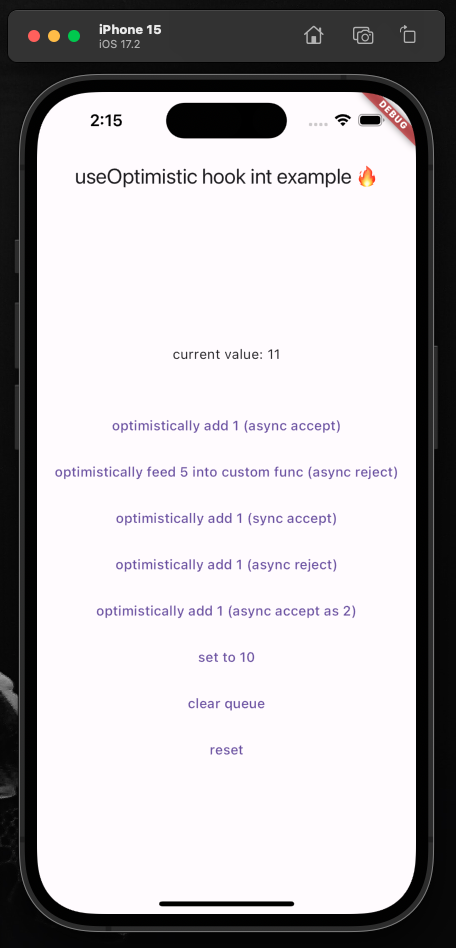
Initialize the hook:
final UseOptimistic<int> useOptimistic = UseOptimistic<int>(initialState: 0)
Ensure your widget listens to its state changes:
@override
void initState() {
  super.initState();
  useOptimistic.addListener(() => setState(() => debugPrint("state changed to: ${useOptimistic.state}")));
}
Ensure the hook will be disposed when your widget is:
@override
void dispose() {
  super.dispose();
  useOptimistic.dispose();
}
Update your state optimistically:
TextButton(
  onPressed: () async {

    Resolver r = useOptimistic.fn(
      1, // the [newValue] to be passed to functions below
      todo: (currentState, newValue) => currentState + newValue,
      undo: (currentState, oldValue) => currentState - oldValue,
    );

    // simulating an API call
    await Future.delayed(const Duration(seconds: 1));

    // three mutually exclusive ways to deal with result
    r.acceptAs(2); // [undo] original function, then [todo] with new value
    r.accept(); // accept the original optimistic update
    r.reject(); // reject the original optimistic update and [undo] original function

  },
  child: const Text("optimistically add 1"),
),
You can call useOptimistic.fn( ... ) multiple times with different todo and undo functions and it'll execute the proper todo/undo associated with fn at the moment you called it. This means you can call multiple separate useOptimistic.fn( ... )s safely together. It does not mean you can have a single fn like this (pseudo-code): useOptimistic.fn( if x todo: () => {...} else todo: () => {...} ) that has conditionally rendered todo/undo functions.
Listen to the state:
Text("current value: ${useOptimistic.state}"),
Dependency list 4 items
{"sdk":"flutter"}^4.3.3{"sdk":"flutter"}^3.0.0Start with your use case, compare repository activity, and check the original project before adopting it.
“A repository is the most basic element of GitHub.”
GitHub Docs — About repositories ↗