

 v1.1.3
drop_cap_text
This Flutter plugin aims to achive drop cap in text capitalization.
101Likes 26430-day downloads55Pub points
Platforms unavailable
This Flutter plugin aims to achive drop cap in text capitalization.

English project snapshot. Visit GitHub for the latest content.


This Flutter plugin aims to achive drop cap in text capitalization.
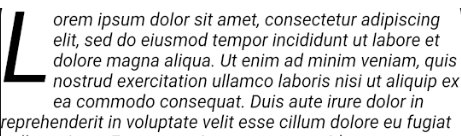
import 'package:drop_cap_text/drop_cap_text.dart';
DropCapText(
    loremIpsumText,
    style: TextStyle(fontStyle: FontStyle.italic),
),

| Name | Type | Default | Description |
|---|---|---|---|
| data | String | null | |
| mode | DropCapMode | DropCapMode.inside | aside, upwards, .. |
| textAlign | TextAlign | null | |
| indentation | Offset | Offset.zero | |
| dropCapChars | int | 1 | |
| dropCapPadding | EdgeInsets | EdgeInsets.zero | |
| dropCap | DropCap [Widget] |
null | |
| style | TextStyle | null | |
| dropCapStyle | TextStyle | ||
| forceNoDescent | bool | false | |
| parseInlineMarkdown | bool | false | bold |
| dropCapPosition | DropCapPosition | DropCapPosition.start | |
| textDirection | TextDirection | TextDirection.ltr | |
| maxLines | int | ||
| overflow | TextOverflow | TextOverflow.clip |

DropCapText(
    loremIpsumText,
    dropCap: DropCap(
    width: 100,
    height: 100,
    child: Image.network(
    	'https://www.codemate.com/wp-content/uploads/2017/09/flutter-logo.png')
    ),
),
only supports italic bold underline

DropCapText(
  'Lorem ipsum **dolor sit amet, consectetur adipiscing elit, ++sed do eiusmod++ tempor incididunt** ut labore et _dolore magna aliqua_.',
  parseInlineMarkdown: true,
  dropCapStyle: TextStyle(fontSize: 100, fontWeight: FontWeight.bold, color: Colors.green),
  dropCapPadding: EdgeInsets.only(right: 19.0),
  style: TextStyle(fontSize: 18.0, height: 1.5),
),

DropCapText(
    loremIpsumText,
    dropCapPosition: DropCapPosition.end,
    textAlign: TextAlign.justify,
    dropCap: DropCap(
    width: 100,
    height: 100,
    child: Image.network(
    	'https://www.codemate.com/wp-content/uploads/2017/09/flutter-logo.png')
    ),
),

DropCapText(
    loremIpsumText,
    style: TextStyle(
        height: 1.3,
        fontFamily: 'times',
    ),
    dropCapChars: 2,
    indentation: Offset(25, 10),
),

DropCapText(
    loremIpsumText,
    mode: DropCapMode.upwards,
    dropCapStyle: TextStyle(
        color: Colors.red,
        fontWeight: FontWeight.bold,
        fontSize: 120,
        fontFamily: 'times',
    ),
),

DropCapText(
    loremIpsumText,
    style: TextStyle(
        fontWeight: FontWeight.bold,
        height: 1.2,
    ),
    mode: DropCapMode.aside,
),
Dependency list 2 items
{"sdk":"flutter"}{"sdk":"flutter"}Start with your use case, compare repository activity, and check the original project before adopting it.
“A repository is the most basic element of GitHub.”
GitHub Docs — About repositories ↗