
my_fatoorah
My fatoorah sdk
View on GitHub ↗Archived

- Stars
- 6
- Forks
- 14
- Last push (UTC)
- Mar 13, 2025
- Project status
- Archived
Original README
English project snapshot. Visit GitHub for the latest content.
Note
Because of changes in my_fatoorah api itself i can not cotinue this repo My fatoorah implemented thier own package => "https://pub.dev/packages/myfatoorah_flutter"
my_fatoorah
My Fatoorah Payment
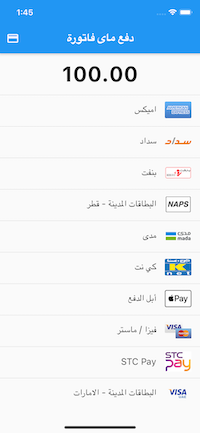
Screenshots in Test mode
Screenshots in Live(Release) mode
Getting Started
Installation
# add this to your pubspec.yaml
my_fatoorah: any
Config
Ios
add this to your Info.plist
<key>io.flutter.embedded_views_preview</key>
<true/>
<key>NSAppTransportSecurity</key>
<dict>
    <key>NSAllowsArbitraryLoads</key>
    <true/>
</dict>
if this url is not using ssl you have to use clear text traffic . put this value in your manifest for android
and allow arbitrary loads in your Info.plist for ios
Android
 <application
  ...
  android:usesCleartextTraffic="true"
  ...>
  ...
  </application>
Dialog Usage
import 'package:my_fatoorah/my_fatoorah.dart';
import 'dart:developer';
...
 var response = await MyFatoorah.startPayment(
                context: context,
                request: MyfatoorahRequest.test(
                  currencyIso: Country.SaudiArabia,
                  successUrl: "Your success call back",
                  errorUrl: "Your error call back",
                  invoiceAmount: 100,
                  language: ApiLanguage.Arabic,
                  token: "Your token here",
                ),
              );
              log(response.paymentId.toString());

See the example for more details
Example
 var response = await MyFatoorah.startPayment(
                context: context,
                request: MyfatoorahRequest.test(
                  currencyIso: Country.SaudiArabia,
                  successUrl: 'https://www.facebook.com',
                  errorUrl: 'https://www.google.com/',
                  invoiceAmount: 100,
                  language: ApiLanguage.English,
                  token:
                      'rLtt6JWvbUHDDhsZnfpAhpYk4dxYDQkbcPTyGaKp2TYqQgG7FGZ5Th_WD53Oq8Ebz6A53njUoo1w3pjU1D4vs_ZMqFiz_j0urb_BH9Oq9VZoKFoJEDAbRZepGcQanImyYrry7Kt6MnMdgfG5jn4HngWoRdKduNNyP4kzcp3mRv7x00ahkm9LAK7ZRieg7k1PDAnBIOG3EyVSJ5kK4WLMvYr7sCwHbHcu4A5WwelxYK0GMJy37bNAarSJDFQsJ2ZvJjvMDmfWwDVFEVe_5tOomfVNt6bOg9mexbGjMrnHBnKnZR1vQbBtQieDlQepzTZMuQrSuKn-t5XZM7V6fCW7oP-uXGX-sMOajeX65JOf6XVpk29DP6ro8WTAflCDANC193yof8-f5_EYY-3hXhJj7RBXmizDpneEQDSaSz5sFk0sV5qPcARJ9zGG73vuGFyenjPPmtDtXtpx35A-BVcOSBYVIWe9kndG3nclfefjKEuZ3m4jL9Gg1h2JBvmXSMYiZtp9MR5I6pvbvylU_PP5xJFSjVTIz7IQSjcVGO41npnwIxRXNRxFOdIUHn0tjQ-7LwvEcTXyPsHXcMD8WtgBh-wxR8aKX7WPSsT1O8d8reb2aR7K3rkV3K82K_0OgawImEpwSvp9MNKynEAJQS6ZHe_J_l77652xwPNxMRTMASk1ZsJL',
                ),
              );
              log(response.paymentId.toString());
Result:

Another usage way => Listview Usage
import 'package:my_fatoorah/my_fatoorah.dart';
import 'dart:developer';

...
 MyFatoorah(
        onResult:(response){
            log(response.paymentId.toString());
            print(res.status.toString()));
        },
        request: MyfatoorahRequest.test(
                      currencyIso: Country.SaudiArabia,
                      successUrl:
                          "Your success call back",
                      errorUrl:
                          "Your error call back",
                      invoiceAmount: 100,
                      language: ApiLanguage.Arabic,
                      token: "Your token here",
                      ),
 );
Example:
 MyFatoorah(
                                  onResult: (response) {
                                    print(response.status);
                                  },
                                  request: MyfatoorahRequest.test(
                                    currencyIso: Country.SaudiArabia,
                                    successUrl: 'https://www.facebook.com',
                                    errorUrl: 'https://www.google.com',
                                    invoiceAmount: widget.cartDetails.total,
                                    language: ApiLanguage.Arabic,
                                    token:
                                        "rLtt6JWvbUHDDhsZnfpAhpYk4dxYDQkbcPTyGaKp2TYqQgG7FGZ5Th_WD53Oq8Ebz6A53njUoo1w3pjU1D4vs_ZMqFiz_j0urb_BH9Oq9VZoKFoJEDAbRZepGcQanImyYrry7Kt6MnMdgfG5jn4HngWoRdKduNNyP4kzcp3mRv7x00ahkm9LAK7ZRieg7k1PDAnBIOG3EyVSJ5kK4WLMvYr7sCwHbHcu4A5WwelxYK0GMJy37bNAarSJDFQsJ2ZvJjvMDmfWwDVFEVe_5tOomfVNt6bOg9mexbGjMrnHBnKnZR1vQbBtQieDlQepzTZMuQrSuKn-t5XZM7V6fCW7oP-uXGX-sMOajeX65JOf6XVpk29DP6ro8WTAflCDANC193yof8-f5_EYY-3hXhJj7RBXmizDpneEQDSaSz5sFk0sV5qPcARJ9zGG73vuGFyenjPPmtDtXtpx35A-BVcOSBYVIWe9kndG3nclfefjKEuZ3m4jL9Gg1h2JBvmXSMYiZtp9MR5I6pvbvylU_PP5xJFSjVTIz7IQSjcVGO41npnwIxRXNRxFOdIUHn0tjQ-7LwvEcTXyPsHXcMD8WtgBh-wxR8aKX7WPSsT1O8d8reb2aR7K3rkV3K82K_0OgawImEpwSvp9MNKynEAJQS6ZHe_J_l77652xwPNxMRTMASk1ZsJL",
                                  ),
                                )
Tutorial
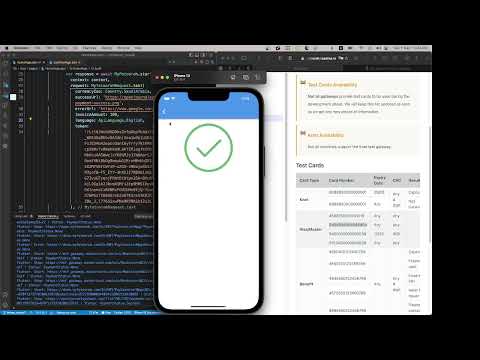
You can see the video by Abdo tarek
Notes
- Before version 2.6.7 we handeled test version if you pass token as null
- But may my fatoorah changed their demo information many times so you have to pass them
in MyfatoorahRequest you have to pass url of the test version
https://apitest.myfatoorah.com
and token of test version
- you can find demo information here https://myfatoorah.readme.io/docs/demo-information
- after version 3.0.2 you can use
MyfatoorahRequest.testorMyfatoorahRequest.live - After redirected to the success url You will get a paymentId which will help your backend to track the payment status with my fatoorah

GitHub author
Mohamed Dawood ↗
LanguagesDartRubySwiftObjective-C
Dependencies used
Dependency list 5 items
- flutter
{"sdk":"flutter"} - http
^1.0.0 - flutter_inappwebview
^6.0.0-beta.23 - lintsDevelopment
^2.1.0 - flutter_testDevelopment
{"sdk":"flutter"}
How do I choose a repository?
Start with your use case, compare repository activity, and check the original project before adopting it.
- Search by repository name, owner or description, then narrow the results by topic.
- Compare stars, forks and recent pushes. Stars show community interest, not a guarantee of quality.
- Read the README, license and issues on GitHub before using a project.
Sources and maintenance
“A repository is the most basic element of GitHub.”
GitHub Docs — About repositories ↗
- mu-dawood/my_fatoorah · GitHub ↗
- GitHub Docs — Saving repositories with stars ↗
- Directory maintained by Ducafecat ↗