

 v1.0.0
folding_menu
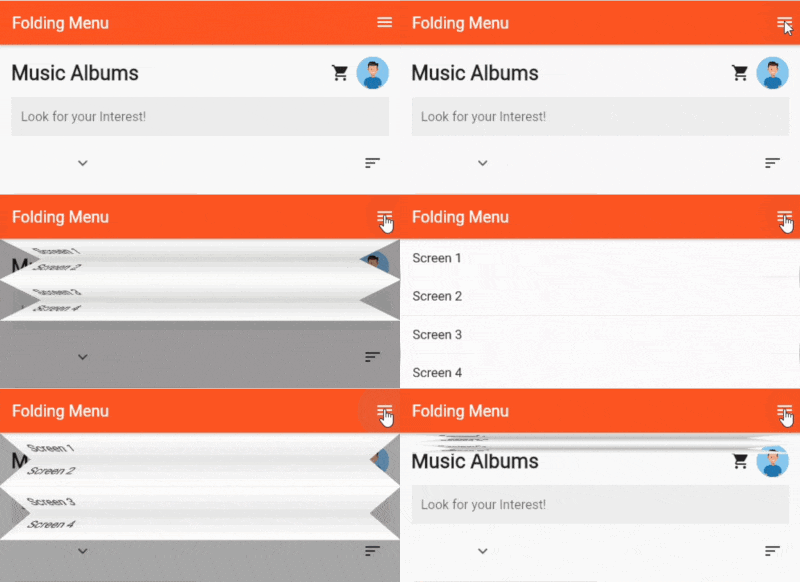
A fancy easy to use Folding Menu for Flutter Applications
22Likes 2930-day downloads120Pub points
AndroidiOSWebmacOSWindowsLinux
A fancy easy to use Folding Menu for Flutter Applications

English project snapshot. Visit GitHub for the latest content.
This is an easy to use package for adding Folding Menu to your Flutter Applications

To Use, simply add Folding Menu to your Stack Widget(as the Last Element for most Cases):
      body: Stack(
        children: [
          Container(
            color: Colors.deepOrange,
            child: Center(child: Text("Other Screen Content",style: TextStyle(color: Colors.white,fontSize: 20),)),),
          // Add FoldingMenu as the Last Child to Stack
          FoldingMenu(duration: Duration(milliseconds: 900), shadowColor: Colors.black26, animationCurve: Curves.decelerate, folded: openMenu, children: [
            ListTile(
              onTap: () {
                Navigator.of(context).push(MaterialPageRoute(
                    builder: (context) => SecondScreen(
                          text: "Page 1",
                        )));
              },
              title: Text("Home Dance"),
              tileColor: Colors.white,
            ),
            ListTile(
              onTap: () {
                Navigator.of(context).push(MaterialPageRoute(
                    builder: (context) => SecondScreen(
                          text: "Page 2",
                        )));
              },
              title: Text("Home Dance 2"),
              tileColor: Colors.white,
            ),
            ListTile(
              onTap: () {
                Navigator.of(context).push(MaterialPageRoute(
                    builder: (context) => SecondScreen(
                          text: "Page 3",
                        )));
              },
              title: Text("Home Dance 3"),
              tileColor: Colors.white,
            ),
            ListTile(
              onTap: () {
                Navigator.of(context).push(MaterialPageRoute(
                    builder: (context) => SecondScreen(
                          text: "Page 4",
                        )));
              },
              title: Text("Home Dance 4"),
              tileColor: Colors.white,
            ),
          ]),
        ],
      ),
Plans to add more customizations.
Dependency list 2 items
{"sdk":"flutter"}{"sdk":"flutter"}Start with your use case, compare repository activity, and check the original project before adopting it.
“A repository is the most basic element of GitHub.”
GitHub Docs — About repositories ↗