🔮 Flat 3d Button
pub package
https://github.com/rijfas/flat_3d_button/raw/main/images/banner.png
A simple 3D flat button with click animation!
🔩 Installation
dependencies:
  flat_3d_button: ^1.0.3
🚚 Import
import 'package:flat_3d_button/flat_3d_button.dart';
🚀 Usage Examples
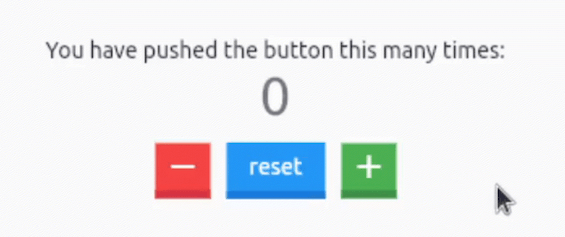
1. Counter app using flat 3D buttons:
https://github.com/rijfas/flat_3d_button/raw/main/images/flat_3d_button_counter.GIF
  Flat3dButton.icon(
    color: Colors.red,
    onPressed: _decrementCounter,
    icon: Icons.remove,
  ),
  const SizedBox(width: 10),
  Flat3dButton.text(
    onPressed: _resetCounter,
    text: 'reset',
  ),
  const SizedBox(width: 10),
  Flat3dButton.icon(
    color: Colors.green,
    onPressed: _incrementCounter,
    icon: Icons.add,
  ),
refer to the main.dart in the example for complete source code.
2. Flat 3D button with text:
https://github.com/rijfas/flat_3d_button/raw/main/images/flat_3d_button_text.GIF
Flat3dButton.text(
  onPressed: () => print('clicked'),
  text: 'Flat',
);
3. Flat 3D button with icon:
https://github.com/rijfas/flat_3d_button/raw/main/images/flat_3d_button_icon.GIF
Flat3dButton.icon(
  onPressed: () => print('clicked'),
  icon: Icons.rocket,
);
🔧 Author
https://avatars.githubusercontent.com/u/67458012?s=40&v=4
📃 License
MIT License


 v1.0.3