
 v1.3.3
stories_for_flutter
Stories like Instagram or statuses like WhatsApp with the highly customizable stories for Flutter package.
97Likes 14330-day downloads140Pub points
AndroidiOSWebmacOSWindowsLinux
Stories like Instagram or statuses like WhatsApp with the highly customizable stories for Flutter package.

{"sdk":"flutter"}{"sdk":"flutter"}^1.1.1^2.0.2{"sdk":"flutter"}^5.0.0English project snapshot. Visit GitHub for the latest content.
https://img.icons8.com/color/48/000000/flutter.png https://avatars1.githubusercontent.com/u/1609975?s=200&v=4
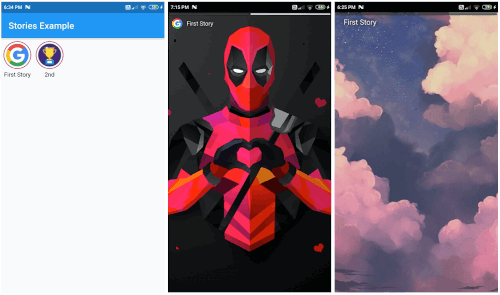
A customizable flutter package that allows you to use Instagram like stories, or WhastApp like statuses in your Flutter app easily, made without using external dependencies.
https://github.com/steevjames/Stories-for-Flutter/blob/master/screenshots/1.jpg?raw=true https://github.com/steevjames/Stories-for-Flutter/blob/master/screenshots/2.jpg?raw=true https://github.com/steevjames/Stories-for-Flutter/blob/master/screenshots/3.jpg?raw=true https://github.com/steevjames/Stories-for-Flutter/blob/master/screenshots/4.jpg?raw=true https://github.com/steevjames/Stories-for-Flutter/blob/master/screenshots/5.jpg?raw=true
Step 1: Import the package.
import 'package:stories_for_flutter/stories_for_flutter.dart';
Step 2: Call the stories plugin and use it. Can give Scaffold to each page, making it highly customizable.
  Stories(
    storyItemList: [
      // First group of stories
      StoryItem(
          name: "First Story", // Name of first story
          thumbnail: // Add icon to first story
          stories: [
            Page1(),
            Page2(),
          ]),
      // Second story group
      StoryItem(
          name: "Second Story",
          thumbnail: // Add icon to first story
        stories: [
          Page1(),
          Page2(),
          Page3()
        ],
      ),
    ],
  );
Example:
Stories(
    displayProgress: true,
    storyItemList: [
      // First group of stories
      StoryItem(
          name: "First Story",
          thumbnail: NetworkImage(
            "https://assets.materialup.com/uploads/82eae29e-33b7-4ff7-be10-df432402b2b6/preview",
          ),
          stories: [
            // First story
            Scaffold(
              body: Container(
                decoration: BoxDecoration(
                  image: DecorationImage(
                    fit: BoxFit.cover,
                    image: NetworkImage(
                      "https://wallpaperaccess.com/full/16568.png",
                    ),
                  ),
                ),
              ),
            ),
            // Second story in first group
            Scaffold(
              body: Center(
                child: Text(
                  "Second story in first group !",
                  style: TextStyle(
                    color: Color(0xff777777),
                    fontSize: 25,
                  ),
                ),
              ),
            ),
          ]),
      // Second story group
      StoryItem(
        name: "2nd",
        thumbnail: NetworkImage(
          "https://www.shareicon.net/data/512x512/2017/03/29/881758_cup_512x512.png",
        ),
        stories: [
          Scaffold(
            body: Center(
              child: Text(
                "That's it, Folks !",
                style: TextStyle(
                  color: Color(0xff777777),
                  fontSize: 25,
                ),
              ),
            ),
          ),
        ],
      ),
    ],
  );