
InnerEcho
InnerEcho(Mental Health App)is a Flutter and Spring Boot-based application focused on providing accessible mental wellness tools. The app offers daily mood tracking, guided meditations,breathing exercises, journaling, and AI chat support to help users manage stress, anxiety,and improve overall mental wellbeing in a private, personalized environment

- Stars
- 2
- Forks
- 2
- Last push (UTC)
- Jul 16, 2025
- Project status
- Active
Original README
English project snapshot. Visit GitHub for the latest content.
(INNERECHO) Mental Health App
A comprehensive mental health application designed to help users manage their mental wellbeing through various features including mood tracking, journaling, meditation exercises, breathing techniques, and AI-powered support.
Table of Contents
- Overview
- Features
- Screenshots
- Tech Stack
- Project Structure
- Installation & Setup
- Usage
- API Documentation
- Contributing
- License
- Contact
Overview
The Mental Health App is designed to provide users with a comprehensive set of tools to support their mental wellbeing journey. The application combines modern UI/UX design principles with evidence-based mental health practices to deliver a seamless and effective user experience.
Our goal is to make mental health support accessible to everyone through technology, providing users with self-help tools that can be used anytime, anywhere.
Features
User Profile Management
- Create and manage personalized user profiles
- Track progress and achievements
- Customize app settings and preferences
Mood Tracking
- Daily mood check-ins and tracking
- Visualization of mood patterns over time
- Identification of triggers and patterns
Journaling
- Private and secure digital journal
- Guided journal prompts for reflection
- Search and review past entries
- Express thoughts and emotions in a safe space
Meditation Exercises
- Guided meditation sessions for various needs
- Timer and tracking for meditation practice
- Background ambient sounds
- Progress tracking for meditation habits
Breathing Exercises
- Guided breathing techniques for stress relief
- Visual breathing guides with animations
- Different techniques for different needs (relaxation, focus, energy)
- Customizable session durations
Daily Affirmations
- Positive daily affirmations
- Customizable affirmation categories
- Option to create personal affirmations
- Scheduled affirmation reminders
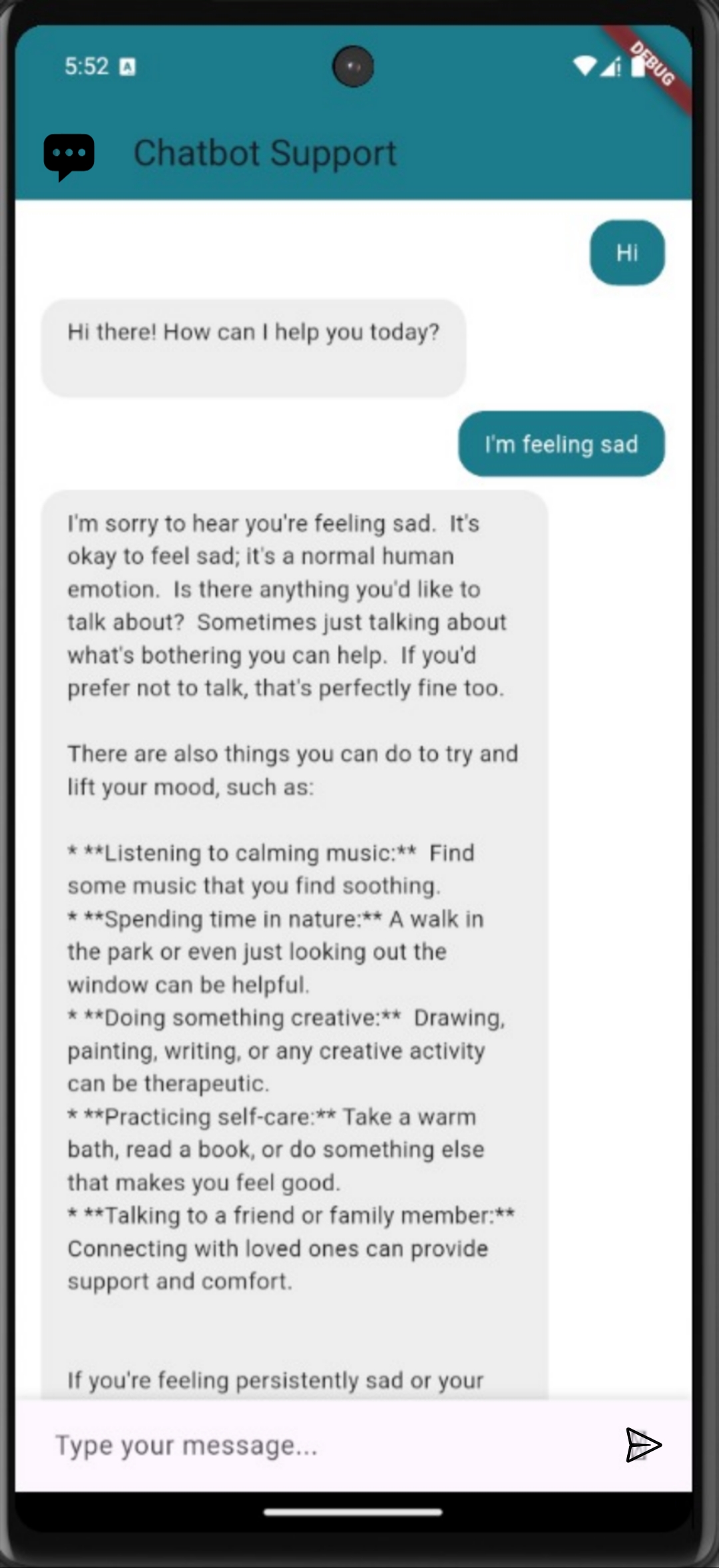
AI-Powered Chat Support
- 24/7 AI chatbot for immediate support
- Guided conversations for various mental health concerns
- Resource recommendations based on user needs
- Crisis support information and referrals
Screenshots
Tech Stack
Frontend
- Framework: Flutter for cross-platform mobile development
- Language: Dart
- State Management: Provider pattern
- UI Components: Material Design
- Navigation: Flutter Navigation 2.0
- Local Storage: SharedPreferences, SQLite
- HTTP Client: Dio
Backend
- Framework: Spring Boot
- Language: Java
- Database: MongoDB for flexible data storage
- API: RESTful API with JSON
- Authentication: JWT (JSON Web Tokens)
- Build Tool: Maven
- Deployment: Docker containerization
- Testing: JUnit, Mockito
Project Structure
The project is organized into two main components:
Frontend (Flutter)
frontend/
├── assets/             # Images, fonts, and other static files
├── lib/
│   ├── main.dart       # Application entry point
│   ├── screens/        # UI screens
│   ├── src/            # Core application code
│   │   ├── app.dart    # App configuration
│   │   ├── localization/  # Internationalization
│   │   ├── settings/   # App settings
│   │   └── sample_feature/ # Feature components
└── test/               # Unit and widget tests
Backend (Spring Boot)
backend/
├── src/
│   ├── main/
│   │   ├── java/com/inecho/
│   │   │   ├── controller/  # REST API controllers
│   │   │   ├── model/       # Data models
│   │   │   ├── repository/  # Database access
│   │   │   └── service/     # Business logic
│   │   └── resources/       # Configuration files
│   └── test/               # Unit and integration tests
└── pom.xml                 # Maven configuration
Installation & Setup
Prerequisites
- Flutter SDK (latest stable version)
- Java Development Kit (JDK) 17 or higher
- Maven
- MongoDB
- Git
Frontend Setup
-
Clone the repository:
git clone https://github.com/yourusername/Mental-Health-App.git cd Mental-Health-App -
Navigate to the frontend directory:
cd frontend -
Install dependencies:
flutter pub get -
Run the application:
flutter run
Backend Setup
-
Navigate to the backend directory:
cd backend -
Configure MongoDB connection in
src/main/resources/application.properties -
Build the project:
./mvnw clean install -
Run the server:
./mvnw spring-boot:run
Docker Setup (Optional)
The backend includes a Dockerfile for containerized deployment:
-
Build the Docker image:
docker build -t mental-health-app-backend . -
Run the container:
docker run -p 8080:8080 mental-health-app-backend
Usage
- User Registration/Login: Create an account or log in to access personalized features
- Profile Setup: Complete your profile to get personalized recommendations
- Daily Check-in: Track your mood and journal daily for best results
- Explore Features: Try different meditation and breathing exercises
- Chat Support: Use the AI chatbot when you need immediate guidance
API Documentation
The backend API documentation is available at http://localhost:8080/swagger-ui.html when the server is running. This provides a complete reference of all available endpoints, request parameters, and response formats.
Key API endpoints include:
/api/users- User management/api/journal- Journal entries/api/mood- Mood tracking
Contributing
We welcome contributions to the Mental Health App! Please follow these steps:
- Fork the repository
- Create your feature branch (
git checkout -b feature/amazing-feature) - Commit your changes (
git commit -m 'Add some amazing feature') - Push to the branch (
git push origin feature/amazing-feature) - Open a Pull Request
Please ensure your code follows the existing style guidelines and includes appropriate tests.
License
This project is licensed under the MIT License - see the LICENSE file for details.
Contact
Project Link: [(https://github.com/sv6095/InnerEcho)]
This application is designed for self-help and is not a replacement for professional mental health care. If you're experiencing a mental health crisis, please contact your local emergency services or a mental health professional.

Shantanu ↗
Categories
How do I choose a repository?
Start with your use case, compare repository activity, and check the original project before adopting it.
- Search by repository name, owner or description, then narrow the results by topic.
- Compare stars, forks and recent pushes. Stars show community interest, not a guarantee of quality.
- Read the README, license and issues on GitHub before using a project.
Sources and maintenance
“A repository is the most basic element of GitHub.”
GitHub Docs — About repositories ↗
- sv6095/InnerEcho · GitHub ↗
- GitHub Docs — Saving repositories with stars ↗
- Directory maintained by Ducafecat ↗