
newsbuzz
News App created in Flutter using News API for fetching realtime data and Firebase as the backend and authenticator.
- Stars
- 597
- Forks
- 190
- Last push (UTC)
- Oct 27, 2018
- Project status
- Active
Original README
English project snapshot. Visit GitHub for the latest content.
News Buzz
News App created in Flutter using News API for fetching realtime data and Firebase as the backend and authenticator.
Features
- Custom news feed based on selected sources
- Saving articles
- Explore news based on categories
- Search for topics
- Sharing articles
Preview
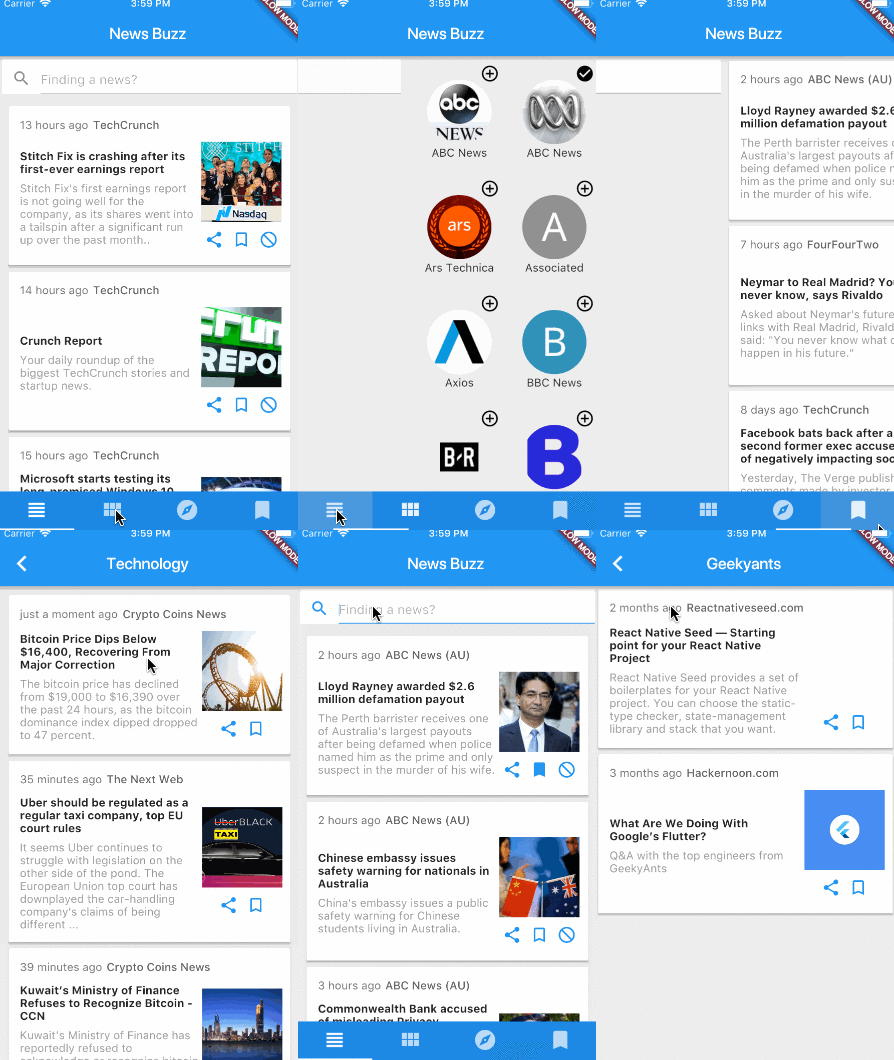
Dependencies
Getting Started
1. Setup Flutter
2. Clone the repo
$ git clone https://github.com/theankurkedia/newsbuzz.git
$ cd newsbuzz/
3. Setup firebase app
- You'll need to create a Firebase instance. Follow the instructions at https://console.firebase.google.com.
- Once your Firebase instance is created, you'll need to enable anonymous authentication.
- Go to the Firebase Console for your new instance.
- Click "Authentication" in the left-hand menu
- Click the "sign-in method" tab
- Click "Google" and enable it
- (skip if not running on Android)
- Create an app within your Firebase instance for Android, with package name com.yourcompany.news
- Run the following command to get your SHA-1 key:
keytool -exportcert -list -v \
-alias androiddebugkey -keystore ~/.android/debug.keystore
- In the Firebase console, in the settings of your Android app, add your SHA-1 key by clicking "Add Fingerprint".
- Follow instructions to download google-services.json
- place
google-services.jsonintonewsbuzz/android/app/.
- (skip if not running on iOS)
- Create an app within your Firebase instance for iOS, with package name com.yourcompany.news
- Follow instructions to download GoogleService-Info.plist, and place it into newsbuzz/ios/Runner in XCode
- Open newsbuzz/ios/Runner/Info.plist. Locate the CFBundleURLSchemes key. The second item in the array value of this key is specific to the Firebase instance. Replace it with the value for REVERSED_CLIENT_ID from GoogleService-Info.plist
4. Run the app
$ flutter run
License
Licensed under the MIT license.

GitHub author
Ankur Kedia ↗
LanguagesDartRubyObjective-CJava
Categories
Dependencies used
Dependency list 11 items
- flutter
{"sdk":"flutter"} - flutter_testDevelopment
{"sdk":"flutter"} - shareDevelopment
^0.2.1 - flutter_webview_pluginDevelopment
^0.0.9+1 - google_sign_inDevelopment
0.3.1 - firebase_analyticsDevelopment
0.0.4 - firebase_authDevelopment
0.2.0 - firebase_databaseDevelopment
0.0.12 - firebase_storageDevelopment
0.0.5 - timeagoDevelopment
^1.2.0 - cupertino_iconsDevelopment
^0.1.0
Rankings
How do I choose a repository?
Start with your use case, compare repository activity, and check the original project before adopting it.
- Search by repository name, owner or description, then narrow the results by topic.
- Compare stars, forks and recent pushes. Stars show community interest, not a guarantee of quality.
- Read the README, license and issues on GitHub before using a project.
Sources and maintenance
“A repository is the most basic element of GitHub.”
GitHub Docs — About repositories ↗
- theankurkedia/newsbuzz · GitHub ↗
- GitHub Docs — Saving repositories with stars ↗
- Directory maintained by Ducafecat ↗