
md2_tab_indicator
westdabestdb/md2_tab_indicator open-source repository details.

- Stars
- 42
- Forks
- 16
- Last push (UTC)
- Apr 24, 2022
- Project status
- Active
Original README
English project snapshot. Visit GitHub for the latest content.
md2_tab_indicator / MD2 Tab Indicator
MD2TabIndicator is a tab indicator influenced by Google's Material Design 2 tab indicator design and developed by westdabestdb.

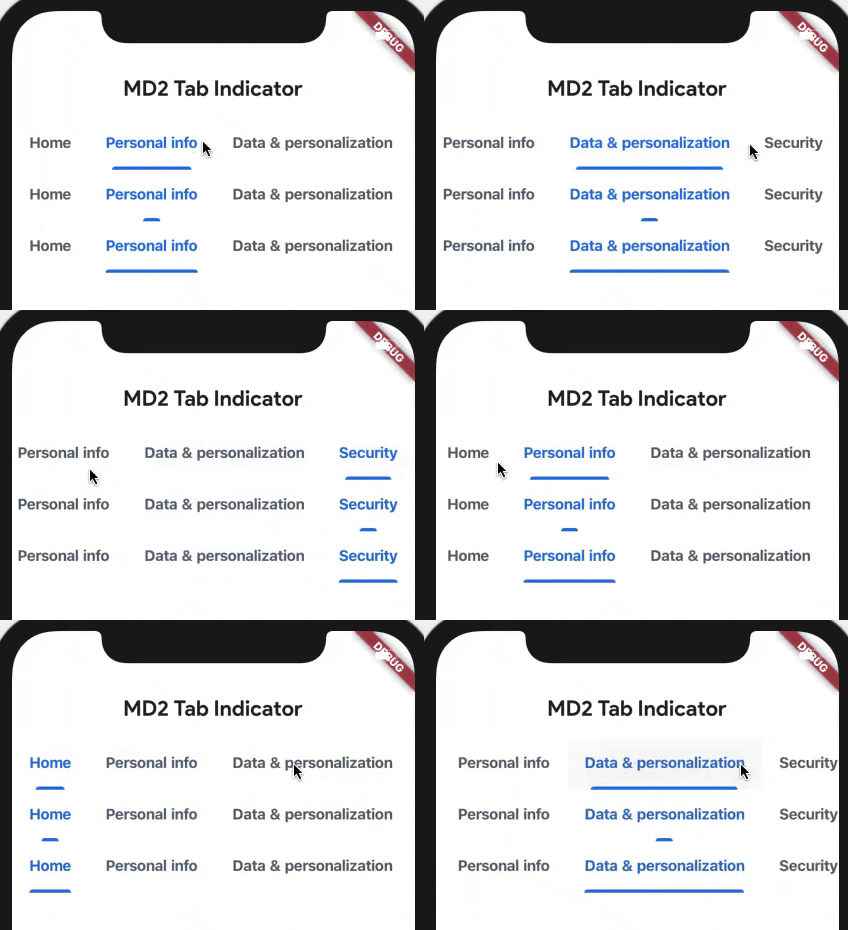
Getting Started
Add this to your package's pubspec.yaml file:
...
dependencies:
  md2_tab_indicator: ^1.0.2
Now in your Dart code, you can use:
import 'package:md2_tab_indicator/md2_tab_indicator.dart';
Usage
TabBar(
  labelStyle: TextStyle( //up to your taste
    fontWeight: FontWeight.w700
  ),
  indicatorSize: TabBarIndicatorSize.label, //makes it better
  labelColor: Color(0xff1a73e8), //Google's sweet blue
  unselectedLabelColor: Color(0xff5f6368), //niceish grey
  isScrollable: true, //up to your taste
  indicator: MD2Indicator( //it begins here
    indicatorHeight: 3,
    indicatorColor: Color(0xff1a73e8),
    indicatorSize: MD2IndicatorSize.normal //3 different modes tiny-normal-full
  ),
  tabs: <Widget>[
    Tab(
      text: "Home",
    ),
    Tab(
      text: "Personal info",
    ),
    Tab(
      text: "Data & personalization",
    ),
    Tab(
      text: "Security",
    )
  ],
),

GitHub author
Görkem Erol ↗
LanguagesDartJavaObjective-C
Dependencies used
Dependency list 2 items
- flutter
{"sdk":"flutter"} - flutter_testDevelopment
{"sdk":"flutter"}
How do I choose a repository?
Start with your use case, compare repository activity, and check the original project before adopting it.
- Search by repository name, owner or description, then narrow the results by topic.
- Compare stars, forks and recent pushes. Stars show community interest, not a guarantee of quality.
- Read the README, license and issues on GitHub before using a project.
Sources and maintenance
“A repository is the most basic element of GitHub.”
GitHub Docs — About repositories ↗