
esc_pos_bluetooth
ESC/POS (thermal, receipt) printing for Flutter & Dart (Android/iOS)
- Stars
- 270
- Forks
- 361
- Last push (UTC)
- Apr 8, 2024
- Project status
- Active
Original README
English project snapshot. Visit GitHub for the latest content.
esc_pos_bluetooth

The library allows to print receipts using a Bluetooth printer. For WiFi/Ethernet printers, use esc_pos_printer library.
TODO (PRs are welcomed!)
- Split byte data into chunks: issue
- Print QR Codes using the
GS ( kcommand (printing QR code from an image already supported) - PDF-417 Barcodes using the
GS ( kcommand - Line spacing using the
ESC 3 <n>command
How to Help
- Test your printer and add it in the table: Wifi/Network printer or Bluetooth printer
- Test and report bugs
- Share your ideas about what could be improved (code optimization, new features...)
- PRs are welcomed!
Tested Printers
Here are some printers tested with this library. Please add the models you have tested to maintain and improve this library and help others to choose the right printer.
Generate a Ticket
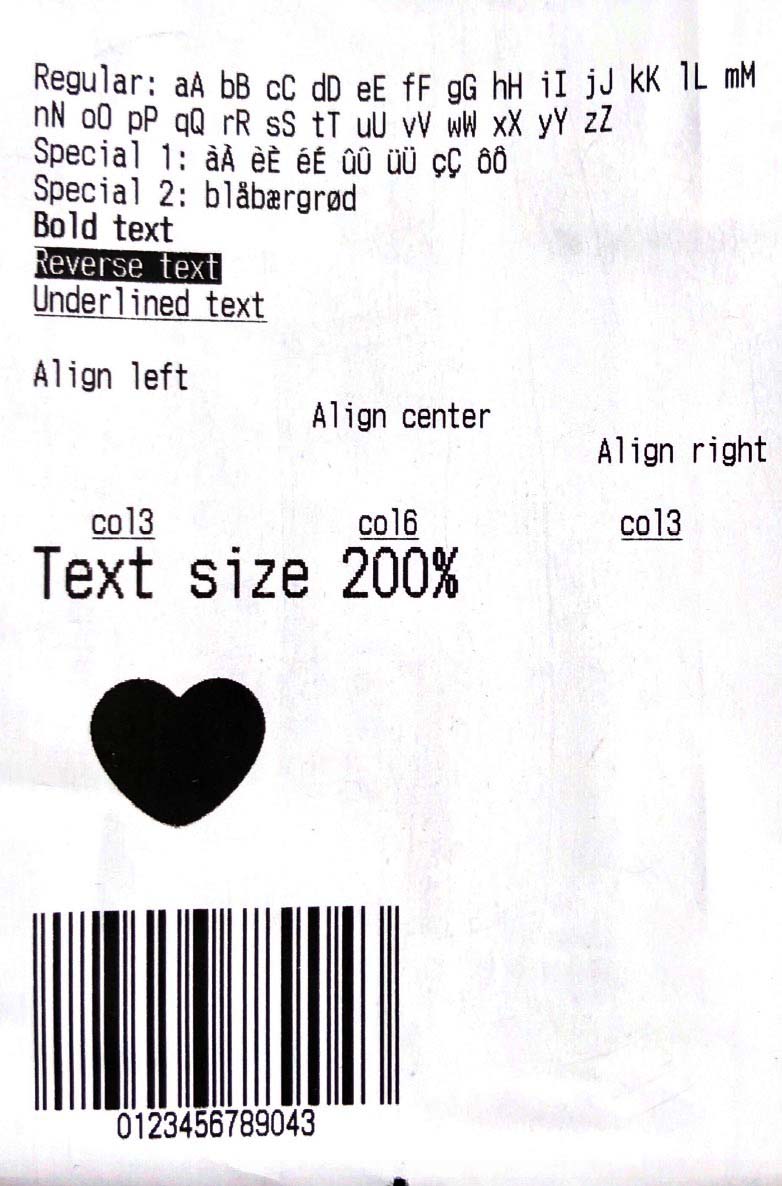
Simple Ticket with Styles:
Ticket testTicket() {
  final Ticket ticket = Ticket(PaperSize.mm80);

  ticket.text(
      'Regular: aA bB cC dD eE fF gG hH iI jJ kK lL mM nN oO pP qQ rR sS tT uU vV wW xX yY zZ');
  ticket.text('Special 1: àÀ èÈ éÉ ûÛ üÜ çÇ ôÔ',
      styles: PosStyles(codeTable: PosCodeTable.westEur));
  ticket.text('Special 2: blåbærgrød',
      styles: PosStyles(codeTable: PosCodeTable.westEur));

  ticket.text('Bold text', styles: PosStyles(bold: true));
  ticket.text('Reverse text', styles: PosStyles(reverse: true));
  ticket.text('Underlined text',
      styles: PosStyles(underline: true), linesAfter: 1);
  ticket.text('Align left', styles: PosStyles(align: PosAlign.left));
  ticket.text('Align center', styles: PosStyles(align: PosAlign.center));
  ticket.text('Align right',
      styles: PosStyles(align: PosAlign.right), linesAfter: 1);

  ticket.text('Text size 200%',
      styles: PosStyles(
        height: PosTextSize.size2,
        width: PosTextSize.size2,
      ));

  ticket.feed(2);
  ticket.cut();
  return ticket;
}
You can find more examples here: esc_pos_utils.
Print a Ticket
PrinterBluetoothManager printerManager = PrinterBluetoothManager();

printerManager.scanResults.listen((printers) async {
  // store found printers
});
printerManager.startScan(Duration(seconds: 4));

// ...

printerManager.selectPrinter(printer);
final PosPrintResult res = await printerManager.printTicket(testTicket());

print('Print result: ${res.msg}');
For a complete example, check the demo project example/blue.
Troubleshooting
- If your printer prints only 5%-10% of an image and then stops, or it can't print more than 1 image on the same ticket, or it can't print long tickets, try to ajust
queueSleepTimeMsof thePrinterBluetoothManager.printTicket(try 50 or 100ms):printerManager.printTicket(await demoReceipt(paper), queueSleepTimeMs: 50);
Test Print

GitHub author
wwandreww ↗
LanguagesDartRubyObjective-CKotlin
Categories
Dependencies used
Dependency list 5 items
- flutter
{"sdk":"flutter"} - rxdart
^0.26.0 - esc_pos_utils
^1.1.0 - flutter_bluetooth_basic
^0.1.7 - flutter_testDevelopment
{"sdk":"flutter"}
How do I choose a repository?
Start with your use case, compare repository activity, and check the original project before adopting it.
- Search by repository name, owner or description, then narrow the results by topic.
- Compare stars, forks and recent pushes. Stars show community interest, not a guarantee of quality.
- Read the README, license and issues on GitHub before using a project.
Sources and maintenance
“A repository is the most basic element of GitHub.”
GitHub Docs — About repositories ↗
- wwandreww/esc_pos_bluetooth · GitHub ↗
- GitHub Docs — Saving repositories with stars ↗
- Directory maintained by Ducafecat ↗