
relative_scale
RelativeScale is a simple custom sizing system for flutter widgets to achieve the same physical sizes across different devices.

- Stars
- 18
- Forks
- 1
- Last push (UTC)
- Mar 5, 2021
- Project status
- Active
Original README
English project snapshot. Visit GitHub for the latest content.

RelativeScale is a simple custom sizing system for flutter widgets to achieve the same physical sizes across different devices.


Usage
It is VERY easy to use.
-
sy(value)andsx(value) -
Example:
sy(10) - size relative to screen height.sx(10) - size relative to screen width.
-
RelativeBuilder- A builder widget that provides the scaling methodssyandsx. -
RelativeScale(deprecated) - A StatefulWidget mixin that provides the scaling methodssyandsx. It is highly recommended to useRelativeBuilder.
Example
RelativeBuilder example.
class Example extends StatelessWidget {
  @override
  Widget build(BuildContext context) {
    return RelativeBuilder(
      builder: (context, height, width, sy, sx) {
        return Scaffold(
          appBar: AppBar(
            title: Text(
              'App Bar Title',
              style: TextStyle(fontSize: sy(13)),
            ),
          ),
          body: Container(
            height: height,
            width: width,
            child: Text(
              'Body Text',
              style: TextStyle(fontSize: sy(11)),
            ),
          ),
        );
      },
    );
  }
}
Preview
The base screen size for these widgets is 480 x 800. The source code for this preview app is here.
Scaled with RelativeScale:
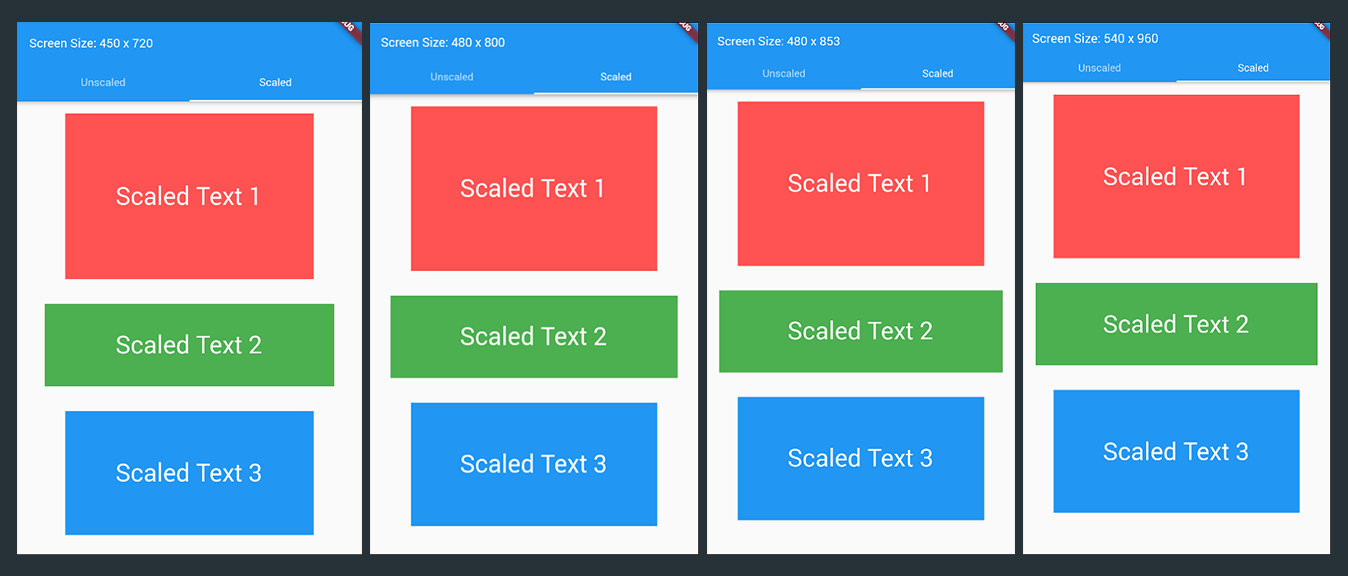
Now, look at these scaled widgets with RelativeScale. There is a difference, yeah, but that's because of the system scaled sizes like the AppBar (look at the appbar's height :) ). Now let's forget about that and focus on the texts and the rectangle containers. They are the same sizes.
Normal scaling from a flutter:
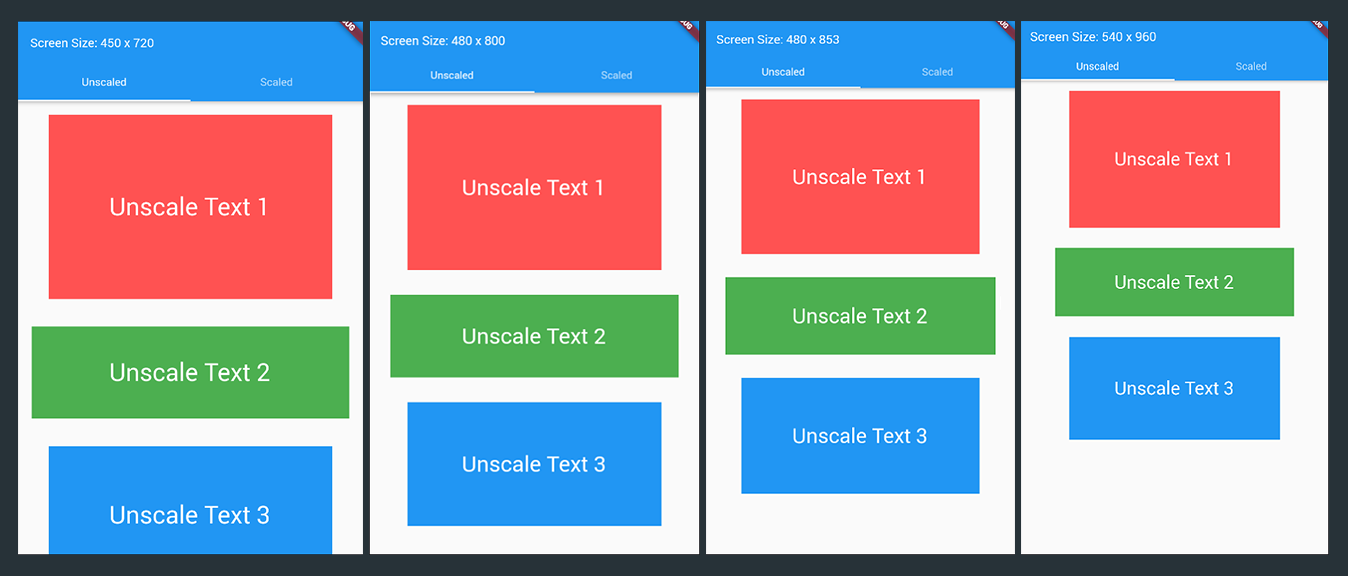
Now, for unscaled sizes, no RelativeScale at all. Well, that's quite obvious :). Look at the texts on the last image, they are very small comparing to the first image. And the rectangle containers, very big difference.
The full example is in the Example section.
Scaling Notes
For instance, you have a container widget like this:
Container(
    height: 300,
    width: 500,
)
and you implemented RelativeScale:
Container(
    height: sy(300),
    width: sx(500),
)
they will not be the same size anymore, using relative scaler will make your sizes a bit bigger. But the hard work will payoff after adjusting your sizes because your app will now have the same widget sizes in every devices.
Please note that these scaler methods are relative to screen size. So basically in this case sy(50) and sx(50) is NOT the same size.
Also, another thing to note is that if you use sy for height and sx for width (or vice-versa), you'll get widgets with the same ratio (not size) which is still useful. The Scaled preview image above uses only sy, and containers and text have the same size across different screens.
If you want to make a perfect Square container, DON'T do this:
Container(
    height: sy(300),
    width: sx(300),
)
// Yeah they are the same value "300", but they are not the same unit 'cause you used "sx" on the width.
DO this instead:
Container(
    height: sy(300), // or sx(value)
    width: sy(300), // or sx(value)
)
Portrait & Landscape
The library doesn't support orientation yet. If you designed your app for portrait and the user rotates the app to landscape view, the sizes will be messed up. So if you want to use this library, it's highly recommended you lock the rotation. Or if your app should adapt to orientation, DO NOT use this library, there are a lot of alternatives.

xamantra ↗
Categories
Dependencies used
Dependency list 2 items
- flutter
{"sdk":"flutter"} - flutter_testDevelopment
{"sdk":"flutter"}
How do I choose a repository?
Start with your use case, compare repository activity, and check the original project before adopting it.
- Search by repository name, owner or description, then narrow the results by topic.
- Compare stars, forks and recent pushes. Stars show community interest, not a guarantee of quality.
- Read the README, license and issues on GitHub before using a project.
Sources and maintenance
“A repository is the most basic element of GitHub.”
GitHub Docs — About repositories ↗
- xamantra/relative_scale · GitHub ↗
- GitHub Docs — Saving repositories with stars ↗
- Directory maintained by Ducafecat ↗