

 v2.1.0
flutter_boring_avatars
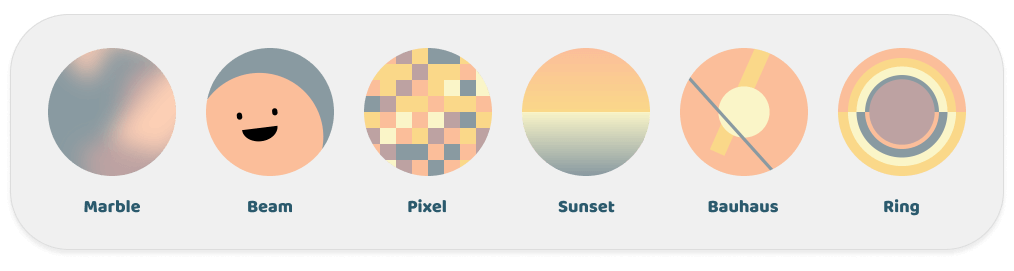
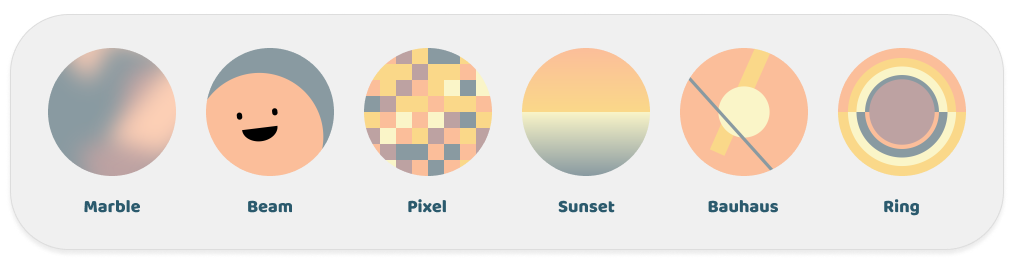
Boring avatars can generate unique avatars based on the username and color palette.
54Likes 2.5K30-day downloads160Pub points
AndroidiOSWebmacOSWindowsLinux
Boring avatars can generate unique avatars based on the username and color palette.
English project snapshot. Visit GitHub for the latest content.

English | 中文
Boring avatars can generate unique avatars based on the username and color palette.
This project is a Flutter implementation of Boring Avatars.
It differs from the original project in its implementation, using Canvas for rendering and adding transition animations.
Check out the Web Demo to experience the effect.
Add the dependency in your pubspec.yaml file:
dependencies:
  flutter_boring_avatars: any # or the latest version on Pub
Get a simple avatar
BoringAvatar(name: "Maria Mitchell", type: BoringAvatarType.marble);
Get an animated avatar that has a nice transition animation when the name changes
AnimatedBoringAvatar(
  name: "Maria Mitchell",
  type: BoringAvatarType.marble,
  duration: const Duration(milliseconds: 300),
)
Get an avatar with a custom color palette
final colorPalette = BoringAvatarPalette(Color(0xffA3A948), Color(0xffEDB92E), Color(0xffF85931), Color(0xffCE1836), Color(0xff009989));

BoringAvatar(name: "Maria Mitchell", palette: colorPalette);
Set default type and palette, applicable only for BoringAvatar and AnimatedBoringAvatar
build(context) {
  return DefaultBoringAvatarStyle(
    type: BoringAvatarType.marble,
    palette: colorPalette,
    child: Column(
      children: [
        BoringAvatar(name: "Maria Mitchell"),
        BoringAvatar(name: "Alexis Brooks"),
        BoringAvatar(name: "Justin Gray"),
      ]
    ),
  );
}
Use ShapeBorder to control the avatar shape and add a border
BoringAvatar(
  name: "Maria Mitchell",
  type: BoringAvatarType.marble,
  shape: OvalBorder(), // or RoundedRectangleBorder(borderRadius: BorderRadius.circular(16))
);
Use the avatar for Decoration, it also supports transition animations when used in AnimatedContainer
Container(
  decoration: BoringAvatarDecoration(
    avatarData: BoringAvatarData.generate(name: name),
  ),
);
Export the avatar as an image
final avatarData = BoringAvatarData.generate(name: name);
final image = await avatarData.toImage(size: const Size.square(256));
final pngByteData = await image.toByteData(format: ImageByteFormat.png);
Thanks to the developers of Boring Avatars.
The example uses the beautiful palette project from Matt DesLauriers.
If you like this project, please give me a star.

Dependency list 3 items
{"sdk":"flutter"}{"sdk":"flutter"}^6.0.0Start with your use case, compare repository activity, and check the original project before adopting it.
“A repository is the most basic element of GitHub.”
GitHub Docs — About repositories ↗