
 v1.5.2
glow_bottom_app_bar
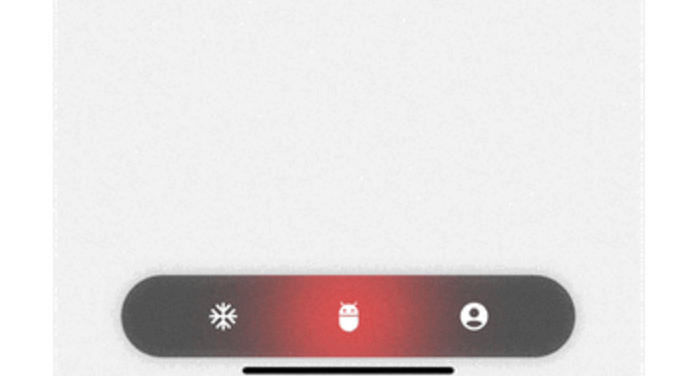
Simple Bottom App Bar with Glowing transition effect to provide a beautiful effect for navigation
10Likes 6230-day downloads150Pub points
AndroidiOSWebmacOSWindowsLinux
Simple Flutter Bottom App Bar with Glow Transition
English project snapshot. Visit GitHub for the latest content.
GlowBottomAppBar is a beautiful and easy to use widget which shows a glowing transition from when index changes and is fully customizable.
Resources:
class DemoScreen extends StatelessWidget {
  const DemoScreen({super.key});

  @override
  Widget build(BuildContext context) {
    return Scaffold(
      bottomNavigationBar: GlowBottomAppBar(
        height: 60,
        onChange: (value) {
          print(value);
        },
        background: Colors.black54,
        iconSize: 35,
        glowColor: Colors.redAccent,
        selectedChildren: const [
          Icon(Icons.ac_unit, color: Colors.redAccent,),
          Icon(Icons.adb_rounded, color: Colors.redAccent,),
          Icon(Icons.account_circle_rounded, color: Colors.redAccent,),
        ],
        children: const [
          Icon(Icons.ac_unit, color: Colors.white,),
          Icon(Icons.adb_rounded, color: Colors.white,),
          Icon(Icons.account_circle_rounded, color: Colors.white,),
        ],
      ),
    );
  }
}
You can customise glow_bottom_app_bar using parameters like:
height
width
iconSize
duration
glowColor
background
shadowColor
children
selectedChildren
initialIndex

Dependency list 3 items
{"sdk":"flutter"}{"sdk":"flutter"}^2.0.3Start with your use case, compare repository activity, and check the original project before adopting it.
“A repository is the most basic element of GitHub.”
GitHub Docs — About repositories ↗