
v0.0.1+1
paymob_payment
使用 Paymob 在您的 Flutter 应用中轻松通过在线信用卡接受付款。
39喜欢 3近 30 天下载150Pub 分数
AndroidiOSmacOS
Paymob 支付插件。
以下为英文项目原文快照,最新内容请访问 GitHub。
Easily accept payments through Online Cards in your Flutter app with Paymob.
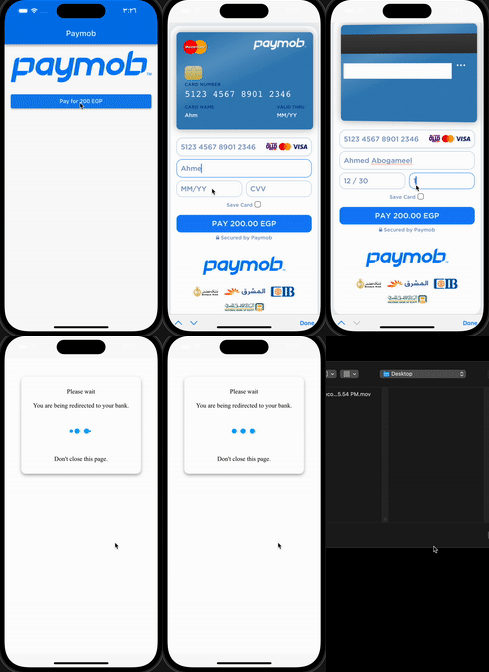
Add this to dependencies in your app's pubspec.yaml
paymob_payment : latest_version
PaymobPayment.instance.initialize(
  apiKey: "", // from dashboard Select Settings -> Account Info -> API Key
  integrationID: 123456, // from dashboard Select Developers -> Payment Integrations -> Online Card ID
  iFrameID: 123456, // from paymob Select Developers -> iframes
);
:pushpin: Note :
You can use this singleton (instance) or Create your own
if you want to create different iFrames or integrations
final PaymobPayment paymobPayment = PaymobPayment();
  paymobPayment.initialize(
  apiKey: "",
  integrationID: 123456,
  iFrameID: 123456,
);
final PaymobResponse? response = await PaymobPayment.instance.pay(
  context: context,
  currency: "EGP",
  amountInCents: "20000", // 200 EGP
  onPayment: (response) => setState(() => this.response = response), // Optional
)
| Variable | Type | Description |
|---|---|---|
| success | bool | Indicates if the transaction was successful or not |
| transactionID | String? | The ID of the transaction |
| responseCode | String? | The response code for the transaction |
| message | String? | A brief message describing the transaction |
| Variable | Description |
|---|---|
| Card Number | 5123456789012346 |
| Expiry Month | 12 |
| Expiry Year | 30 |
| CVV | 123 |
Change cvv to 111 or expiry year to 20
:pushpin: Note :
May be you have to contact paymob support to activate your test card

依赖清单 5 项
^5.2.1+1^4.2.2{"sdk":"flutter"}{"sdk":"flutter"}^2.0.2先按使用场景筛选,再比较项目活跃情况,最后到原始仓库核对使用要求。
“A repository is the most basic element of GitHub.”
GitHub Docs — About repositories ↗