

 v3.0.1
simple_url_preview
用于显示网址预览的 Flutter 包。可自定义高度、背景和文本样式,以及行数。
77喜欢 103近 30 天下载60Pub 分数
平台暂无数据
适用于 Flutter 的简单 URL 预览包

以下为英文项目原文快照,最新内容请访问 GitHub。
Flutter package to show url preview
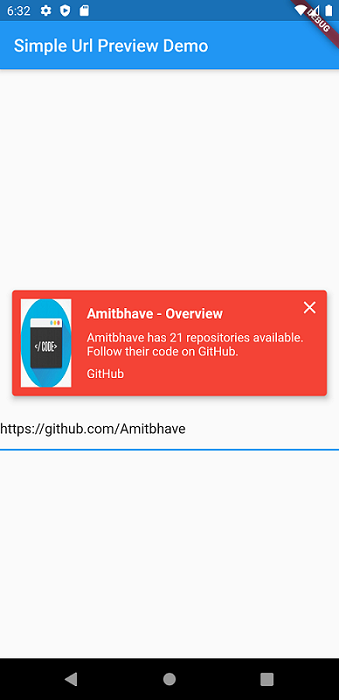
This shows url preview of a URL. (Now migrated to null-safety).
Currently only supports Open Graph Protocol
Please use latest version of the package.
Add simple_url_preview to pubspec.yaml, and hit command 'flutter pub get'
dependencies:
  ...
  simple_url_preview: ^3.0.1
SimpleUrlPreview(
  url: 'https://pub.dev/',
),
SimpleUrlPreview(
  url: 'https://pub.dev/',
  previewHeight: 200,
  previewContainerPadding: EdgeInsets.all(10),
),
Default bgColor = Theme.of(context).primaryColor
SimpleUrlPreview(
  url: 'https://pub.dev/',
  bgColor: Colors.red,
),
Default titleStyle = TextStyle( fontWeight: FontWeight.bold, fontSize: 16, color: Theme.of(context).accentColor )
Default descriptionStyle = TextStyle( fontSize: 14, color: Theme.of(context).accentColor )
Default siteNameStyle = TextStyle( fontSize: 14, color: Theme.of(context).accentColor )
SimpleUrlPreview(
  url: 'https://pub.dev/',
  titleStyle: TextStyle(
    fontSize: 16,
    fontWeight: FontWeight.bold,
    color: Colors.red,
  ),
  descriptionStyle: TextStyle(
    fontSize: 14,
    color: Theme.of(context).primaryColor,
  ),
  siteNameStyle: TextStyle(
    fontSize: 14,
    color: Theme.of(context).primaryColor,
  ),
),
SimpleUrlPreview(
  url: 'https://pub.dev/',
  isClosable: true,
),
Default and maximum title lines = 2 and description lines = 3.
SimpleUrlPreview(
  url: 'https://pub.dev/',
  titleLines: 1,
  descriptionLines: 2,
  imageLoaderColor: Colors.white,
),
By Default, will open URL in default browser.
SimpleUrlPreview(
  url: 'https://pub.dev/',
  onTap: () => print('Hello Flutter URL Preview'),
),
Would :heart: to see any contributions.
If you liked my work, show some :heart: by :star: repo.
Also you can appreciate by

|

|
依赖清单 8 项
{"sdk":"flutter"}^0.13.3^0.15.0^6.0.6^0.3.0^3.0.0^1.15.0{"sdk":"flutter"}先按使用场景筛选,再比较项目活跃情况,最后到原始仓库核对使用要求。
“A repository is the most basic element of GitHub.”
GitHub Docs — About repositories ↗