
FloatingActionBubble
Darshan0/FloatingActionBubble open-source repository details.

- 星标
- 21
- 复刻
- 34
- 最近推送(UTC)
- 2023年4月6日
- 项目状态
- 未归档
原始 README
以下为英文项目原文快照,最新内容请访问 GitHub。
Floating Action Bubble


A Flutter package to create a animated menu using a Floating Action Button.
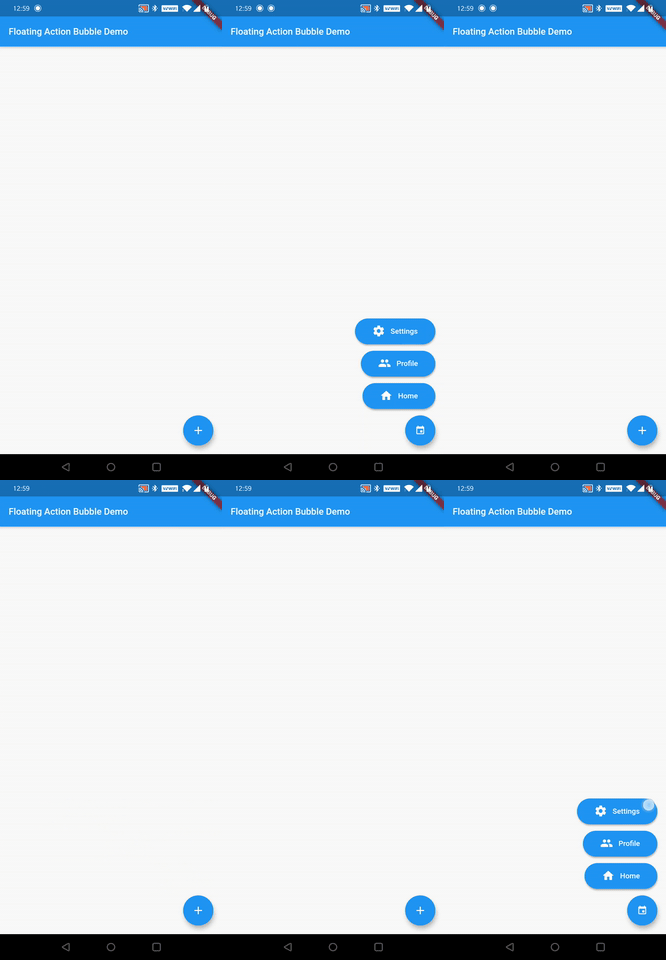
Installation
Just add floating_action_bubble to your pubspec.yml file
dependencies:
  floating_action_bubble: 1.1.2
Example
class MyApp extends StatelessWidget {
  @override
  Widget build(BuildContext context) {
    return MaterialApp(
      title: 'Floating Action Bubble Demo',
      theme: ThemeData(
        primarySwatch: Colors.blue,
      ),
      home: Directionality(textDirection: TextDirection.rtl, child: MyHomePage(title: 'Floating Action Bubble Demo')),
    );
  }
}

class MyHomePage extends StatefulWidget {
  MyHomePage({Key key, this.title}) : super(key: key);
  final String title;

  @override
  _MyHomePageState createState() => _MyHomePageState();
}

class _MyHomePageState extends State<MyHomePage> with SingleTickerProviderStateMixin{

  Animation<double> _animation;
  AnimationController _animationController;

  @override
  void initState(){

    _animationController = AnimationController(
      vsync: this,
      duration: Duration(milliseconds: 260),
    );

    final curvedAnimation = CurvedAnimation(curve: Curves.easeInOut, parent: _animationController);
    _animation = Tween<double>(begin: 0, end: 1).animate(curvedAnimation);


    super.initState();


  }

  @override
  Widget build(BuildContext context) {
    return  Scaffold(
      appBar: AppBar(
        title: Text(widget.title),
      ),

      floatingActionButtonLocation: FloatingActionButtonLocation.endDocked,

      //Init Floating Action Bubble
      floatingActionButton: FloatingActionBubble(
        // Menu items
        items: <Bubble>[

          // Floating action menu item
          Bubble(
            title:"Settings",
            iconColor :Colors.white,
            bubbleColor : Colors.blue,
            icon:Icons.settings,
            titleStyle:TextStyle(fontSize: 16 , color: Colors.white),
            onPress: () {
              _animationController.reverse();
            },
          ),
          // Floating action menu item
          Bubble(
            title:"Profile",
            iconColor :Colors.white,
            bubbleColor : Colors.blue,
            icon:Icons.people,
            titleStyle:TextStyle(fontSize: 16 , color: Colors.white),
            onPress: () {
              _animationController.reverse();
            },
          ),
          //Floating action menu item
          Bubble(
            title:"Home",
            iconColor :Colors.white,
            bubbleColor : Colors.blue,
            icon:Icons.home,
            titleStyle:TextStyle(fontSize: 16 , color: Colors.white),
            onPress: () {
              Navigator.push(context, new MaterialPageRoute(builder: (BuildContext context) => Homepage()));
              _animationController.reverse();
            },
          ),
        ],

        // animation controller
        animation: _animation,

        // On pressed change animation state
        onPress: () => _animationController.isCompleted
              ? _animationController.reverse()
              : _animationController.forward(),

        // Floating Action button Icon color
        iconColor: Colors.blue,

        // Flaoting Action button Icon
        iconData: Icons.ac_unit,
        backGroundColor: Colors.white,
      )
    );
  }

}
You can check for a more complete example in the example directory.
Customize
You can customize the widget appareance using the following properties:
| Property | Description |
|---|---|
| fabColor | Sets the FAB color |
| fabIcon | Sets the FAB icon |
| BubbleTitle | Sets the menu item title |
| BubbleTitleStyle | Sets the menu item title style |
| BubbleIcon | Sets the menu item icon |
| BubbleIconColor | Sets the menu item icon color |
| BubbleColor | Sets the menu item color |
| animation | Allows to animated the menu items |
Contributing
If you want to contribute to this project, please submit a PR to the development branch Thank you 😁

GitHub 作者
Darshan Murthy ↗
语言DartKotlinSwiftObjective-C
使用的依赖
依赖清单 3 项
- flutter
{"sdk":"flutter"} - flutter_test开发依赖
{"sdk":"flutter"} - flutter_lints开发依赖
^1.0.0
如何选择适合项目的代码仓?
先按使用场景筛选,再比较项目活跃情况,最后到原始仓库核对使用要求。
- 通过仓库名、作者或描述搜索,再按技术分类缩小范围。
- 结合星标、复刻与最近推送比较项目;星标反映社区关注,不代表质量保证。
- 使用前在 GitHub 核对 README、许可证与 Issues。
来源与维护
“A repository is the most basic element of GitHub.”
GitHub Docs — About repositories ↗