
 v2.0.0
flutter_auto_form
一个简化在 Flutter 中创建用户友好表单过程的包
43喜欢 122近 30 天下载140Pub 分数
AndroidiOSWebmacOSWindowsLinux
一个简化在 Flutter 中创建用户友好表单过程的包
以下为英文项目原文快照,最新内容请访问 GitHub。

The easiest way to create fully customizable forms with only a tiny amount of code.
Are you tired of writing endless lines of code to create forms in your Flutter apps? Look no further! Our Flutter Auto Form package is here to revolutionize your form-building experience.
Our primary goal is to significantly reduce the amount of code required to create forms in Flutter. We achieve this by embracing a clear separation of concerns between form logic and form display.
With Flutter Auto Form, you write the form logic in pure Dart, without any direct mention of widgets. Instead, we introduce the AFWidget, which dynamically renders all the necessary widgets based on a straightforward form declaration—a simple Dart class that extends the TemplateForm class.
But that's not all! Our package empowers you to design your custom fields and linked widgets, making nearly any form conceivable. Whether you're working on basic forms or tackling complex ones, Flutter Auto Form has got you covered.
The true magic of Flutter Auto Form shines when you're dealing with multiple forms, especially complex ones. All your validators are automatically called when you submit a form, and you can even create sub-forms that cascade into one another.
Dynamic form generation is also feasible but still in experimental mode. It is accessible through the JsonSchemaForm class.
To use this plugin, add flutter_auto_form as
a dependency in your pubspec.yaml file.
pubspec.yaml
dependencies:
  flutter:
    sdk: flutter

  # Your other packages  ...

  flutter_auto_form: ^1.0.6
The first step in creating a form with Flutter Auto Form is to create a class inheriting from the TemplateForm class.
import 'package:flutter_auto_form/flutter_auto_form.dart';
import 'package:flutter_auto_form/flutter_auto_form.dart';

class LoginForm extends TemplateForm {
  @override
  final List<Field> fields = [
    AFTextField(
      id: 'identifier',
      name: 'Identifier',
      validators: [
        MinimumStringLengthValidator(
          5,
              (e) => 'Min 5 characters, currently ${e?.length ?? 0} ',
        )
      ],
      type: AFTextFieldType.USERNAME,
    ),
    AFTextField(
      id: 'password',
      name: 'Password',
      validators: [
        MinimumStringLengthValidator(
          6,
              (e) => 'Min 6 characters, currently ${e?.length ?? 0} ',
        )
      ],
      type: AFTextFieldType.PASSWORD,
    ),
    AFBooleanField(
      id: 'accept-condition',
      name: 'Accept terms',
      validators: [ShouldBeTrueValidator('Please accept terms to continue?')],
      value: false,
    )
  ];
}
The second & (already) last step is to add the AFWidget wherever you would like to display a form.
AFWidget<RegistrationForm>(
formBuilder: () => RegistrationForm(),
submitButton: (Function({bool showLoadingDialog}) submit) => Padding(
padding: const EdgeInsets.only(top: 32),
child: MaterialButton(
child: Text('Submit'),
onPressed: () => submit(showLoadingDialog: true),
),
),
onSubmitted: (RegistrationForm form) {
// do whatever you want when the form is submitted
print(form.toMap());
},
);
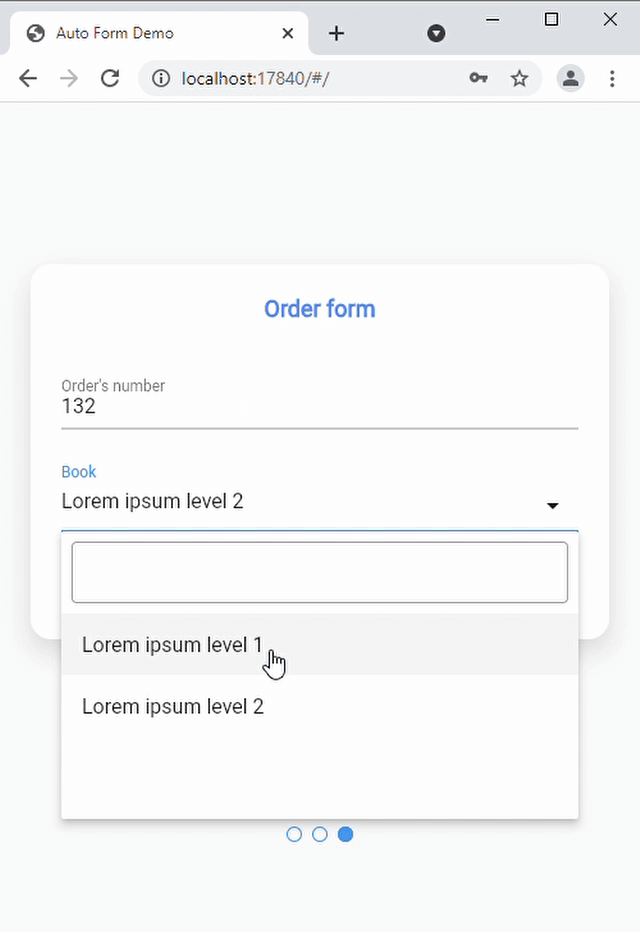
A demo video can be found here. The four forms displayed in the video are all created with Flutter Auto Form, even the model search field.
The source code is located in the example folder.
If you need to create your own field (color field, image field, ...) you can always create it by overriding the Field class. Then to display a custom widget, create a stateful widget that extends the FieldStatefulWidget, and of which the state extends the FieldState class.
This package is still under construction ! Do not hesitate to create an issue on the GitHub page if you find any bug or if you would like to see a new type of validator, field !

依赖清单 7 项
^8.0.2^0.0.7^5.0.1^5.0.6{"sdk":"flutter"}{"sdk":"flutter"}^2.0.1先按使用场景筛选,再比较项目活跃情况,最后到原始仓库核对使用要求。
“A repository is the most basic element of GitHub.”
GitHub Docs — About repositories ↗