
platform_info
包含有关当前平台的信息,例如构建模式和操作系统。

- 星标
- 33
- 复刻
- 5
- 最近推送(UTC)
- 2024年8月13日
- 项目状态
- 未归档
原始 README
以下为英文项目原文快照,最新内容请访问 GitHub。
platform_info


About
Cross-platform io/html package. Works on the web, mobile phones, desktops and console. Fully caches itself on first initialization.
Easy to use, just add to pubspec.yaml as dependency and then import:
import 'package:platform_info/platform_info.dart';
Platform is a singleton, and the default way to access an instance of Platform is to call static getters:
Platform.instance or Platform.I or platform
Usage
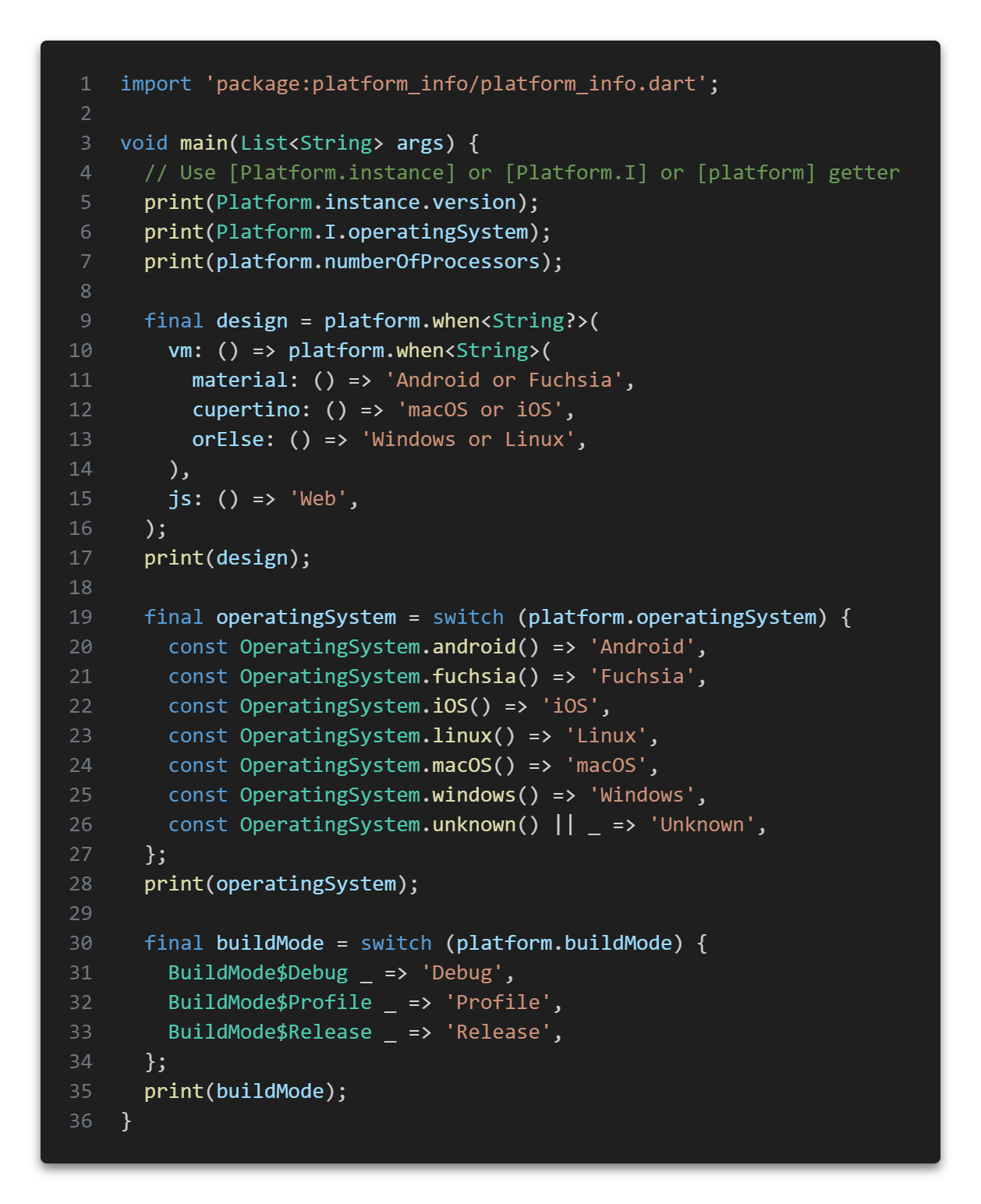 Example of using the library to get the current platform info
Platform Information
Provides platform information such as:
-
Build mode
- release
- profile
- debug
-
Host platform type
- vm (io, desktops, mobile, console, server)
- js (web, html, browser)
-
Operating system
- Fuchsia
- Linux
- MacOS
- Windows
- iOS
- Android
- Unknown
-
Version (
unknownif not available) -
Locale string (
enif not available) -
The number of individual execution units of the machine (
0if not available) -
Operating system is a known type
-
Is a Web-based applications
-
Is a VM supporting for non-web applications
-
Is a mobile device (Android, iOS)
-
Is a desktop device (Windows, macOS, Fuchsia)
-
Is Material design device (Android, Fuchsia)
-
Is Cupertino design device (macOS, iOS)
-
is Linux
-
is macOS
-
is Windows
-
is android
-
is iOS
-
is fuchsia
-
whenmethod allowing to compose a complex condition
Pattern matching
Run functions that satisfy the current state of the platform. You can use nested methods to compose more complex queries.
Operating System
[fuchsia] - whether the operating system is a version of Fuchsia [windows] - whether the operating system is a version of Windows [android] - whether the operating system is a version of Android [iOS] - whether the operating system is a version of iOS [macOS] - whether the operating system is a version of MacOS [linux] - whether the operating system is a version of Linux [unknown] - operating system unknown
Design
[material] - is material (Android, Fuchsia) [cupertino] - is cupertino (macOS, iOS)
Mobile or desktop
[mobile] - is mobile device (Android, iOS) [desktop] - is desktop device (Windows, MacOS, Fuchsia)
VM (IO) or JS (Web)
[js] - is web-based applications [vm] - is I/O supporting for non-web applications
Build mode
[release] - release build mode [profile] - profile build mode [debug] - debug build mode [orElse] - any callback was not called
Sequence of checks
- Operating System
- Design
- Mobile/Desktop
- VM/JS
- Build mode
- Call [orElse] if any callback was not called
Coverage

Changelog
Refer to the Changelog to get all release notes.
Maintainers
Funding
If you want to support the development of our library, there are several ways you can do it:
We appreciate any form of support, whether it's a financial donation or just a star on GitHub. It helps us to continue developing and improving our library. Thank you for your support!
License
Tags
cross, platform, info

Plague Fox ↗
分类
使用的依赖
如何选择适合项目的代码仓?
先按使用场景筛选,再比较项目活跃情况,最后到原始仓库核对使用要求。
- 通过仓库名、作者或描述搜索,再按技术分类缩小范围。
- 结合星标、复刻与最近推送比较项目;星标反映社区关注,不代表质量保证。
- 使用前在 GitHub 核对 README、许可证与 Issues。
来源与维护
“A repository is the most basic element of GitHub.”
GitHub Docs — About repositories ↗