

 v0.0.18
comment_box
一个简单的 Flutter 评论框,用于帖子和产品。
45喜欢 461近 30 天下载130Pub 分数
AndroidiOSWebmacOSWindowsLinux
adeleyeayodeji/comment_box open-source repository details.

以下为英文项目原文快照,最新内容请访问 GitHub。
A simple Flutter comment box for posts and products.
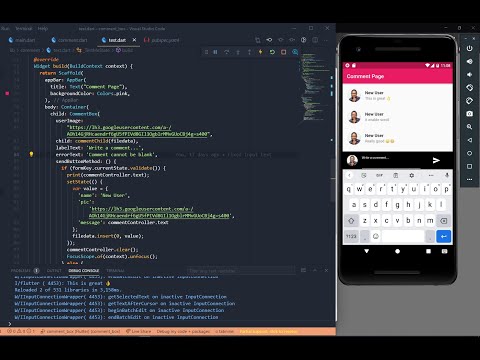


In the pubspec.yaml of your flutter project, add the following dependency:
dependencies:
  ...
  comment_box: ^0.0.18
In your library add the following import:
import 'package:comment_box/comment/comment.dart';
For help getting started with Flutter, view the online documentation.
You can create a CommentBox:
CommentBox(
          userImage: CommentBox.commentImageParser(
              imageURLorPath: "assets/img/userpic.jpg"),
          child: commentChild(filedata),
          labelText: 'Write a comment...',
          errorText: 'Comment cannot be blank',
          withBorder: false,
          sendButtonMethod: () {
            if (formKey.currentState!.validate()) {
              print(commentController.text);
              setState(() {
                var value = {
                  'name': 'New User',
                  'pic':
                      'https://lh3.googleusercontent.com/a-/AOh14GjRHcaendrf6gU5fPIVd8GIl1OgblrMMvGUoCBj4g=s400',
                  'message': commentController.text,
                  'date': '2021-01-01 12:00:00'
                };
                filedata.insert(0, value);
              });
              commentController.clear();
              FocusScope.of(context).unfocus();
            } else {
              print("Not validated");
            }
          },
          formKey: formKey,
          commentController: commentController,
          backgroundColor: Colors.pink,
          textColor: Colors.white,
          sendWidget: Icon(Icons.send_sharp, size: 30, color: Colors.white),
        );
import 'package:comment_box/comment/comment.dart';
import 'package:flutter/material.dart';

class TestMe extends StatefulWidget {
  @override
  _TestMeState createState() => _TestMeState();
}

class _TestMeState extends State<TestMe> {
  final formKey = GlobalKey<FormState>();
  final TextEditingController commentController = TextEditingController();
  List filedata = [
    {
      'name': 'Chuks Okwuenu',
      'pic': 'https://picsum.photos/300/30',
      'message': 'I love to code',
      'date': '2021-01-01 12:00:00'
    },
    {
      'name': 'Biggi Man',
      'pic': 'https://www.adeleyeayodeji.com/img/IMG_20200522_121756_834_2.jpg',
      'message': 'Very cool',
      'date': '2021-01-01 12:00:00'
    },
    {
      'name': 'Tunde Martins',
      'pic': 'assets/img/userpic.jpg',
      'message': 'Very cool',
      'date': '2021-01-01 12:00:00'
    },
    {
      'name': 'Biggi Man',
      'pic': 'https://picsum.photos/300/30',
      'message': 'Very cool',
      'date': '2021-01-01 12:00:00'
    },
  ];

  Widget commentChild(data) {
    return ListView(
      children: [
        for (var i = 0; i < data.length; i++)
          Padding(
            padding: const EdgeInsets.fromLTRB(2.0, 8.0, 2.0, 0.0),
            child: ListTile(
              leading: GestureDetector(
                onTap: () async {
                  // Display the image in large form.
                  print("Comment Clicked");
                },
                child: Container(
                  height: 50.0,
                  width: 50.0,
                  decoration: new BoxDecoration(
                      color: Colors.blue,
                      borderRadius: new BorderRadius.all(Radius.circular(50))),
                  child: CircleAvatar(
                      radius: 50,
                      backgroundImage: CommentBox.commentImageParser(
                          imageURLorPath: data[i]['pic'])),
                ),
              ),
              title: Text(
                data[i]['name'],
                style: TextStyle(fontWeight: FontWeight.bold),
              ),
              subtitle: Text(data[i]['message']),
              trailing: Text(data[i]['date'], style: TextStyle(fontSize: 10)),
            ),
          )
      ],
    );
  }

  @override
  Widget build(BuildContext context) {
    return Scaffold(
      appBar: AppBar(
        title: Text("Comment Page"),
        backgroundColor: Colors.pink,
      ),
      body: Container(
        child: CommentBox(
          userImage: CommentBox.commentImageParser(
              imageURLorPath: "assets/img/userpic.jpg"),
          child: commentChild(filedata),
          labelText: 'Write a comment...',
          errorText: 'Comment cannot be blank',
          withBorder: false,
          sendButtonMethod: () {
            if (formKey.currentState!.validate()) {
              print(commentController.text);
              setState(() {
                var value = {
                  'name': 'New User',
                  'pic':
                      'https://lh3.googleusercontent.com/a-/AOh14GjRHcaendrf6gU5fPIVd8GIl1OgblrMMvGUoCBj4g=s400',
                  'message': commentController.text,
                  'date': '2021-01-01 12:00:00'
                };
                filedata.insert(0, value);
              });
              commentController.clear();
              FocusScope.of(context).unfocus();
            } else {
              print("Not validated");
            }
          },
          formKey: formKey,
          commentController: commentController,
          backgroundColor: Colors.pink,
          textColor: Colors.white,
          sendWidget: Icon(Icons.send_sharp, size: 30, color: Colors.white),
        ),
      ),
    );
  }
}
依赖清单 3 项
{"sdk":"flutter"}^1.0.3{"sdk":"flutter"}先按使用场景筛选,再比较项目活跃情况,最后到原始仓库核对使用要求。
“A repository is the most basic element of GitHub.”
GitHub Docs — About repositories ↗