
 v0.0.3
map_picker
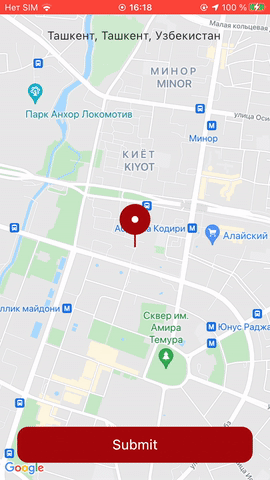
一个非常棒的 Flutter 包,用于在地图中心创建一个定位点,并随着地图移动进行动画,让用户可以选取自己的位置。
161喜欢 476近 30 天下载160Pub 分数
AndroidiOSWebmacOSWindowsLinux
Flutter 地图选择器

{"sdk":"flutter"}{"sdk":"flutter"}^1.0.0以下为英文项目原文快照,最新内容请访问 GitHub。
A Vendor-free map Library for Easy and Quick Usage.
Follow the steps to integrate Google Maps (https://pub.dev/packages/google_maps_flutter)
The source code is 100% Dart, and everything resides in the /lib folder.
In the dependencies: section of your pubspec.yaml, add the following line:
map_pin_picker: <latest_version>
import 'package:map_pin_picker/map_pin_picker.dart';
import 'dart:async';
import 'package:google_maps_flutter/google_maps_flutter.dart';
import 'package:flutter/material.dart';
import 'package:map_picker/map_picker.dart';
import 'package:geocoding/geocoding.dart';
import 'package:flutter_svg/flutter_svg.dart';

void main() {
  runApp(const MyApp());
}

class MyApp extends StatelessWidget {
  const MyApp({Key? key}) : super(key: key);

  @override
  Widget build(BuildContext context) {
    return const MaterialApp(
      debugShowCheckedModeBanner: false,
      home: MyHomePage(),
    );
  }
}

class MyHomePage extends StatefulWidget {
  const MyHomePage({Key? key}) : super(key: key);

  @override
  _MyHomePageState createState() => _MyHomePageState();
}

class _MyHomePageState extends State<MyHomePage> {
  final _controller = Completer<GoogleMapController>();
  MapPickerController mapPickerController = MapPickerController();

  CameraPosition cameraPosition = const CameraPosition(
    target: LatLng(41.311158, 69.279737),
    zoom: 14.4746,
  );

  var textController = TextEditingController();

  @override
  Widget build(BuildContext context) {
    return Scaffold(
      body: Stack(
        alignment: Alignment.topCenter,
        children: [
          MapPicker(
            // pass icon widget
            iconWidget: SvgPicture.asset(
              "assets/location_icon.svg",
              height: 60,
            ),
            //add map picker controller
            mapPickerController: mapPickerController,
            child: GoogleMap(
              myLocationEnabled: true,
              zoomControlsEnabled: false,
              // hide location button
              myLocationButtonEnabled: false,
              mapType: MapType.normal,
              //  camera position
              initialCameraPosition: cameraPosition,
              onMapCreated: (GoogleMapController controller) {
                _controller.complete(controller);
              },
              onCameraMoveStarted: () {
                // notify map is moving
                mapPickerController.mapMoving!();
                textController.text = "checking ...";
              },
              onCameraMove: (cameraPosition) {
                this.cameraPosition = cameraPosition;
              },
              onCameraIdle: () async {
                // notify map stopped moving
                mapPickerController.mapFinishedMoving!();
                //get address name from camera position
                List<Placemark> placemarks = await placemarkFromCoordinates(
                  cameraPosition.target.latitude,
                  cameraPosition.target.longitude,
                );

                // update the ui with the address
                textController.text =
                '${placemarks.first.name}, ${placemarks.first.administrativeArea}, ${placemarks.first.country}';
              },
            ),
          ),
          Positioned(
            top: MediaQuery.of(context).viewPadding.top + 20,
            width: MediaQuery.of(context).size.width - 50,
            height: 50,
            child: TextFormField(
              maxLines: 3,
              textAlign: TextAlign.center,
              readOnly: true,
              decoration: const InputDecoration(
                  contentPadding: EdgeInsets.zero, border: InputBorder.none),
              controller: textController,
            ),
          ),
          Positioned(
            bottom: 24,
            left: 24,
            right: 24,
            child: SizedBox(
              height: 50,
              child: TextButton(
                child: const Text(
                  "Submit",
                  style: TextStyle(
                    fontWeight: FontWeight.w400,
                    fontStyle: FontStyle.normal,
                    color: Color(0xFFFFFFFF),
                    fontSize: 19,
                    // height: 19/19,
                  ),
                ),
                onPressed: () {
                  print(
                      "Location ${cameraPosition.target.latitude} ${cameraPosition.target.longitude}");
                  print("Address: ${textController.text}");
                },
                style: ButtonStyle(
                  backgroundColor:
                  MaterialStateProperty.all<Color>(const Color(0xFFA3080C)),
                  shape: MaterialStateProperty.all<RoundedRectangleBorder>(
                    RoundedRectangleBorder(
                      borderRadius: BorderRadius.circular(15.0),
                    ),
                  ),
                ),
              ),
            ),
          )
        ],
      ),
    );
  }
}
| Attribute Name | Example Value | Description |
|---|---|---|
| child | GoogleMap() | Google map widget |
| iconWidget | Icon( Icons.location_pin, size: 50, ) | Pin icon widget |
| mapPickerController | 20.0 | body radius value the default value is 0.0 |
| showDot | true | show dot under the pin ,the default value is true |
Thanks goes to these wonderful people (emoji key):
| https://avatars1.githubusercontent.com/u/18017854?s=100 Ahmed Eslayed 💻 |
Copyright (c) 2021 Akbar

Permission is hereby granted, free of charge, to any person obtaining a copy of this software and associated documentation files (the "Software"), to deal in the Software without restriction, including without limitation the rights to use, copy, modify, merge, publish, distribute, sublicense, and/or sell copies of the Software, and to permit persons to whom the Software is furnished to do so, subject to the following conditions:

The above copyright notice and this permission notice shall be included in all copies or substantial portions of the Software.

THE SOFTWARE IS PROVIDED "AS IS", WITHOUT WARRANTY OF ANY KIND, EXPRESS OR IMPLIED, INCLUDING BUT NOT LIMITED TO THE WARRANTIES OF MERCHANTABILITY, FITNESS FOR A PARTICULAR PURPOSE AND NONINFRINGEMENT. IN NO EVENT SHALL THE AUTHORS OR COPYRIGHT HOLDERS BE LIABLE FOR ANY CLAIM, DAMAGES OR OTHER LIABILITY, WHETHER IN AN ACTION OF CONTRACT, TORT OR OTHERWISE, ARISING FROM, OUT OF OR IN CONNECTION WITH THE SOFTWARE OR THE USE OR OTHER DEALINGS IN THE SOFTWARE.
For help getting started with Flutter, view our online documentation.
For help on editing package code, view the documentation.