 v3.3.0
table_calendar
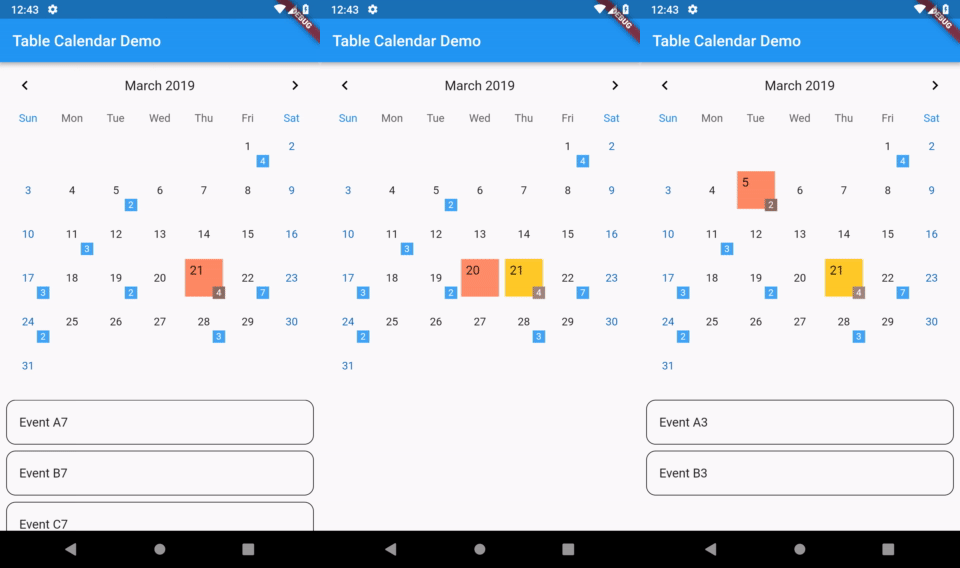
高度可定制、功能丰富的 Flutter 日历小部件。
3320喜欢 73.9万近 30 天下载160Pub 分数
AndroidiOSWebmacOSWindowsLinux
使用 BLoC 模式构建的极简 Flutter 待办事项应用

以下为英文项目原文快照,最新内容请访问 GitHub。


|

|

|

|
Deer uses BLoC (Business Logic Component) pattern to manage app state. If you want to use Streams in your Flutter project, then I think this is the way to go. BLoC plays exceptionally well with Flutter's reactive nature, especially since Flutter has built-in StreamBuilder widget.
Each screen is splitted into 4 files:
Instead of calling setState() in screen file, an action is pushed to bloc's input Stream<Action>.
Then, bloc resolves that action and updates the output Stream<State>. Every state update is listened to inside screen with StreamBuilder, which updates the UI when needed. This way we achieve clear separation of concerns.
Usually with BLoC, Sink is used for input Stream, and BehaviorSubject for output Stream.
Check those resources for more details on the pattern:
flutter packages pub run build_runner build --delete-conflicting-outputs
高度可定制、功能丰富的 Flutter 日历小部件。
带有构建器的值类型、Dart 类作为枚举以及序列化。此库是运行时依赖项。
具有构建器的值类型、Dart 类作为枚举以及序列化。此库是开发依赖项。
基于 SDK 集合的不可变集合。每个 SDK 集合类都被拆分为一个新的不可变集合类和一个对应的可变构建器类。
一个提供元组数据结构的库。
易于使用、可靠且轻量级的 Flutter 应用手势检测器。提供简单的 API 来响应基本手势。
适用于 Flutter 应用的易于使用的文本小部件,可将内联 URL 转换为可点击链接。支持自定义样式。
适用于 Flutter 的最佳滑动轮播图(Carousel),支持多种布局和无限循环。兼容 Android 和 iOS。
用于在 Android 和 iOS 上发现软键盘可见性状态的 Flutter 插件。
依赖清单 19 项
{"sdk":"flutter"}{"sdk":"flutter"}^0.21.0^6.3.2^4.2.0^1.14.11^0.6.0^0.6.1+11^0.4.2^2.2.1^0.1.1^0.1.3^1.1.6^0.5.1+2^0.5.2^1.0.2{"sdk":"flutter"}^1.7.1^6.8.2先按使用场景筛选,再比较项目活跃情况,最后到原始仓库核对使用要求。
“A repository is the most basic element of GitHub.”
GitHub Docs — About repositories ↗