
 v0.1.4
page_flip_builder
一个自定义的 Flutter 小部件,可让您在应用中实现交互式翻页过渡效果。
122喜欢 259近 30 天下载145Pub 分数
AndroidiOSWebmacOSWindowsLinux
交互式翻页 Flutter 小部件

{"sdk":"flutter"}{"sdk":"flutter"}^3.0.1以下为英文项目原文快照,最新内容请访问 GitHub。
A custom Flutter widget that enables interactive page-flip transitions in your app.
You can use this to flip images, cards, or widgets of any size.
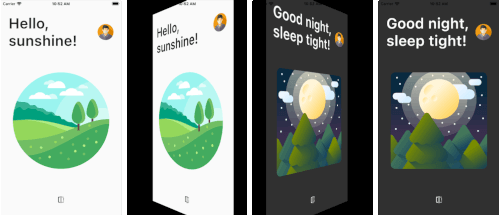
Page Flip screenshots
Card Flip screenshots
Also see the Flutter Web Live Preview.
Note: This package uses null-safety.
PageFlipBuilder is best used for full-screen page-flip transitions, but works with widgets of any size as long as their width and height is not unbounded.
PageFlipBuilder uses a drag gesture to interactively transition between a "front" and a "back" widget. These are specified with the frontBuilder and backBuilder arguments:
class MyApp extends StatelessWidget {
  @override
  Widget build(BuildContext context) {
    return MaterialApp(
      home: Container(
        // add a black background to prevent flickering on Android when the page flips
        color: Colors.black,
        child: PageFlipBuilder(
          frontBuilder: (_) => LightHomePage(),
          backBuilder: (_) => DarkHomePage(),
        ),
      ),
    );
  }
}
By defalt the flip happens along the vertical axis, but you can change the flipAxis to Axis.horizontal if you want.
For more control, you can also add a GlobalKey<PageFlipBuilderState> and programmatically flip the page with a callback-based API:
class MyApp extends StatelessWidget {
  // used to flip the page programmatically
  final pageFlipKey = GlobalKey<PageFlipBuilderState>();
  @override
  Widget build(BuildContext context) {
    return MaterialApp(
      home: Container(
        // add a black background to prevent flickering on Android when the page flips
        color: Colors.black,
        child: PageFlipBuilder(
          key: pageFlipKey,
          frontBuilder: (_) => LightHomePage(
            onFlip: () => pageFlipKey.currentState?.flip(),
          ),
          backBuilder: (_) => DarkHomePage(
            onFlip: () => pageFlipKey.currentState?.flip(),
          ),
          // flip the axis to horizontal
          flipAxis: Axis.horizontal,
          // customize tilt value
          maxTilt: 0.003,
          // customize scale
          maxScale: 0.2,
          // be notified when the flip has completed
          onFlipComplete: (isFrontSide) => print('isFrontSide: $isFrontSide'),
        ),
      ),
    );
  }
}
Before running the example app, you need to create the ios, android, web folders as needed:
flutter create . --platform ios
flutter create . --platform android
flutter create . --platform web