
 v0.0.3
overlapping_panels
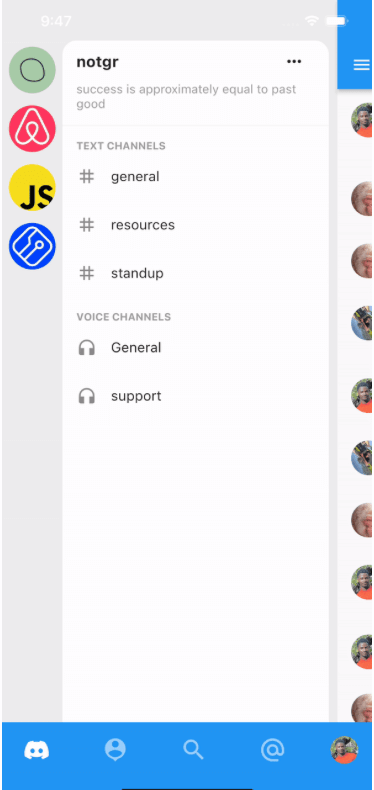
受 Discord 移动应用导航的启发。为您的应用添加左右面板,通过手势显示面板,并提供回调以监听面板的显示。
56喜欢 13近 30 天下载150Pub 分数
AndroidiOSWebmacOSWindowsLinux
适用于 Flutter 应用的 Discord 风格导航

{"sdk":"flutter"}{"sdk":"flutter"}^1.0.0以下为英文项目原文快照,最新内容请访问 GitHub。
Add Discord-like navigation to your app. Demo project here: overlapping_panels_demo
DemoThis widget does not support navigation events yet. So pressing the back button, does not slide the main panel back into view. This feature will be implemented in the nearest future.
Simple and straight to the point. Just provide usual widgets for all panels:
class _MyHomePageState extends StatelessWidget {

  @override
  Widget build(BuildContext context) {
    return Stack(
      children: [
        OverlappingPanels(
          // Using the Builder widget is not required. You can pass your widget directly.
          // But to use `OverlappingPanels.of(context)` you need to wrap your widget in a Builder
          left: Builder(builder: (context) {
            return const LeftPage();
          }),
          right: Builder(
            builder: (context) => const RightPage(),
          ),
          main: Builder(
            builder: (context) {
              return const MainPage();
            },
          ),
          onSideChange: (side) {
            setState(() {
              if (side == RevealSide.main) {
                // hide something
              } else if (side == RevealSide.left) {
                // show something
              }
            });
          },
        ),
      ],
    );
  }
}
To be able to reveal a panel with the tap of a button, for example, do:
IconButton(
  icon: const Icon(Icons.menu),
  onPressed: () {
    // This is the main point
    OverlappingPanels.of(context)?.reveal(RevealSide.left);
  },
)