

 v0.0.18
flutter_stripe_payment
将 Stripe 添加到您的 Flutter 应用程序中,使用带有强 SCA 3DS 合规性的 Payment Intents 接受信用卡支付。
57喜欢 85近 30 天下载125Pub 分数
AndroidiOS
将 Stripe 支付功能添加到 Flutter 应用程序

以下为英文项目原文快照,最新内容请访问 GitHub。
Add Stripe to your Flutter Application to Accept Card Payments using Payment Intents and the Latest SCA Compliance 3DS Requirements
Strong Customer Authentication (SCA), a new rule coming into effect on September 14, 2019, as part of PSD2 regulation in Europe, will require changes to how your European customers authenticate online payments. Card payments will require a different user experience, namely 3D Secure, in order to meet SCA requirements. Transactions that don’t follow the new authentication guidelines may be declined by your customers’ banks.
The Payment Intents API is a new way to build dynamic payment flows. It tracks the lifecycle of a customer checkout flow and triggers additional authentication steps when required by regulatory mandates, custom Radar fraud rules, or redirect-based payment methods.
final _stripePayment = FlutterStripePayment();
_stripePayment.onCancel = (){
  print("User Cancelled the Payment Method Form");
};
_stripePayment.setStripeSettings(
        appConfig.values.stripePublishableKey,
        appConfig.values.applePayMerchantId);
var paymentResponse = await _stripePayment.addPaymentMethod();
if(paymentResponse.status == PaymentResponseStatus.succeeded)
  {
    print(paymentResponse.paymentMethodId);
  }
var intent = PaymentIntent();
    intent.amount = widget.order.cart.total;
    intent.isManual = true;
    intent.isConfirmed = false;
    intent.paymentMethodId = paymentResponse.paymentMethodId;
    intent.currency = "usd";
    intent.isOnSession = true;
    intent.isSuccessful = false;
    intent.statementDescriptor = "Dorm Mom, Inc";
    var response = await widget.clientDataStore.createPaymentIntent(intent);
var intentResponse = await _stripePayment.confirmPaymentIntent(
          response.clientSecret, paymentResponse.paymentMethodId, widget.order.cart.total);

      if (intentResponse.status == PaymentResponseStatus.succeeded) {
        widget.order.paymentIntentId = intentResponse.paymentIntentId;
        widget.order.paymentMethodId = paymentResponse.paymentMethodId;
        _submitOrder();
      } else if (intentResponse.status == PaymentResponseStatus.failed) {
        setState(() {
          hideBusy();
        });
        globals.Utility.showAlertPopup(
            context, "Error Occurred", intentResponse.errorMessage);
      } else {
        setState(() {
          hideBusy();
        });
      }
var intentResponse = await _stripePayment.setupPaymentIntent(
        response.clientSecret, paymentResponse.paymentMethodId);

    if (intentResponse.status == PaymentResponseStatus.succeeded) {
      await _addCardToAccount(paymentResponse.paymentMethodId);
    } else if (intentResponse.status == PaymentResponseStatus.failed) {
      setState(() {
        hideBusy();
      });
      globals.Utility.showAlertPopup(
          context, "Error Occurred", intentResponse.errorMessage);
    } else {
      setState(() {
        hideBusy();
      });
    }
 |
 |
|---|---|
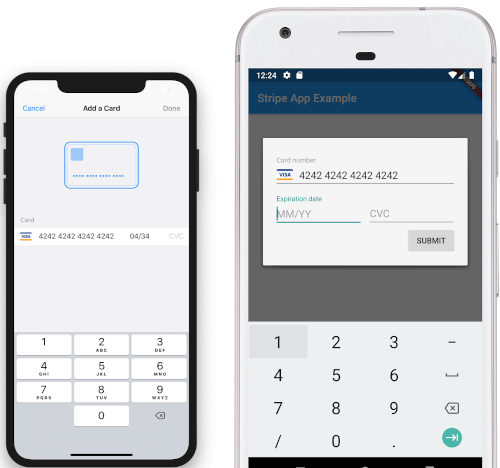
| iOS View | Android View |
依赖清单 3 项
{"sdk":"flutter"}{"sdk":"flutter"}^2.0.0先按使用场景筛选,再比较项目活跃情况,最后到原始仓库核对使用要求。
“A repository is the most basic element of GitHub.”
GitHub Docs — About repositories ↗