
 v2.0.0
flutter_epub_viewer
一个结合了 Epubjs 和 flutter_inappwebview 功能的 Flutter 包,用于查看 Epub 文档
33喜欢 1720近 30 天下载150Pub 分数
AndroidiOS
一个用于渲染电子书文档的Flutter包

{"sdk":"flutter"}^6.1.5^1.3.0^4.9.0^1.1.0{"sdk":"flutter"}^3.0.0^2.3.3^6.6.0以下为英文项目原文快照,最新内容请访问 GitHub。
A powerful Flutter package for viewing EPUB documents, built by combining the capabilities of Epub.js and flutter_inappwebview. This package provides a highly customizable and feature-rich EPUB reader for your Flutter applications.
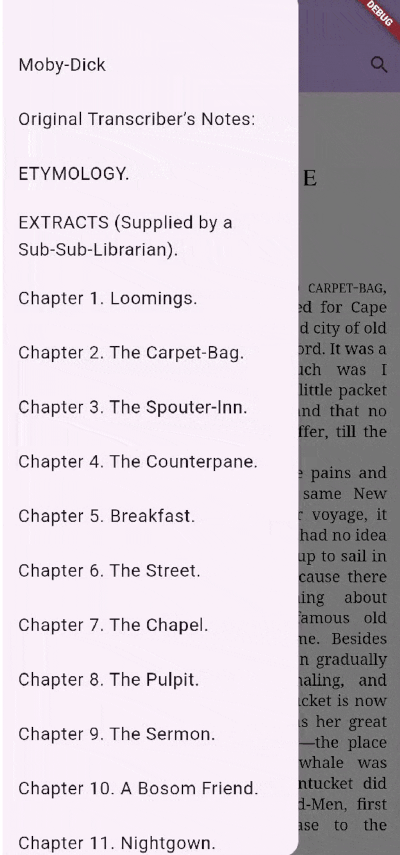
Demo GIFonTouchDown, onTouchUp).Add the dependency to your pubspec.yaml file:
flutter pub add flutter_epub_viewer
Important: You must enable cleartext traffic for the viewer to function correctly on Android 8.0+.
Add android:usesCleartextTraffic="true" to your AndroidManifest.xml file in the <application> tag.
For more details, refer to this StackOverflow answer.
Also, ensure you complete the platform-wise setup for flutter_inappwebview as described here.
Web is supported out of the box — no extra setup is required. Instead of a webview
plugin, the viewer renders epub.js inside a native <iframe> and communicates with
it through dart:js_interop, so all EpubController/EpubViewer APIs and callbacks
behave the same as on mobile.
Notes for web:
EpubSource.fromData(Uint8List) or EpubSource.fromAsset(...). EpubSource.fromUrl(...)
works only if the remote server sends permissive CORS headers; EpubSource.fromFile(...)
is not available (there is no filesystem).<iframe> composites above the Flutter scene, so Flutter widgets placed
over the viewer (a Drawer, dialog, or pushed route) may not receive taps. Keep
interactive controls outside the viewer's rectangle (e.g. an AppBar or a side
panel) — see the example app.macOS uses the same flutter_inappwebview (WKWebView) rendering path as iOS, so
all EpubController/EpubViewer APIs and callbacks behave the same as on mobile.
flutter_inappwebview requirement). Set platform :osx, '10.13' (or higher) in
your app's macos/Podfile if it is currently lower.EpubSource.fromUrl(...)) or writing
highlights/annotations may require the App Sandbox network entitlement. Add
com.apple.security.network.client to macos/Runner/*.entitlements if network
loads fail.flutter_inappwebview as described
here.The package no longer re-exports flutter_inappwebview's ContextMenu. Replace it
with the package-owned EpubContextMenu / EpubContextMenuItem:
selectionContextMenu: EpubContextMenu(
  hideDefaultSystemItems: true,
  items: [
    EpubContextMenuItem(id: 1, title: 'Highlight', action: () { /* ... */ }),
  ],
),
Request methods (getCurrentLocation, search, extractText, getRectFromCfi,
…) now return their values directly and throw TimeoutException instead of hanging
if the viewer never replies. Tune the wait via EpubController.requestTimeout.
See the CHANGELOG for the full list of changes.
Here is a simple example of how to use EpubViewer in your application:
import 'package:flutter_epub_viewer/flutter_epub_viewer.dart';
import 'package:flutter/material.dart';

class MyHomePage extends StatefulWidget {
  const MyHomePage({super.key});

  @override
  State<MyHomePage> createState() => _MyHomePageState();
}

class _MyHomePageState extends State<MyHomePage> {
  final epubController = EpubController();

  @override
  Widget build(BuildContext context) {
    return Scaffold(
      body: SafeArea(
        child: EpubViewer(
          epubSource: EpubSource.fromUrl(
              'https://github.com/IDPF/epub3-samples/releases/download/20230704/accessible_epub_3.epub'),
          epubController: epubController,
          displaySettings:
              EpubDisplaySettings(flow: EpubFlow.paginated, snap: true),
          onChaptersLoaded: (chapters) {
            // Handle chapters loaded
          },
          onEpubLoaded: () async {
            // Handle epub loaded
          },
          onRelocated: (value) {
            // Handle page change
          },
          onTextSelected: (epubTextSelection) {
            // Handle text selection
          },
        ),
      ),
    );
  }
}
| Parameter | Type | Description |
|---|---|---|
epubController |
EpubController |
Controller to manage EPUB actions and state. |
epubSource |
EpubSource |
Source of the EPUB (URL, File, or Asset). Note: OPF format is not fully tested. |
headers |
Map<String, String> |
HTTP headers for loading EPUBs from the network. |
initialCfi |
String? |
Initial CFI string to specify the starting position. Defaults to the first chapter if null. |
displaySettings |
EpubDisplaySettings? |
Initial display settings (flow, snap, etc.). |
selectionContextMenu |
EpubContextMenu? |
Custom context menu for text selection (mobile). If null, the default menu is used. Ignored on web. |
selectAnnotationRange |
bool |
If true, clicking an annotation automatically selects the text range. Defaults to false. |
| Callback | Description |
|---|---|
onEpubLoaded |
Called when the EPUB is successfully loaded and displayed. |
onChaptersLoaded |
Called when the chapters are loaded. Returns a list of EpubChapter. |
onRelocated |
Called when the EPUB page changes. Returns EpubLocation. |
onTextSelected |
Called when text is selected. Returns EpubTextSelection. |
onAnnotationClicked |
Called when an annotation (highlight/underline) is clicked. Provides CFI range and rect. |
onTouchDown |
Called on touch down event. Provides normalized (x, y) coordinates. |
onTouchUp |
Called on touch up event. Provides normalized (x, y) coordinates. |
Use the EpubController to interact with the viewer programmatically:
// Navigation
epubController.display(cfi: cfiString); // Move to specific CFI or chapter href
epubController.next(); // Go to next page
epubController.prev(); // Go to previous page
epubController.toProgressPercentage(0.5); // Go to 50% progress
epubController.moveToFistPage(); // Go to first page
epubController.moveToLastPage(); // Go to last page

// Information
epubController.getCurrentLocation(); // Get current location info
epubController.getChapters(); // Get list of chapters
epubController.getMetadata(); // Get book metadata

// Search
epubController.search(query: "search term"); // Search in EPUB

// Annotations
epubController.addHighlight(cfi: cfiString, color: Colors.yellow); // Add highlight
epubController.removeHighlight(cfi: cfiString); // Remove highlight
epubController.addUnderline(cfi: cfiString); // Add underline
epubController.removeUnderline(cfi: cfiString); // Remove underline

// Custom Theme
EpubTheme.custom(
  customCss: {
    'p': {
      'font-family': 'Roboto, sans-serif',
      'font-size': '18px',
      'line-height': '1.5',
      'color': '#333333',
    },
    'h1': {
       'color': 'blue'
    },
    "a": {
      "color": "inherit !important",
      "-webkit-text-fill-color": "red !important"
    },
    "a:link": {
      "color": "inherit !important",
      "-webkit-text-fill-color": "red !important"
    },
  },
);

// Selection
epubController.clearSelection(); // Clear active selection
epubController.extractText(startCfi: start, endCfi: end); // Extract text from range
epubController.extractCurrentPageText(); // Extract text from current page

// Settings
epubController.setSpread(spread: EpubSpread.auto); // Set spread mode
epubController.setFlow(flow: EpubFlow.paginated); // Set flow mode
epubController.setManager(manager: EpubManager.defaultManager); // Set manager
epubController.setFontSize(fontSize: 16); // Adjust font size
onRelocated callback may be broken when useSnapAnimationAndroid is set to true in EpubDisplaySettings on Android.scrolled flow.Contributions are welcome! We appreciate your help in making this package better.
Please ensure your code follows the existing style and includes relevant tests.
This project is licensed under the MIT License - see the LICENSE file for details.
Big thanks to all the contributors who have helped build this project!
https://contrib.rocks/image?repo=fayis672/epub_viewer