

 v0.1.6
card_stack_widget
一个垂直的可滑动关闭且可自定义的卡片堆栈,适用于 Flutter 应用程序
88喜欢 286近 30 天下载160Pub 分数
AndroidiOSWebmacOSWindowsLinux
用 Dart+Flutter 构建的卡片堆叠

以下为英文项目原文快照,最新内容请访问 GitHub。
A vertical dismissible and customizable stack of cards for a Flutter application.
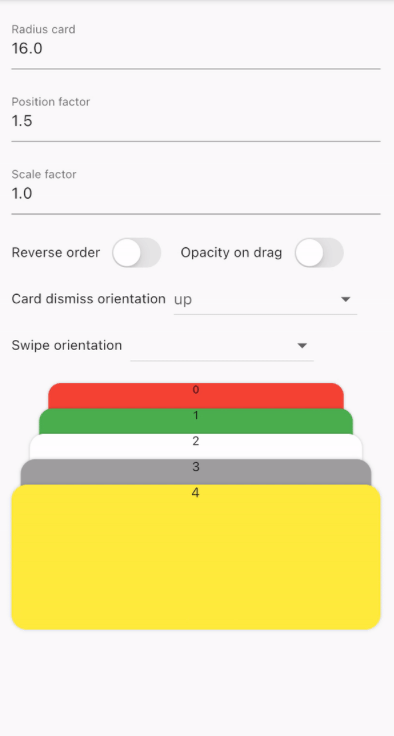
CardStackWidget requires a list of CardModel, in order to create a stack of cards. You can
customize their swipe or dismiss orientation, change the scale or the position factor. You can also
apply an opacity, that change on drag movement.
Below, you can find an example of the usage of CardStackWidget and CardModel:
CardStackWidget _buildCardStackWidget(BuildContext context) {
  final mockList = _buildMockList(context, size: 4);

  return CardStackWidget(
    opacityChangeOnDrag: true,
    swipeOrientation: CardOrientation.both,
    cardDismissOrientation: CardOrientation.both,
    positionFactor: 3,
    scaleFactor: 1.5,
    alignment: Alignment.center,
    reverseOrder: true,
    animateCardScale: true,
    dismissedCardDuration: const Duration(milliseconds: 150),
    cardList: mockList,
  );
}

/// Create a mock list of `CardModel` to use inside `CardStackWidget`
_buildMockList(BuildContext context, {int size = 0}) {
  final double containerWidth = MediaQuery
      .of(context)
      .size
      .width - 16;

  var list = <CardModel>[];
  for (int i = 0; i < size; i++) {
    var color = Color((Random().nextDouble() * 0xFFFFFF).toInt() << 0)
        .withOpacity(1.0);

    list.add(
      CardModel(
        backgroundColor: color,
        radius: 8,
        shadowColor: Colors.black.withOpacity(0.2),
        child: SizedBox(
          height: 310,
          width: containerWidth,
          child: Container(), // Whatever you want
        ),
      ),
    );
  }

  return list;
}


CardStackWidget:
CardModel:
依赖清单 3 项
{"sdk":"flutter"}{"sdk":"flutter"}^4.0.0先按使用场景筛选,再比较项目活跃情况,最后到原始仓库核对使用要求。
“A repository is the most basic element of GitHub.”
GitHub Docs — About repositories ↗