
 v14.1.0
flutter_stripe
用于 Stripe 的 Flutter 库。支持 PaymentSheets、Apple Pay 和 Google Pay、SCA、PSD2 等功能。
1530喜欢 33.6万近 30 天下载150Pub 分数
AndroidiOSWeb
Stripe 的 Flutter SDK。
 v14.1.0
用于 Stripe 的 Flutter 库。支持 PaymentSheets、Apple Pay 和 Google Pay、SCA、PSD2 等功能。
适用于 Flutter Web 平台的 Stripe SDK 绑定。此包包含 Web 平台接口的实现。
 v1.0.2
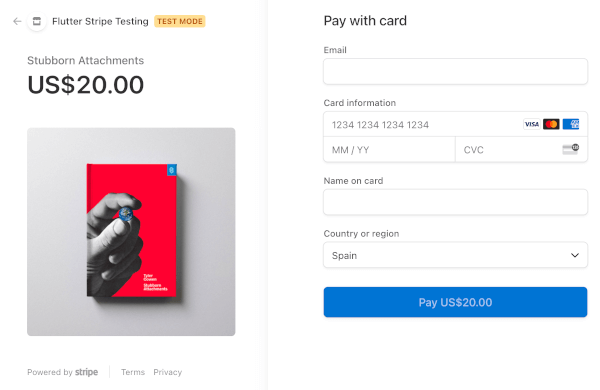
为网页和移动设备创建 Stripe 结账付款页面
Dart 的 Stripe.js 绑定。此包由 Stripe web 使用,以便直接调用 Stripe js SDK。
Android 平台的 Stripe 实现。包含 stripe_platform_interface 包的 Android 实现。
iOS 平台的 Stripe 实现。包含 stripe_platform_interface 包的 iOS 实现。
Stripe SDK 的平台接口。此接口允许对 Stripe 插件进行平台特定的实现。
^3.1.0^5.0.0以下为英文项目原文快照,最新内容请访问 GitHub。
pub package build
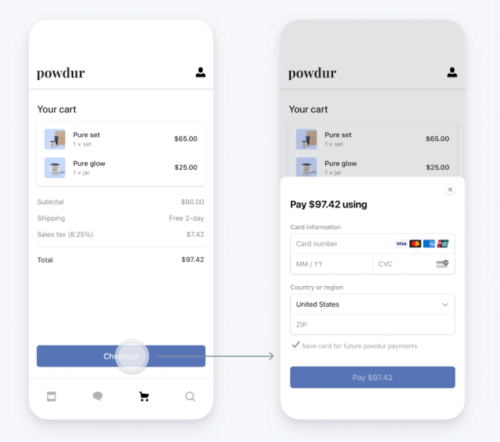
The Stripe Flutter SDK allows you to build delightful payment experiences in your native Android and iOS apps using Flutter. We provide powerful and customizable UI screens and elements that can be used out-of-the-box to collect your users' payment details.
stripe-flutter_cover
Simplified Security: We make it simple for you to collect sensitive data such as credit card numbers and remain PCI compliant. This means the sensitive data is sent directly to Stripe instead of passing through your server. For more information, see our Integration Security Guide.
Apple Pay: We provide a seamless integration with Apple Pay.
Google Pay: The plugin can easily act as payment provider for the Pay plugin that enables you to seamlessly integrate Google Pay or Apple Pay. All you need to do is add your stripe publishable key to the payment profile.
Payment methods: Accepting more payment methods helps your business expand its global reach and improve checkout conversion.
SCA-Ready: The SDK automatically performs native 3D Secure authentication if needed to comply with Strong Customer Authentication regulation in Europe.
Native UI: We provide native screens and elements to securely collect payment details on Android and iOS.
Pre-built payments UI: Learn how to integrate Payment Sheet, the new pre-built payments UI for mobile apps. This pre-built UI lets you accept cards, Apple Pay, and Google Pay out of the box, and includes support for saving & reusing cards.
If you're selling digital products or services within your app, (e.g. subscriptions, in-game currencies, game levels, access to premium content, or unlocking a full version), you must use the app store's in-app purchase APIs. This does not apply to app developers in the USA as they are excluded by new court ruling in 2025. See Apple's and Google's guidelines for more information. For all other scenarios you can use this SDK to process payments via Stripe.
dart pub add flutter_stripe
This plugin requires several changes to be able to work on Android devices. Please make sure you follow all these steps:
Theme.AppCompat for your activity: example, example night themeFlutterFragmentActivity instead of FlutterActivity in MainActivity.kt: exampleproguard-rules.pro file: example-dontwarn com.stripe.android.pushProvisioning.**
-dontwarn com.google.android.gms.tapandpay.**
-dontwarn kotlinx.parcelize.Parceler$DefaultImpls
-dontwarn kotlinx.parcelize.Parceler
-dontwarn kotlinx.parcelize.Parcelize
# Keep Stripe classes
-keep class com.stripe.** { *; }
These changes are needed because the Android Stripe SDK requires the use of the AppCompat theme for their UI components and the Support Fragment Manager for the Payment Sheets
If you are having troubles to make this package to work on Android, join this discussion to get some support.
Compatible with apps targeting iOS 13 or above.
To upgrade your iOS deployment target to 13.0, you can either do so in Xcode under your Build Settings, or by modifying IPHONEOS_DEPLOYMENT_TARGET in your project.pbxproj directly.
You will also need to update in your Podfile:
platform :ios, '13.0'
For card scanning add the following to your Info.plist:
<key>NSCameraUsageDescription</key>
<string>Scan your card to add it automatically</string>
<key>NSCameraUsageDescription</key>
<string>To scan cards</string>
Now you can use Stripe with Flutter web! Notice right now it is highly experimental and only a subset of features is implemented. Namely:
To use Stripe on web, it is required to add flutter_stripe_web in your pubspec file
To run the project with WebAssembly support:
flutter build web --wasm
dhttpd --path build/web --headers "Cross-Origin-Opener-Policy:same-origin,Cross-Origin-Embedder-Policy:credentialless"
Note: The dhttpd package is required to serve the app with proper CORS headers. Install it with:
dart pub global activate dhttpd
There are 3 ways of handling card payments
| Method | Ease of use | description | Implementation docs |
|---|---|---|---|
| Payment sheet | Easy | Our recommended way of handling payments. It offers localization, animations and error handling out of the box. | docs |
| Cardfield | Medium | Single line cardfield. Offers more flexibility but has less built-in functionality. | docs |
| Card form | Medium | Similar as the cardfield but the entry fields are spread across multi lines | docs |
Note: Stripe is sunsetting CardField and CardForm in favor of PaymentSheet. We recommend using PaymentSheet for all new integrations. See Stripe's documentation for more details.
This library fully supports native Apple Pay and Google pay integration.
We also support the Customer Sheet and the Address sheet mobile elements to collect and manage customer payment methods and addresses.
We also support Financial connections in our latest sdk. Check out the docs to learn more on how to set it up.
Redirect-based payment methods (Link, iDEAL, Bancontact, PayPal, etc.) send the user out to a browser and back to your app via a returnURL. On iOS, flutter_stripe registers an app- and scene-delegate and forwards incoming URLs to the Stripe SDK. For URLs that are not a pending Stripe redirect it returns false and does not consume them — it does not block app_links, uni_links, go_router, or any other URL handler.
If a deep-link plugin stops receiving links after adding flutter_stripe, it is almost always one of the following (none of which is flutter_stripe consuming the URL):
app_links version. On apps using UISceneDelegate (the Flutter default since 3.41), use app_links >= 7.0.0, which registers a scene delegate. Older versions only register an app delegate and never receive scene:openURLContexts:.FlutterDeepLinkingEnabled. If it is true in Info.plist, Flutter's own router may handle the URL. Either set it to false, or forward only your Stripe URLs from your router/deep-link handler (see below) and let everything else flow to your routes.CFBundleURLSchemes, Stripe.urlScheme, and your PaymentSheet returnURL all use the same scheme.To complete a Stripe redirect while your app owns deep linking, forward matching URLs to Stripe.instance.handleURLCallback():
// e.g. from your app_links / go_router listener
if (uri.scheme == 'yourappscheme' && uri.host == 'safepay') {
  await Stripe.instance.handleURLCallback(uri.toString());
}
A full example (router-based, deep-link-package-based, and the FlutterDeepLinkingEnabled=false approach) is in example/lib/main.dart. See also Stripe.instance.handleURLCallback in the Dart API.
To initialize Stripe in your Flutter app, use the Stripe base class.
Stripe offers publishableKey, stripeAccountId, threeDSecureParams and merchantIdentifier. Only publishableKey is required.
The library offers several methods to handle stripe related actions:
Future<PaymentMethod> createPaymentMethod(...);
Future<PaymentIntent> handleNextAction(...);
Future<PaymentIntent> confirmPayment(...);
Future<void> configure3dSecure(...);
Future<bool> isApplePaySupported();
Future<void> presentApplePay(...);
Future<void> confirmApplePayPayment(...);
Future<SetupIntent> confirmSetupIntent(...);
Future<PaymentIntent> retrievePaymentIntent(...);
Future<String> createTokenForCVCUpdate(...);

Future<void> initPaymentSheet(...);
Future<void> presentPaymentSheet(...);
Future<void> confirmPaymentSheetPayment()
The example app offers examples on how to use these methods.
flutter_stripe fully supports the Pay plugin from the Google Pay team. By including a few lines you can integrate Stripe as a payment processor for Google / Apple Pay:
Future<void> onGooglePayResult(paymentResult) async {
    final response = await fetchPaymentIntentClientSecret();
    final clientSecret = response['clientSecret'];
    final token = paymentResult['paymentMethodData']['tokenizationData']['token'];
    final tokenJson = Map.castFrom(json.decode(token));

    final params = PaymentMethodParams.cardFromToken(
      token: tokenJson['id'],
    );
    // Confirm Google pay payment method
    await Stripe.instance.confirmPayment(
      clientSecret,
      params,
    );
}
cd exampleflutter pub getcp lib/.env.example.dart lib/.env.dart and set your Stripe publishable key.cp server/.env.example server/.env and set the variable values in your newly created .env file.server directory:
cd servernpm install or yarn --cwd "server"server directory: cd servernpm start or yarn --cwd "server" startlib directory: cd libflutter runstripe-clistripe listen --forward-to localhost:4242/webhookYou can help us make this project better, feel free to open an new issue or a pull request. Make sure to follow our contribution guidelines.