


 v1.0.4
recursive_tree_flutter
一个专注于树形数据结构并将其显示在 UI 中的树视图包。
42喜欢 5290近 30 天下载160Pub 分数
AndroidiOSWebmacOSWindowsLinux
gpmndev/recursive_tree_flutter open-source repository details.

以下为英文项目原文快照,最新内容请访问 GitHub。
Languages:

The recursive_tree_flutter library helps build a tree data structure and visualizes it as an inheritance tree (stack view or expandable tree view). While most tree-view libraries focus on the interface, recursive_tree_flutter prioritizes the tree data structure, allowing it to support various special UI styles - that's the strength of this library. For example, it can update the tree when a node is selected, return a list of chosen nodes/leaves, return a list of favorite nodes...
Reference to Explaining the working of the Expandable Tree based on ExpandableTreeMixin.
import 'package:flutter/material.dart';
import 'package:recursive_tree_flutter/recursive_tree_flutter.dart';

import '../data/custom_node_type.dart';
import '../data/example_vts_department_data.dart';

class ExTreeSingleChoice extends StatefulWidget {
  const ExTreeSingleChoice({super.key});

  @override
  State<ExTreeSingleChoice> createState() => _ExTreeSingleChoiceState();
}

class _ExTreeSingleChoiceState extends State<ExTreeSingleChoice> {
  late TreeType<CustomNodeType> _tree;
  final TextEditingController _textController = TextEditingController();

  @override
  void initState() {
    _tree = sampleTree();
    super.initState();
  }

  @override
  void dispose() {
    _textController.dispose();
    super.dispose();
  }

  @override
  Widget build(BuildContext context) {
    return GestureDetector(
      onTap: () => FocusManager.instance.primaryFocus?.unfocus(),
      child: Scaffold(
        appBar: AppBar(
          title: const Text("Example Single Choice Expandable Tree"),
        ),
        body: Column(
          children: [
            Expanded(
              flex: 4,
              child: SingleChildScrollView(
                child: _VTSNodeWidget(
                  _tree,
                  onNodeDataChanged: () => setState(() {}),
                ),
              ),
            ),
            Expanded(
              flex: 1,
              child: TextFormField(
                controller: _textController,
                decoration: const InputDecoration(
                  hintText: "PRESS ENTER TO UPDATE",
                ),
                onFieldSubmitted: (value) {
                  updateTreeWithSearchingTitle(_tree, value);
                  setState(() {});
                },
              ),
            ),
          ],
        ),
      ),
    );
  }
}

//? ____________________________________________________________________________

class _VTSNodeWidget extends StatefulWidget {
  const _VTSNodeWidget(
    this.tree, {
    required this.onNodeDataChanged,
  });

  final TreeType<CustomNodeType> tree;

  /// IMPORTANT: Because this library **DOESN'T** use any state management
  /// library, therefore I need to use call back function like this - although
  /// it is more readable if using `Provider`.
  final VoidCallback onNodeDataChanged;

  @override
  State<_VTSNodeWidget> createState() => _VTSNodeWidgetState();
}

class _VTSNodeWidgetState<T extends AbsNodeType> extends State<_VTSNodeWidget>
    with SingleTickerProviderStateMixin, ExpandableTreeMixin<CustomNodeType> {
  final Tween<double> _turnsTween = Tween<double>(begin: -0.25, end: 0.0);

  @override
  initState() {
    super.initState();
    initTree();
    initRotationController();
    if (tree.data.isExpanded) {
      rotationController.forward();
    }
  }

  @override
  void initTree() {
    tree = widget.tree;
  }

  @override
  void initRotationController() {
    rotationController = AnimationController(
      duration: const Duration(milliseconds: 300),
      vsync: this,
    );
  }

  @override
  void dispose() {
    disposeRotationController();
    super.dispose();
  }

  @override
  Widget build(BuildContext context) => buildView();

  @override
  Widget buildNode() {
    if (!widget.tree.data.isShowedInSearching) return const SizedBox.shrink();

    return InkWell(
      onTap: updateStateToggleExpansion,
      child: Row(
        children: [
          buildRotationIcon(),
          Expanded(child: buildTitle()),
          buildTrailing(),
        ],
      ),
    );
  }

  //* __________________________________________________________________________

  Widget buildRotationIcon() {
    return RotationTransition(
      turns: _turnsTween.animate(rotationController),
      child: tree.isLeaf
          ? Container()
          : IconButton(
              iconSize: 16,
              icon: const Icon(Icons.expand_more, size: 16.0),
              onPressed: updateStateToggleExpansion,
            ),
    );
  }

  Widget buildTitle() {
    return Padding(
      padding: const EdgeInsets.symmetric(horizontal: 6.0),
      child: Text(
        tree.data.title + (tree.isLeaf ? "" : " (${tree.children.length})"),
        maxLines: 1,
        overflow: TextOverflow.ellipsis,
      ),
    );
  }

  Widget buildTrailing() {
    if (tree.data.isUnavailable) {
      return const Icon(Icons.close_rounded, color: Colors.red);
    }

    if (tree.isLeaf) {
      return Checkbox(
        value: tree.data.isChosen!, // leaves always is true or false
        onChanged: (value) {
          updateTreeSingleChoice(tree, !tree.data.isChosen!);
          widget.onNodeDataChanged();
        },
      );
    }

    return const SizedBox.shrink();
  }

  //* __________________________________________________________________________

  @override
  List<Widget> generateChildrenNodesWidget(
          List<TreeType<CustomNodeType>> list) =>
      List.generate(
        list.length,
        (int index) => _VTSNodeWidget(
          list[index],
          onNodeDataChanged: widget.onNodeDataChanged,
        ),
      );

  @override
  void updateStateToggleExpansion() => setState(() => toggleExpansion());
}
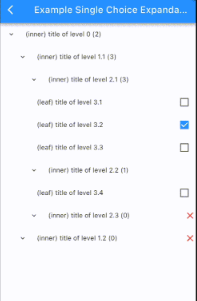
Result:

Some features provided by this library include:
Inspired by the structure of a directory tree on a computer, there are two types of nodes: directories and files. A directory can contain multiple files and other directories, and a file is the smallest level that cannot contain anything else.
Similarly to the directory tree structure on a computer, recursive_tree_flutter will build a tree data structure that includes inner nodes and leaf nodes.
id: required, dynamic.title: required, String.isInner: boolean, default is true.isUnavailable: boolean, default is false.isChosen: nullable boolean, default is false.isExpanded: boolean, default is false.isFavorite: boolean, default is false.isShowedInSearching: boolean, default is true. Also known as isDisplayable, được sử dụng used when the UI tree has a search function.clone(): abstract method, T extends AbsNodeType. Allows cloning the object.T is the Implement Class of AbsNodeType.data: required, T.children: required, List<TreeType<T>>.parent: required, TreeType<T>?. If parent == null, it means we are at the root of the entire tree.isChildrenLoadedLazily: boolean, default is false. Only used if the current tree is lazy-loading, indicating whether the children have been loaded before or not.isLeaf: Is current tree at a leaf node?isRoot: Is current tree at the root node?clone(tree, parent): static method. Allows cloning a tree.tree_traversal_functions.dart: Contains functions related to tree traversal:
enum type for choosing/deselecting nodes in the tree, including 4 values: chosenAll, unchosenAll, chosenSome & notChosenable.result.result variable.result variable.result variable.result variable.tree_update_functions.dart: Contains functions related to updating the tree:
isUnavailable property of all nodes in the current tree. Suppose when parsing data for the first time, some leaves will be unavailable, and we need to update the affected inner nodes. The function returns true if the tree is available (chosenable), otherwise false.isShowedInSearching field of the nodes when applying the search function.StackWidget: The UI tree is built using the stack approach. Multiple choice, data is parsed only once:

StackWidget: The UI tree is built using the lazy-loading stack approach. Multiple choice, data is parsed at runtime:

ExpandableTreeWidget: The UI tree is built using the expandable approach, and data is parsed only once:

VTSDepartmentTreeWidget: Another UI tree built using the expandable approach, and data is parsed only once:

SingleChoiceTreeWidget: Another UI tree built using the expandable approach, and data is parsed only once, single choice:
LazySingleChoiceTreeWidget: Another UI tree built using the expandable approach, data is parsed at runtime, single choice:

ExVNRegions: Vietnam's regions, tree is customized with different color for each level, data is parsed only once:

ExVTSDms4TreeScreen: Viettel VTS DMS.4 tree:

An expandable UI tree has the following structure:
SingleChildScrollView( // tree is scrollable
  - NodeWidget (root)
    -- NodeWidget
      +++ NodeWidget
      +++ NodeWidget
      +++ NodeWidget
    -- NodeWidget
      +++ NodeWidget
    ...
)
We can see that NodeWidget is a StatefulWidget built recursively and wrapped by SingleChildScrollView to provide scrolling capability to the tree. Updating the tree (data) will change the state/UI of the NodeWidget - this can be done using setState or Provider for management. NodeWidget will inherit ExpandableTreeMixin (as shown in the example VTSDepartmentTreeWidget using setState) with some functions like:
initTree(): Initializes the tree (data) (called in initState()).initRotationController(): Initializes the rotationController variable used to create an animation effect when expanding the UI tree (called in initState()).disposeRotationController().buildView(): Builds the UI of the tree (already written).buildNode(): Builds the UI of a node (must be implemented). This function allows developers to freely customize the UI in unlimited ways.buildChildrenNodes(): Builds the child nodes with animation for expansion (already written).generateChildrenNodesWidget(): Returns List<NodeWidget>, must be implemented (an example is provided in the function documentation).toggleExpansion(): Determines whether to collapse/expand the child nodes.updateStateToggleExpansion(): Updates the state after performing the collapse/expand action.Copyright (c) 2023, Viettel Solutions
Redistribution and use in source and binary forms, with or without
modification, are permitted provided that the following conditions are met:
1. Redistributions of source code must retain the above copyright notice, this
list of conditions and the following disclaimer.
2. Redistributions in binary form must reproduce the above copyright notice,
this list of conditions and the following disclaimer in the documentation
and/or other materials provided with the distribution.
3. Neither the name of the copyright holder nor the names of its
contributors may be used to endorse or promote products derived from
this software without specific prior written permission.
THIS SOFTWARE IS PROVIDED BY THE COPYRIGHT HOLDERS AND CONTRIBUTORS "AS IS"
AND ANY EXPRESS OR IMPLIED WARRANTIES, INCLUDING, BUT NOT LIMITED TO, THE
IMPLIED WARRANTIES OF MERCHANTABILITY AND FITNESS FOR A PARTICULAR PURPOSE ARE
DISCLAIMED. IN NO EVENT SHALL THE COPYRIGHT HOLDER OR CONTRIBUTORS BE LIABLE
FOR ANY DIRECT, INDIRECT, INCIDENTAL, SPECIAL, EXEMPLARY, OR CONSEQUENTIAL
DAMAGES (INCLUDING, BUT NOT LIMITED TO, PROCUREMENT OF SUBSTITUTE GOODS OR
SERVICES; LOSS OF USE, DATA, OR PROFITS; OR BUSINESS INTERRUPTION) HOWEVER
CAUSED AND ON ANY THEORY OF LIABILITY, WHETHER IN CONTRACT, STRICT LIABILITY,
OR TORT (INCLUDING NEGLIGENCE OR OTHERWISE) ARISING IN ANY WAY OUT OF THE USE
OF THIS SOFTWARE, EVEN IF ADVISED OF THE POSSIBILITY OF SUCH DAMAGE.
依赖清单 2 项
{"sdk":"flutter"}{"sdk":"flutter"}先按使用场景筛选,再比较项目活跃情况,最后到原始仓库核对使用要求。
“A repository is the most basic element of GitHub.”
GitHub Docs — About repositories ↗