
dynamix
📱 dynamix - 混合应用中 Web / WebView 的缺失桥梁

- 星标
- 72
- 复刻
- 4
- 最近推送(UTC)
- 2024年1月7日
- 项目状态
- 未归档
原始 README
以下为英文项目原文快照,最新内容请访问 GitHub。

Dynamix. Build Hybrid Apps.
Dynamix. a remotely configured user interface with super flexibility. Make web / app / webview / server to work as one.
With Dynamix, You can...
- Mix multiple frameworks in one app with ease.
- Use NextJS for Web & Webview, Flutter for App.
- Manage User authentication in one place.
- Login on App, use the same session on Web.
- Configure UI Remotely.
- Provide UI Specs on server, Great for A/B Testing & User Customization.
- Form validation on server, display errors on client with ui response
Why Dynamix?
Web is the best platform we have. Depending Soley on Mobile App framework, such as Flutter can slow down your development speed. With Dynamix, you can mix App UI & Web UI in one app, with shared state management and access to native features. Plus, with remote-ui, you can configure your app's pages remotely, having business logic on server side.
How it works
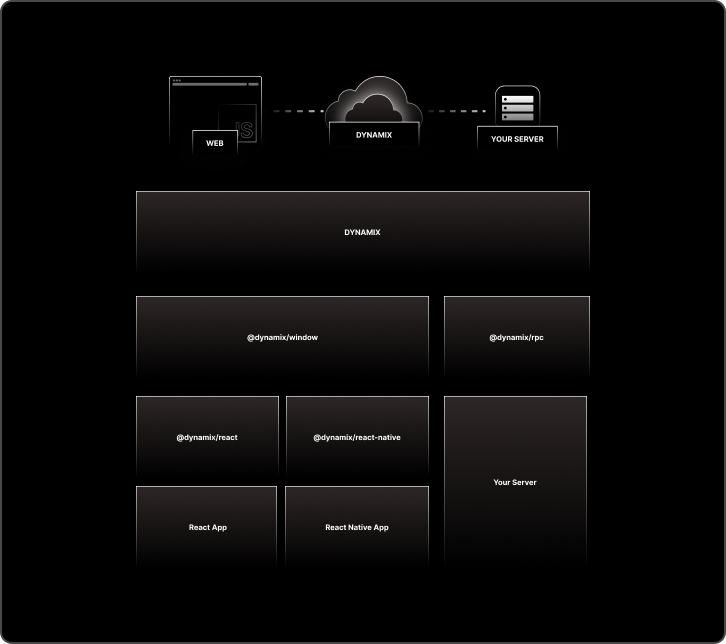
server - dynamically change client specs from server
client - dynamically load content from server & with dynamic layout / component / action specs
Packages
Dynamix comes with multiple packages for different platforms.
for instance, if you are using react-native for app and nextjs for webview web, you can use
@dynamix/react-nativefor react-native and@dynamix/reactfor nextjs.
| Packages | platform | description |
|---|---|---|
@dynamix/react  |
react | dynamix on react |
@dynamix/react-native |
react-native | dynamix on react-native |
@dynamix/react-native-webview |
react-native | dynamix react-native-webview wrapper |
react-native-webview-window-declaration |
web (typescript) | dts type utility for webprojects used on react-native-webview |
x_icon  |
flutter | dynamically load flutter icons with name string |
x_icon_generator |
flutter | x_icon codegen for custom icons |
x_color |
flutter | dynamically load flutter color with name string |
x_action |
flutter | dynamix flutter actions |
dyanmic actions
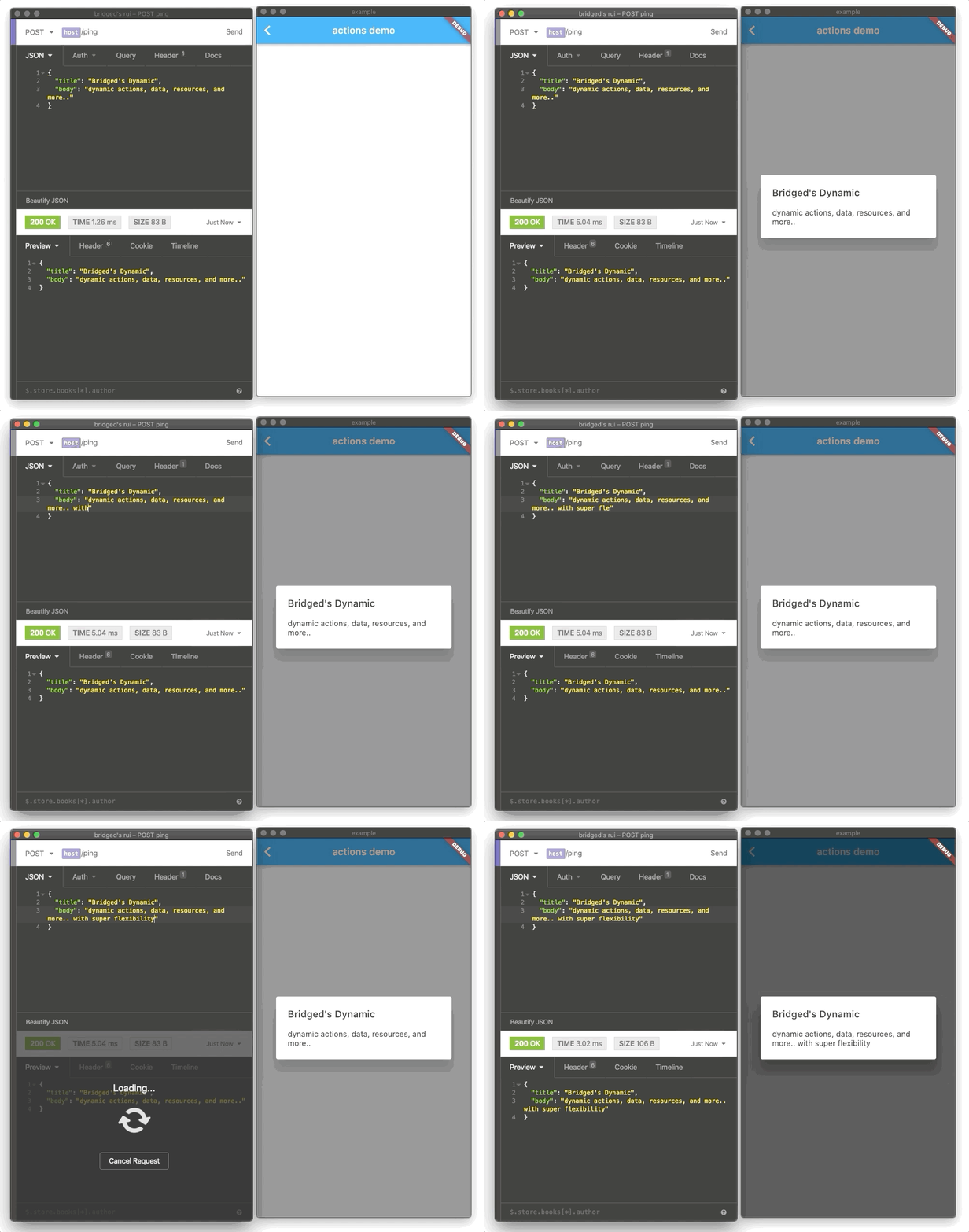
Installation
Server side
# install with yarn
yarn add @bridged.xyz/remote-ui-core

# install with npm
npm install @bridged.xyz/remote-ui-core
How to use
server side (express/ts)
import * as rui from "@bridged.xyz/remote-ui-core";

router.get("ui", (req, res) => {
  const ui = new rui.Layout({
    icon: rui.icons.material.note.uri,
    title: new rui.Text("hello world!"),
  });
  res.json(ui).send();
});
app side (flutter)
import "package:flutter_remote_ui/flutter_remote_ui.dart"

Widget buildRui(BuildContext context){
 final ruiData = fetchRuiDataFromServer();
 return RemoteUI.of(context).build(ruiiData);
}
Concepts & onthology will be documented under notion document, which will be added soon.
Platform support
| usage | language | runs on | example | Ready? | |
|---|---|---|---|---|---|
| core | rui core library (@bridged.xyz/remote-ui-core) | TS/JS | NodeJS | @bridged.xyz/remote-ui-core | ✅ |
| flutter | flutter_remote_ui | dart | iOS Android OSX Windows Linux Web |
flutter-remote-ui flutter remote ui example |
✅ |
| express | remote-ui-core wrapper for ExpressJS (@bridged.xyz/remote-ui-server) (in 2020) | TS/JS | NodeJS (server) | express, plain | 👩💻 |
| iOS native | note supported (2021 Q2) | swift | iOS OSX | 👩💻 | |
| android native | note supported (2021 Q2) | kotlin | Android | 👩💻 | |
| vue | vueJS wrapper for remote-ui | Web | 👩💻 |
Concepts
| concept | description | example | demo |
|---|---|---|---|
| action | provide client action data to be executed on specific events | ||
| layout | register & call layouts with built data dynamically | ||
| icon | register & use font based icons or svg icons dynamically | ||
| image | use registered local assets or remote assets dynamically | ||
| route | specify route spec to provide routing, building menus, shortcuts, etc.. | ||
| modal | show modals with custom transition with desired content | ||
| client | the client is the app instance, customize with your database user | ||
| session | the session of single flow. show modal, get event of "ok" button clicked, trigger the action in single session so it can be tracked & managed |
Remote Icons
import * as rui from "@bridged.xyz/remote-ui-core";

console.log(rui.icons.material.note);

/// logs
/// RemoteIconData {
///  uri: 'material://Icons.note',
///  type: 'MATERIAL_NATIVE',
///  asset: undefined }

/// can be used directly on flutter
Remote Route Specs
import { routes } from "@bridged.xyz/remote-ui-core";

const MOCK_DATABASE = {
  users: [
    {
      id: "1",
      name: "softmarshmallow",
    },
    {
      id: "2",
      name: "GY",
    },
    {
      id: "3",
      name: "gin",
    },
  ],
};

function fetchUserFromMockDatabase(id: string): { id; name } {
  return MOCK_DATABASE.users.find((e) => e.id == id);
}

routes.register(
  new routes.spec(
    new routes.spec<{ id }, { id; name }>({
      key: "/users/:id",
      pattern: "/users/:id",
      dataFetcher: async (p) => {
        return fetchUserFromMockDatabase(p.id);
      },
      title: {
        default: "user detail",
        template: "user {{ data.name }}",
      },
    })
  )
);

const route = "/users/1";
const spec = routes.match(route);
routes.build(spec).then((d) => {
  console.log(d);
});

/// logs
/// { title: 'user softmarshmallow',
///  description: undefined,
///  icon: undefined,
///  route: '/users/1' }
Contribution
Contributor's documentation
we are using figma file for the contributor's documenting and suggesting roadmap.
TODO
- remote ui dashboard -> customize & configure your app through web interface remotely, realtime.
related projects
Sponsors
References
Use dynamic with figma plugin / bridged console
comming soon features
- sync assets directly (dont download, put it in asset. bridged provides bucket and usable resource uri. s3 GCP supported)
- live update data
Blogs

Grida ↗
分类
如何选择适合项目的代码仓?
先按使用场景筛选,再比较项目活跃情况,最后到原始仓库核对使用要求。
- 通过仓库名、作者或描述搜索,再按技术分类缩小范围。
- 结合星标、复刻与最近推送比较项目;星标反映社区关注,不代表质量保证。
- 使用前在 GitHub 核对 README、许可证与 Issues。
来源与维护
“A repository is the most basic element of GitHub.”
GitHub Docs — About repositories ↗