
 v2.3.1
siri_wave
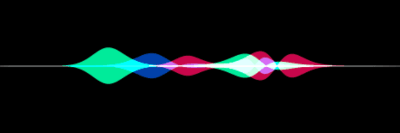
一个 Flutter 包,可让您创建视觉效果惊艳的 Siri 风格波形。
159喜欢 4460近 30 天下载150Pub 分数
AndroidiOSWebmacOSWindowsLinux
创建如 Siri 般美丽的波形。

{"sdk":"flutter"}{"sdk":"flutter"}^0.1.1^2.0.0以下为英文项目原文快照,最新内容请访问 GitHub。
ci Package: siri_wave Publisher: halildurmus.dev Language: Dart Platform: Flutter License: BSD-3-Clause
Create visually stunning waveforms similar to those found in Siri.
Inspired from the siriwave library.
Check out the live demo here.
To create an iOS 7 Siri-style waveform, use the SiriWaveform.ios7()
constructor:
import 'package:siri_wave/siri_wave.dart';

class MyWidget extends StatelessWidget {
  MyWidget({super.key});

  Widget build(BuildContext context) => SiriWaveform.ios7();
}
You can customize the waveform by passing a controller and/or options:
class MyWidget extends StatelessWidget {
  MyWidget({super.key});

  final controller = IOS7SiriWaveformController(
    amplitude: 0.5,
    color: Colors.red,
    frequency: 4,
    speed: 0.15,
  );

  @override
  Widget build(BuildContext context) => SiriWaveform.ios7(
        controller: controller,
        options: const IOS7SiriWaveformOptions(height: 200, width: 400),
      );
}
You can also change the properties of the waveform later:
  controller.amplitude = 0.3;
  controller.color = Colors.white;
To create an iOS 9 Siri-style waveform, use the SiriWaveform.ios9()
constructor:
import 'package:siri_wave/siri_wave.dart';

class MyWidget extends StatelessWidget {
  MyWidget({super.key});

  Widget build(BuildContext context) => SiriWaveform.ios9();
}
As with the iOS 7 Siri-style waveform, you can customize the waveform by
passing a controller and/or options:
class MyWidget extends StatelessWidget {
  MyWidget({super.key});

  final controller = IOS9SiriWaveformController(
    amplitude: 0.5,
    color1: Colors.red,
    color2: Colors.green,
    color3: Colors.blue,
    speed: 0.15,
  );

  @override
  Widget build(BuildContext context) => SiriWaveform.ios9(
        controller: controller,
        options: const IOS9SiriWaveformOptions(height: 200, width: 400),
      );
}
For a complete sample application, please checkout the example.
To learn more, see the API Documentation.
Contributions, issues and feature requests are welcome. Feel free to check the issue tracker if you want to contribute.