
 v14.6.0
pro_image_editor
一个Flutter图像编辑器:通过用户友好的编辑功能,无缝提升您的图片质量。
593喜欢 5.6万近 30 天下载160Pub 分数
AndroidiOSWebmacOSWindowsLinux
pro_image_editor 是一个专为在您的应用程序中进行图像编辑而设计的 Flutter 小部件。它提供了一种灵活且便捷的方式,将图像编辑功能集成到您的 Flutter 项目中。

{"sdk":"flutter"}^1.0.2^1.6.0^1.1.1^2.1.8^2.5.4^2.2.0^1.1.1{"sdk":"flutter"}^2.11.1^6.0.0^4.6.0^5.6.3^2.1.1以下为英文项目原文快照,最新内容请访问 GitHub。
pub package Sponsor License GitHub issues Web Demo
The ProImageEditor is a Flutter widget designed for image editing within your application. It provides a flexible and convenient way to integrate image editing capabilities into your Flutter project.
| Grounded-Design | Frosted-Glass-Design | WhatsApp-Design |
|---|---|---|
| Grounded-Design | Frosted-Glass-Design | WhatsApp-Design |
| Ai-Commands | Ai-Remove-Background | Ai-Replace-Background |
|---|---|---|
| Ai-Commands | Ai-Remove-Background | Ai-Replace-Background |
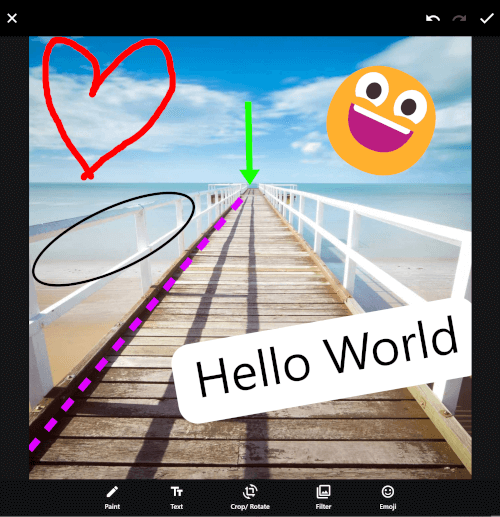
| Paint-Editor | Text-Editor | Crop-Rotate-Editor |
|---|---|---|
| Paint-Editor | Text-Editor | Crop-Rotate-Editor |
| Filter-Editor | Emoji-Editor | Sticker/ Widget Editor |
|---|---|---|
| Filter-Editor | Emoji-Editor | Sticker-Widget-Editor |
If you're displaying emoji on the web and want them to be colored by default (especially if you're not using a custom font like Noto Emoji), you can achieve this by adding the useColorEmoji: true parameter to your flutter_bootstrap.js file, as shown in the code snippet below:
{{flutter_js}}
{{flutter_build_config}}

_flutter.loader.load({
    serviceWorkerSettings: {
        serviceWorkerVersion: {{flutter_service_worker_version}},
    },
    onEntrypointLoaded: function (engineInitializer) {
      engineInitializer.initializeEngine({
        useColorEmoji: true, // add this parameter
        renderer: 'canvaskit'
      }).then(function (appRunner) {
        appRunner.runApp();
      });
    }
});
You can view the full web example here.
No additional setup required.
package:flutter/material.dartSince v14 the editor is built on material_ui and cupertino_ui, which Flutter is decoupling from the SDK. If your app has not migrated its own MaterialApp yet, hand it the localizations of those packages, otherwise the editor's app bars, dialogs and bottom sheets throw No MaterialLocalizations found:
import 'package:material_ui/material_ui.dart' as material_ui;

MaterialApp(
  localizationsDelegates: [
    ...material_ui.GlobalMaterialLocalizations.delegates,
    // Your existing delegates, e.g. the ones from flutter_localizations.
  ],
  // ...
);
import 'package:pro_image_editor/pro_image_editor.dart';

@override
Widget build(BuildContext context) {
  return ProImageEditor.network(
    'https://picsum.photos/id/237/2000',
    callbacks: ProImageEditorCallbacks(
      onImageEditingComplete: (Uint8List bytes) async {
        /*
          Your code to process the edited image, such as uploading it to your server.

          You can choose to use await to keep the loading dialog visible until
          your code completes, or run it without async to close the loading dialog immediately.

          By default, the image bytes are in JPG format.
        */
        Navigator.pop(context);
      },
        /*
        Optional: If you want haptic feedback when a line is hit, similar to WhatsApp,
        you can use the code below along with the vibration package.

          mainEditorCallbacks: MainEditorCallbacks(
            helperLines: HelperLinesCallbacks(
              onLineHit: () {
                Vibration.vibrate(duration: 3);
              }
            ),
          ),
        */
    ),
  );
}
The editor offers three prebuilt designs:
The editor provides extensive customization options, allowing you to modify text, icons, colors, and widgets to fit your needs. It also includes numerous callbacks for full control over its functionality.
Check out the web demo to explore all possibilities. You can find the example code for all demos here.
The editor supports full video generation on Android, iOS, and macOS. Support for Windows and Linux is coming soon.
To keep the image editor lightweight, you’ll need to manually add the video player package of your choice. For rendering the video, you can use my package pro_video_editor, which is also used in the example.
An example of how to implement the video editor with a specific video player can be found here, and a simpler example using just the default video_player is available here.
https://raw.githubusercontent.com/hm21/sponsors/main/sponsorkit/sponsors.svg
A big thanks to the authors of these amazing packages.
Packages created by the Dart team:
Packages that are used with a minor modified version, but are not a direct dependency:
Made with contrib.rocks.