
 v3.0.0
colorize
为控制台输出着色
29喜欢 19.1万近 30 天下载90Pub 分数
AndroidiOSWebmacOSWindowsLinux
iamsalnikov/colorize open-source repository details.
以下为英文项目原文快照,最新内容请访问 GitHub。
Colorize console output in dart console apps!

Add dependency to your pubspec.yaml:
colorize: any
Run
pub get
Import package:
import 'package:colorize/colorize.dart';
You have two way to colorize your string:
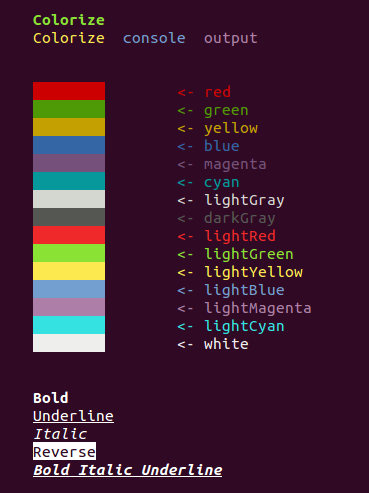
Colorizecolor()ColorizeFor colorize string with Colorize class you should create object of type Colorize:
Colorize string = new Colorize("This is my string!");
Then you can call methods of Colorize.
Text color
Background color
Formatting
After apply styles to string you can print it to console:
print(string);
color()Top-level function color apply one required parameter - String text. It is text, that would be print
on console.
Also top-level function color has seven named parameters:
Styles front - name of front color (you can also use the constants of class Styles). Default value is ''.Styles back: name of background color (you can also use the constants of class Styles). Default value is ''.bool isUnderline - default value is false.bool isBold - default value is false.bool isDark - default value is false.bool isItalic - default value is false.bool isReverse - default value is false.Example of usage
color("Bold Italic Underline", front: Styles.RED, isBold: true, isItalic: true, isUnderline: true);
StylesEnum Styles contains all styles which you can pass to Colorize.applyState method;

先按使用场景筛选,再比较项目活跃情况,最后到原始仓库核对使用要求。
“A repository is the most basic element of GitHub.”
GitHub Docs — About repositories ↗