
readmore
一个允许动态展开和折叠文本的Flutter插件
- 星标
- 272
- 复刻
- 93
- 最近推送(UTC)
- 2024年8月6日
- 项目状态
- 未归档
原始 README
以下为英文项目原文快照,最新内容请访问 GitHub。
readmore
A Flutter plugin that allows for expanding and collapsing text with the added capability to style and interact with specific patterns in the text like hashtags, URLs, and mentions using the Annotation feature.
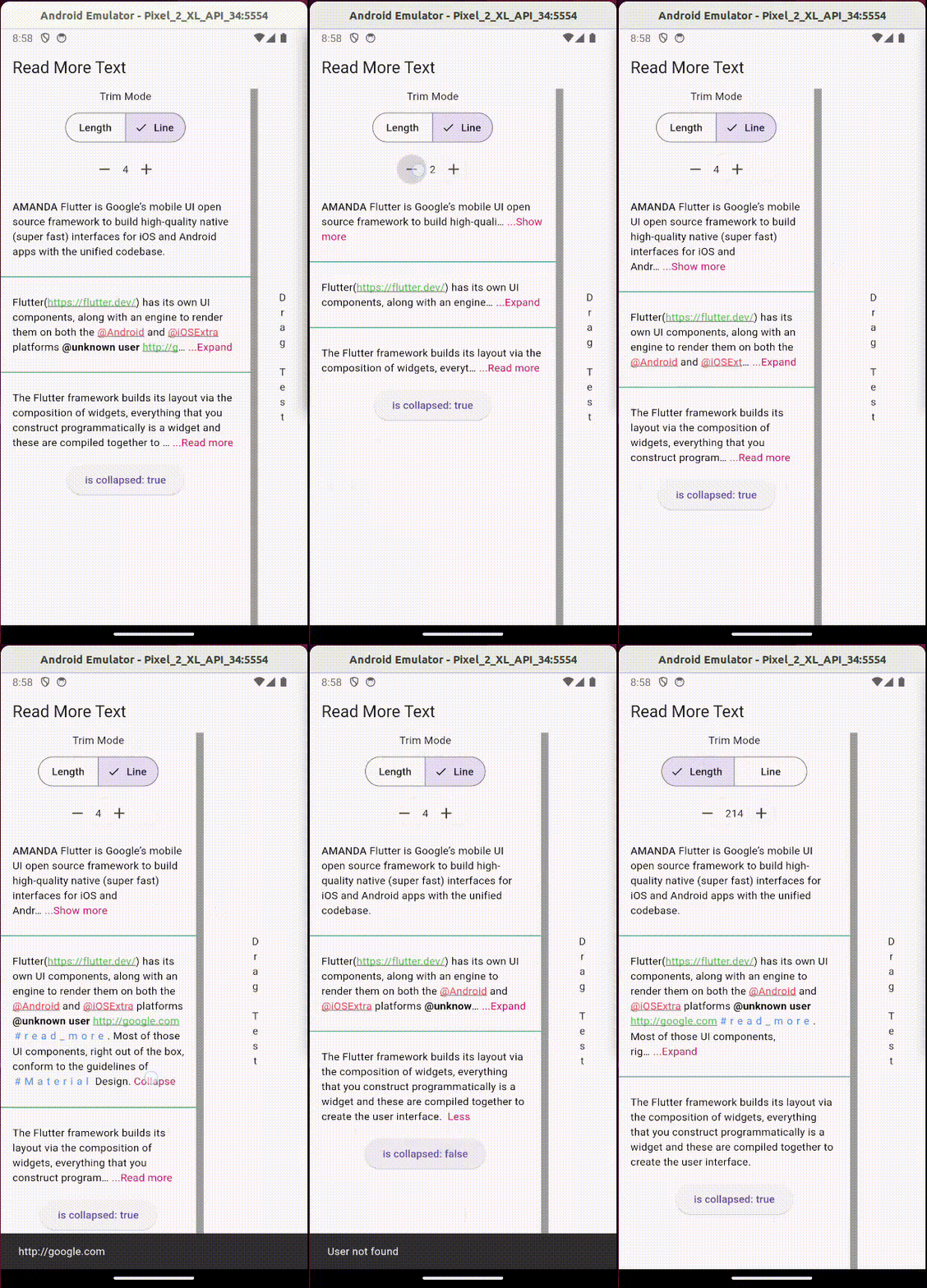
Usage:
Add the package to your pubspec.yaml:
readmore: ^3.0.0
Then, import it in your Dart code:
import 'package:readmore/readmore.dart';
Basic Example
ReadMoreText(
  'Flutter is Google’s mobile UI open source framework to build high-quality native (super fast) interfaces for iOS and Android apps with the unified codebase.',
  trimMode: TrimMode.Line,
  trimLines: 2,
  colorClickableText: Colors.pink,
  trimCollapsedText: 'Show more',
  trimExpandedText: 'Show less',
  moreStyle: TextStyle(fontSize: 14, fontWeight: FontWeight.bold),
);
Rich Text Example
With the ReadMoreText.rich constructor, you can create text with rich formatting, including different colors, decorations, letter spacing, and interactive elements within a single widget.
ReadMoreText.rich(
  TextSpan(
    style: const TextStyle(color: Colors.black),
    children: [
      const TextSpan(text: 'Rich '),
      const TextSpan(
        text: 'Text',
        style: TextStyle(
          color: Colors.blue,
          decoration: TextDecoration.underline,
          letterSpacing: 5,
          recognizer: TapGestureRecognizer()..onTap = () {
            // Handle tap
          },
        ),
      ),
    ],
  ),
  trimMode: TrimMode.Line,
  trimLines: 2,
  colorClickableText: Colors.pink,
  trimCollapsedText: '...Read more',
  trimExpandedText: ' Less',
);
Using Annotations
The Annotation feature enhances the interactivity and functionality of the text content. You can define custom styles and interactions for patterns like hashtags, URLs, and mentions.
ReadMoreText(
  'This is a sample text with a #hashtag, a mention <@123>, and a URL: https://example.com.',
  trimMode: TrimMode.Line,
  trimLines: 2,
  colorClickableText: Colors.pink,
  annotations: [
    Annotation(
      regExp: RegExp(r'#([a-zA-Z0-9_]+)'),
      spanBuilder: ({required String text, required TextStyle textStyle}) => TextSpan(
        text: text,
        style: textStyle.copyWith(color: Colors.blue),
      ),
    ),
    Annotation(
      regExp: RegExp(r'<@(\d+)>'),
      spanBuilder: ({required String text, required TextStyle textStyle}) => TextSpan(
        text: 'User123',
        style: textStyle.copyWith(color: Colors.green),
        recognizer: TapGestureRecognizer()..onTap = () {
          // Handle tap, e.g., navigate to a user profile
        },
      ),
    ),
    // Additional annotations for URLs...
  ],
  moreStyle: TextStyle(fontSize: 14, fontWeight: FontWeight.bold),
);
Note: This feature is not available with the ReadMoreText.rich constructor, as TextSpan gives you total control over styling and adding interactions to parts of the text.

Jonny Borges ↗
使用的依赖
依赖清单 1 项
- flutter
{"sdk":"flutter"}
如何选择适合项目的代码仓?
先按使用场景筛选,再比较项目活跃情况,最后到原始仓库核对使用要求。
- 通过仓库名、作者或描述搜索,再按技术分类缩小范围。
- 结合星标、复刻与最近推送比较项目;星标反映社区关注,不代表质量保证。
- 使用前在 GitHub 核对 README、许可证与 Issues。
来源与维护
“A repository is the most basic element of GitHub.”
GitHub Docs — About repositories ↗