
 v0.0.5
glossy
Glossy:一个用于创建流畅的玻璃态UI效果的Flutter包,非常适合现代应用程序设计和时尚的用户界面。
115喜欢 1590近 30 天下载140Pub 分数
AndroidiOSWebmacOSWindowsLinux
这是一个由我制作的 Flutter 包,用于构建玻璃拟态 UI 组件。在您的 Flutter 项目中添加此依赖项,请运行 flutter pub add glossy。有关更多信息,请阅读 ReadMe 文件。

{"sdk":"flutter"}{"sdk":"flutter"}^2.0.0以下为英文项目原文快照,最新内容请访问 GitHub。
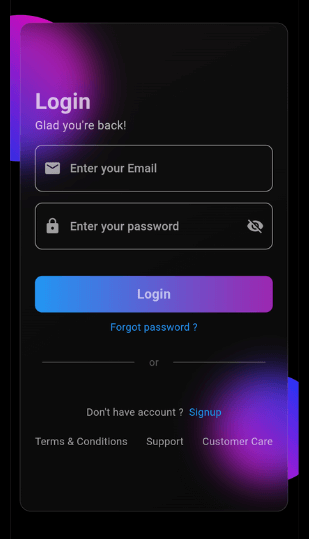
App Screenshot
This Flutter package allows you to easily create glass morphism effects in your Flutter applications. Glass morphism is a design trend that involves using blurred, semi-transparent elements to create a frosted glass-like effect.
To use this package, add glossy as a dependency in your pubspec.yaml file:
dependencies:
  flutter:
    sdk: flutter
  glossy: ^0.0.5
Open your termilar in the project level and run this command.
flutter pub add glossy
You can use the GlossyContainer widget provided by this package to create glass morphism effects. Here's a basic example:
import 'package:flutter/material.dart';
import 'package:glossy/glossy.dart';

void main() {
  runApp(const MyApp());
}

class MyApp extends StatelessWidget {
  const MyApp({super.key});

  @override
  Widget build(BuildContext context) {
    return MaterialApp(
      home: Scaffold(
        backgroundColor: Colors.black,
        appBar: AppBar(
          title: const Text('Glass Morphism Example'),
        ),
        body: Center(
          child: SizedBox(
            width: 300,
            height: 300,
            child: Stack(
              children: [
                Container(
                  height: 140,
                  width: 140,
                  decoration: (BoxDecoration(
                      color: Colors.purple,
                      borderRadius: BorderRadius.circular(70))),
                ),
                Align(
                  alignment: Alignment.bottomRight,
                  child: Container(
                    height: 140,
                    width: 140,
                    decoration: (BoxDecoration(
                        color: Colors.purple,
                        borderRadius: BorderRadius.circular(70))),
                  ),
                ),
                Align(
                  alignment: Alignment.center,
                  child: GlossyContainer(
                    width: 200,
                    height: 200,
                    borderRadius: BorderRadius.circular(12),
                    child: const Center(
                      child: Text(
                        'Glass Morphism',
                        style: TextStyle(
                          fontSize: 20,
                          fontWeight: FontWeight.bold,
                          color: Colors.white,
                        ),
                      ),
                    ),
                  ),
                ),
              ],
            ),
          ),
        ),
      ),
    );
  }
}
width: The width of the container required.height: The height of the container required.borderRadius: The border radius of the container.blur: The amount of blur to apply to the container.child: The widget placed inside the glass container.color: Background color of the container.opacity: Opacity of the container.strengthX: Strength of blur in the horizontal direction.strengthY: Strength of blur in the vertical direction.border: Border of the container.blendMode: Blend mode for applying filter.gradient: Gradient of the container.boxShadow: Box shadows for the container.image: Background image of the container.imageOpacity: Opacity of the background image.If you find this project helpful and would like to support its development, you can connect with me on social media:
Your support and feedback are greatly appreciated and will help in further improving this project.