

v0.0.2
page_slider
一个简单的 Flutter 小部件,可水平滑动浏览页面。适用于向导或类似 Material Stepper 小部件的引导流程,但没有特定的 UI - 任何小部件都可以作为要滑动的页面。
36喜欢 22近 30 天下载30Pub 分数
平台暂无数据
一个水平滑动翻页的 Flutter 小部件

以下为英文项目原文快照,最新内容请访问 GitHub。

A simple Flutter widget that slides through pages horizontally. Use-cases could be wizards or onboarding flows similar to the Material Stepper widget, but without a particular UI - any widget can be a page to slide through.
Here's a demo of the example app:
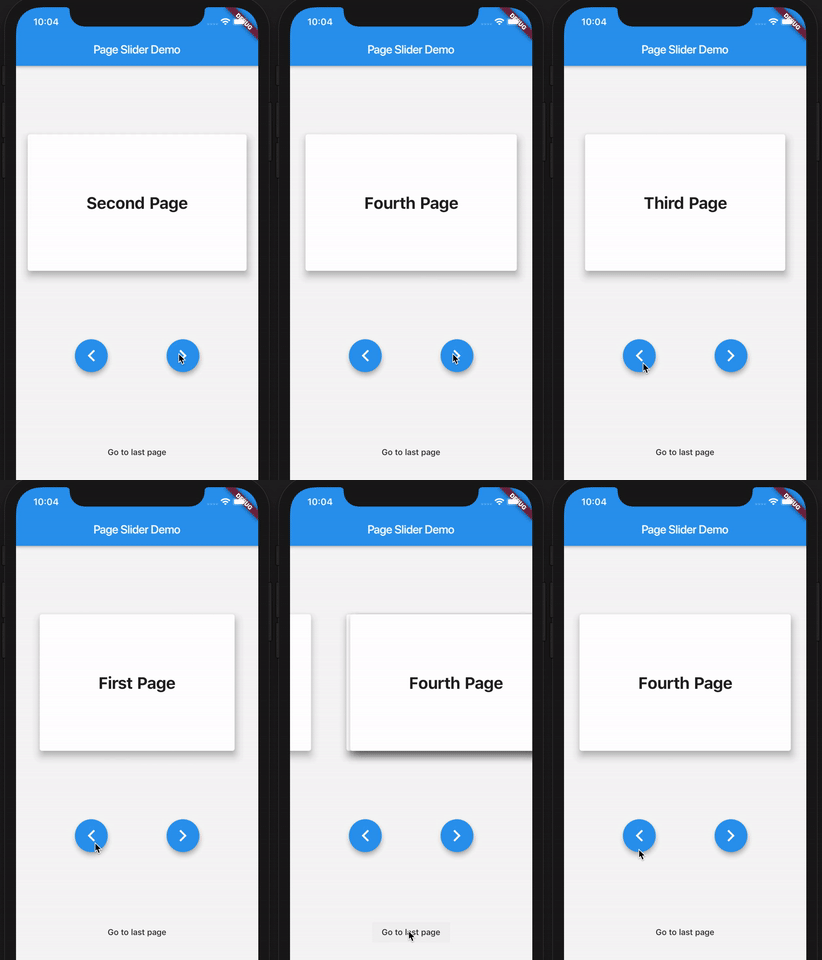
First, create the PageSlider widget with a GlobalKey<PageSliderState> and the child widgets which you want to slide through. Then, control the active page using the global key to address the page slider state like so:
class Demo extends StatefulWidget {
  Demo({Key key}) : super(key: key);
  _DemoState createState() => _DemoState();
}

class _DemoState extends State<Demo> {
  GlobalKey<PageSliderState> _sliderKey = GlobalKey();

  @override
  Widget build(BuildContext context) {
    return Column(
      children: [
        PageSlider(
          key: _sliderKey,
          pages: [
            Text('Page 0'),
            Text('Page 1'),
            Text('Page 2'),
          ]
        ),
        RaisedButton(
          onPressed: _sliderKey.currentState.next,
          child: Text('Next')
        ),
        RaisedButton(
          onPressed: _sliderKey.currentState.previous,
          child: Text('Previous')
        ),
      ]
    );
  }
}
依赖清单 2 项
{"sdk":"flutter"}{"sdk":"flutter"}先按使用场景筛选,再比较项目活跃情况,最后到原始仓库核对使用要求。
“A repository is the most basic element of GitHub.”
GitHub Docs — About repositories ↗