
 v1.3.4
easy_folder_picker
适用于 Flutter 的简单目录选择器,您可以选择目录或创建目录以进行后续操作
34喜欢 197近 30 天下载140Pub 分数
AndroidiOSWindows
适用于 Flutter 的简易文件夹选择器。

{"sdk":"flutter"}^11.3.1^1.9.0{"sdk":"flutter"}以下为英文项目原文快照,最新内容请访问 GitHub。
Easy directory picker for Flutter
A flutter package to pick directories and handles requesting required permissions as well. This package only supports ANDROID.
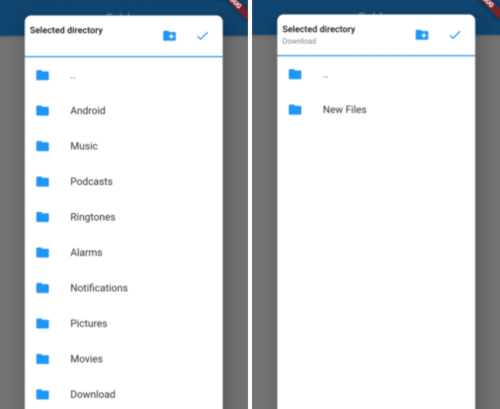
Picker Screenshot1 Picker Screenshot2
Add below line to your pubspec.yaml and run flutter packages get
easy_folder_picker: ^latest version
Add below line to your android/app/src/main/AndroidManifest.xml
<uses-permission android:name="android.permission.READ_EXTERNAL_STORAGE" />
If you want to allow creating new folders directly from picker then add the below permission also
<uses-permission android:name="android.permission.WRITE_EXTERNAL_STORAGE" />
In Android 10, you need to add the Following Lines in AndroidManifest file:
<application
      android:requestLegacyExternalStorage="true"
From Android 11, you need to manage permission within your app, if you want to write in different folders of external storage.
<uses-permission android:name="android.permission.MANAGE_EXTERNAL_STORAGE"/>
  var status = await Permission.manageExternalStorage.status;
      if (status!.isRestricted) {
        status = await Permission.manageExternalStorage.request();
      }

      if (status!.isDenied) {
        status = await Permission.manageExternalStorage.request();
      }
      if (status!.isPermanentlyDenied) {
        ScaffoldMessenger.of(context).showSnackBar(SnackBar(
          backgroundColor: Colors.green,
          content: Text('Please add permission for app to manage external storage'),
        ));
      }
import 'package:easy_folder_picker/FolderPicker.dart';

// In any callback call the below method
  Future<void> _pickDirectory(BuildContext context) async {
    Directory directory = selectedDirectory;
    if (directory == null) {
      directory = Directory(FolderPicker.ROOTPATH);
    }

    Directory newDirectory = await FolderPicker.pick(
        allowFolderCreation: true,
        context: context,
        rootDirectory: directory,
        shape: RoundedRectangleBorder(
            borderRadius: BorderRadius.all(Radius.circular(10))));
    setState(() {
      selectedDirectory = newDirectory;
      print(selectedDirectory);
    });
  }