
 v0.8.0
flutter_sticky_header
Flutter 中的粘性标题实现为一个滑动条。在 CustomScrollView 中使用它。
942喜欢 31.2万近 30 天下载150Pub 分数
AndroidiOSWebmacOSWindowsLinux
Sliver 的粘性标题的 Flutter 实现

{"sdk":"flutter"}^0.5.0{"sdk":"flutter"}^0.2.7以下为英文项目原文快照,最新内容请访问 GitHub。
A Flutter implementation of sticky headers with a sliver as a child.
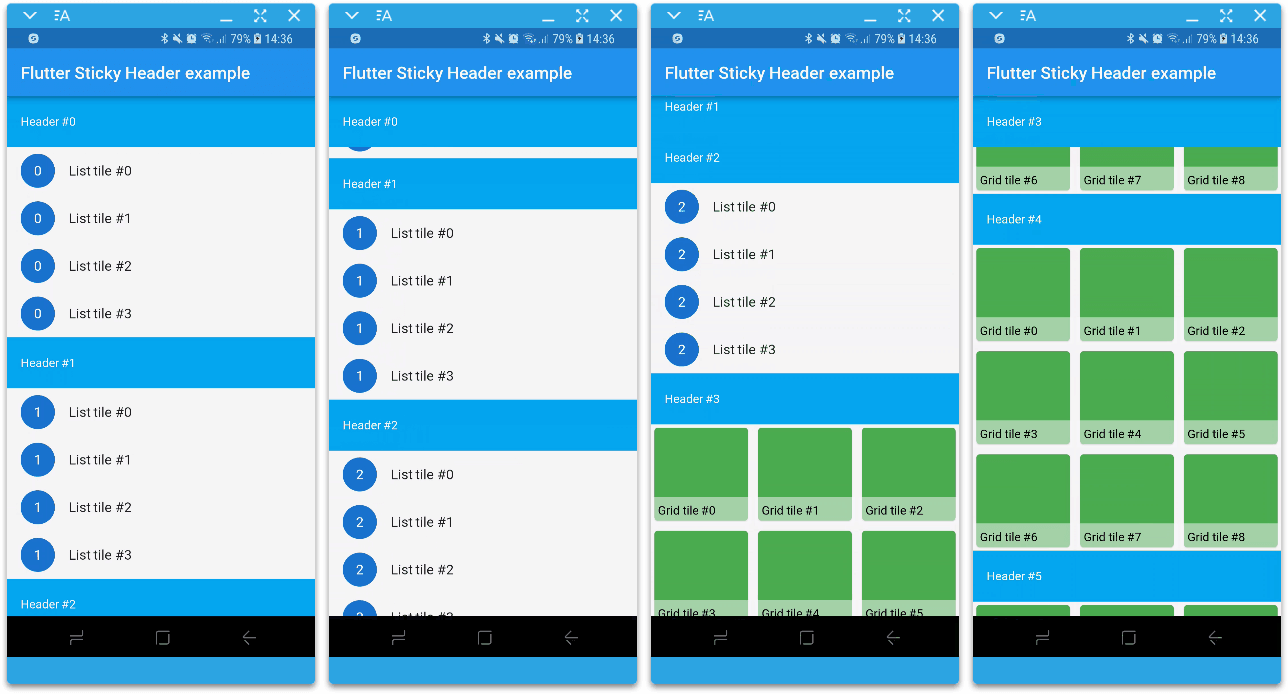
Screenshot
sticky: false parameter).In the pubspec.yaml of your flutter project, add the following dependency:
dependencies:
  ...
  flutter_sticky_header:
In your library add the following import:
import 'package:flutter_sticky_header/flutter_sticky_header.dart';
For help getting started with Flutter, view the online documentation.
You can place one or multiple SliverStickyHeaders inside a CustomScrollView.
SliverStickyHeader(
  header: Container(
    height: 60.0,
    color: Colors.lightBlue,
    padding: EdgeInsets.symmetric(horizontal: 16.0),
    alignment: Alignment.centerLeft,
    child: Text(
      'Header #0',
      style: const TextStyle(color: Colors.white),
    ),
  ),
  sliver: SliverList(
    delegate: SliverChildBuilderDelegate(
      (context, i) => ListTile(
            leading: CircleAvatar(
              child: Text('0'),
            ),
            title: Text('List tile #$i'),
          ),
      childCount: 4,
    ),
  ),
);
If you want to change the header layout during its scroll, you can use the SliverStickyHeader.builder constructor.
The example belows changes the opacity of the header as it scrolls off the viewport.
SliverStickyHeader.builder(
  builder: (context, state) => Container(
        height: 60.0,
        color: (state.isPinned ? Colors.pink : Colors.lightBlue)
            .withOpacity(1.0 - state.scrollPercentage),
        padding: EdgeInsets.symmetric(horizontal: 16.0),
        alignment: Alignment.centerLeft,
        child: Text(
          'Header #1',
          style: const TextStyle(color: Colors.white),
        ),
      ),
  sliver: SliverList(
    delegate: SliverChildBuilderDelegate(
      (context, i) => ListTile(
            leading: CircleAvatar(
              child: Text('0'),
            ),
            title: Text('List tile #$i'),
          ),
      childCount: 4,
    ),
  ),
);
You can find more examples in the Example project.
I'm working on my packages on my free-time, but I don't have as much time as I would. If this package or any other package I created is helping you, please consider to sponsor me. By doing so, I will prioritize your issues or your pull-requests before the others.
Please see the Changelog page to know what's recently changed.
Feel free to contribute to this project.
If you find a bug or want a feature, but don't know how to fix/implement it, please fill an issue.
If you fixed a bug or implemented a new feature, please send a pull request.
:clap: Thanks to slightfoot with it's RenderBox version (https://github.com/slightfoot/flutter_sticky_headers) which unintentionally challenged me to work in this RenderSliver version.