
AwesomeButton
这是一个具有出色外观的预构建按钮,适用于 Flutter。

- 星标
- 8
- 复刻
- 2
- 最近推送(UTC)
- 2019年8月21日
- 项目状态
- 未归档
原始 README
以下为英文项目原文快照,最新内容请访问 GitHub。
AwesomeButton
This is a pre-built button for flutter with an awesome look.
Installation
Add the awesome_button to your dependencies in your pubspec.yaml.
awesome_button: ^1.0.2
Usage
Import the AwesomeButton.dart using this line below.
import 'package:awesome_button/awesome_button.dart';
Add the AwesomeButton widget to your widget tree and provide your parameter to it, like examples below.
Example
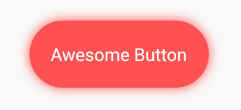
AwesomeButton(
  blurRadius: 10.0,
  splashColor: Color.fromRGBO(255, 255, 255, .4),
  borderRadius: BorderRadius.circular(37.5),
  height: 75.0,
  width: 200.0,
  onTap: () => print("tapped"),
  color: Colors.redAccent,
  child: Text(
    "Awesome Button",
    style: TextStyle(
      color: Colors.white,
      fontSize: 20.0,
    ),
  ),
),

AwesomeButton(
  blurRadius: 10.0,
  splashColor: Color.fromRGBO(255, 255, 255, .4),
  borderRadius: BorderRadius.circular(50.0),
  height: 100.0,
  width: 100.0,
  onTap: () => print("tapped"),
  color: Colors.greenAccent,
  child: Icon(
    Icons.account_circle,
    color: Colors.white,
    size: 50.0,
  ),
),
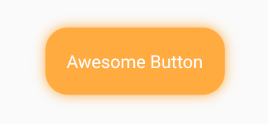
AwesomeButton(
  blurRadius: 10.0,
  splashColor: Color.fromRGBO(255, 255, 255, .4),
  borderRadius: BorderRadius.circular(25.0),
  height: 75.0,
  width: 200.0,
  onTap: () => print("tapped"),
  color: Colors.orangeAccent,
  child: Text(
    "Awesome Button",
    style: TextStyle(
      color: Colors.white,
      fontSize: 20.0,
    ),
   ),
),

GitHub 作者
Millian ↗
语言Dart
如何选择适合项目的代码仓?
先按使用场景筛选,再比较项目活跃情况,最后到原始仓库核对使用要求。
- 通过仓库名、作者或描述搜索,再按技术分类缩小范围。
- 结合星标、复刻与最近推送比较项目;星标反映社区关注,不代表质量保证。
- 使用前在 GitHub 核对 README、许可证与 Issues。
来源与维护
“A repository is the most basic element of GitHub.”
GitHub Docs — About repositories ↗