
 v1.3.0
windows_notification
flutter windows 通知,能够在 Windows 上发送所需模板的通知。
85喜欢 3000近 30 天下载160Pub 分数
Windows
一个使用 Flutter 在 Windows 上发送通知的库

{"sdk":"flutter"}^2.1.8{"sdk":"flutter"}^4.0.0以下为英文项目原文快照,最新内容请访问 GitHub。
A library for sending notifications on Windows using Flutter
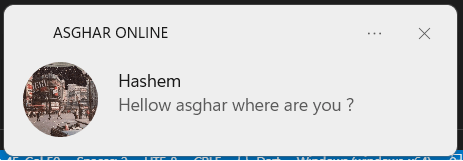
Sending notifications through the plugin's own templates, there are currently 3 template available in the plugin.
import 'package:windows_notification/notification_message.dart';
import 'package:windows_notification/windows_notification.dart';

// Create an instance of Windows Notification with your application name
// application id must be null in packaged mode
final _winNotifyPlugin = WindowsNotification(applicationId: "r"{D65231B0-B2F1-4857-A4CE-A8E7C6EA7D27}\WindowsPowerShell\v1.0\powershell.exe"");


// create new NotificationMessage instance with id, title, body, and images
NotificationMessage message = NotificationMessage.fromPluginTemplate(
      "test1",
      "TEXT",
      "TEXT",
      largeImage: file_path,
      image: file_path
);


// show notification
_winNotifyPlugin.showNotificationPluginTemplate(message);
fix2
fix3
fix1
You can use the template made by you to send the notification You can find a lot of templates code with a simple search on the Internet
const String template = '''
<toast activationType="protocol">
  <visual>
    <binding template="ToastGeneric">
      <text>Weather app</text>
      <text>Expect rain today.</text>
      <group>
        <subgroup hint-weight="1" hint-textStacking="center">
          <text hint-align="center" hint-style="header">15°</text>
          <text hint-align="center" hint-style="SubtitleSubtle">Rainy</text>
        </subgroup>
        <subgroup hint-weight="1">
          <text hint-align="center">Mon</text>
          <image src=".\image.jpg" hint-removeMargin="true" />
          <text hint-align="center">15°</text>
        </subgroup>
        <subgroup hint-weight="1">
          <text hint-align="center">Tue</text>
          <image src=".\image.jpg" hint-removeMargin="true" />
          <text hint-align="center">17°</text>
        </subgroup>
        <subgroup hint-weight="1">
          <text hint-align="center">Wed</text>
          <image src=".\image.jpg" hint-removeMargin="true" />
          <text hint-align="center">21°</text>
        </subgroup>
      </group>
    </binding>
  </visual>
</toast>
''';

    NotificationMessage message =
        NotificationMessage.fromCustomTemplate("notificationid_1", group: "weather_group");
    _winNotifyPlugin.showNotificationCustomTemplate(message, template);
weather
    const String template = '''
<?xml version="1.0" encoding="utf-8"?>
<toast launch="callLaunchArg" scenario="incomingCall" activationType="protocol">
  <visual>
    <binding template="ToastGeneric">
      <text>ASGHAR CALL</text>
      <text>Incoming Call</text>
      <group>
        <subgroup hint-weight="1" hint-textStacking="center">
          <text hint-align="center" hint-style="Header">GHASEM</text>
          <image src=".\image.jpg" hint-crop="circle" hint-align="center" />
        </subgroup>
      </group>
    </binding>
  </visual>
  <actions>
    <action content="Text reply" imageUri="" activationType="protocol" arguments="callReply" />
    <action content="Ignore" imageUri="" activationType="protocol" arguments="callIgnore" />
    <action content="Answer" imageUri="" activationType="protocol" arguments="callAnswer" />
  </actions>
</toast>
''';

    NotificationMessage message =
        NotificationMessage.fromCustomTemplate("notificationid_1", group: "weather_group");
    _winNotifyPlugin.showNotificationCustomTemplate(message, template);
4
_winNotifyPlugin.clearNotificationHistory();
When creating an instance of NotificationMessage , it is possible to add group to the notification
_winNotifyPlugin.removeNotificationGroup("groupname");
When creating an instance of NotificationMessage , it is possible to add group and ID to the notification
_winNotifyPlugin.removeNotificationId("notificationid", "groupname");
To receive your notification events, you must use the initNotificationCallBack method
   _winNotifyPlugin.initNotificationCallBack(
        (NotificationMessage data, EventType eventType, String? arguments) {});
The Launch option allows you to embed your app's deep leak into the notification, and the target user will be redirected to the relevant page by tapping on the notification.
NotificationMessage message = NotificationMessage.fromPluginTemplate(
  "test1", "You Win", "Tap to receive a gift",
   launch: "my-app-schame://page1");

_winNotifyPlugin.showNotificationPluginTemplate(message);
Please file feature requests and bugs at the issue tracker. If you want to contribute to this library, please submit a Pull Request.