
flutter-pencilkit
iOS PencilKit 的 Flutter 插件

- 星标
- 58
- 复刻
- 21
- 最近推送(UTC)
- 2025年4月23日
- 项目状态
- 未归档
原始 README
以下为英文项目原文快照,最新内容请访问 GitHub。
Flutter iOS Pencil Kit


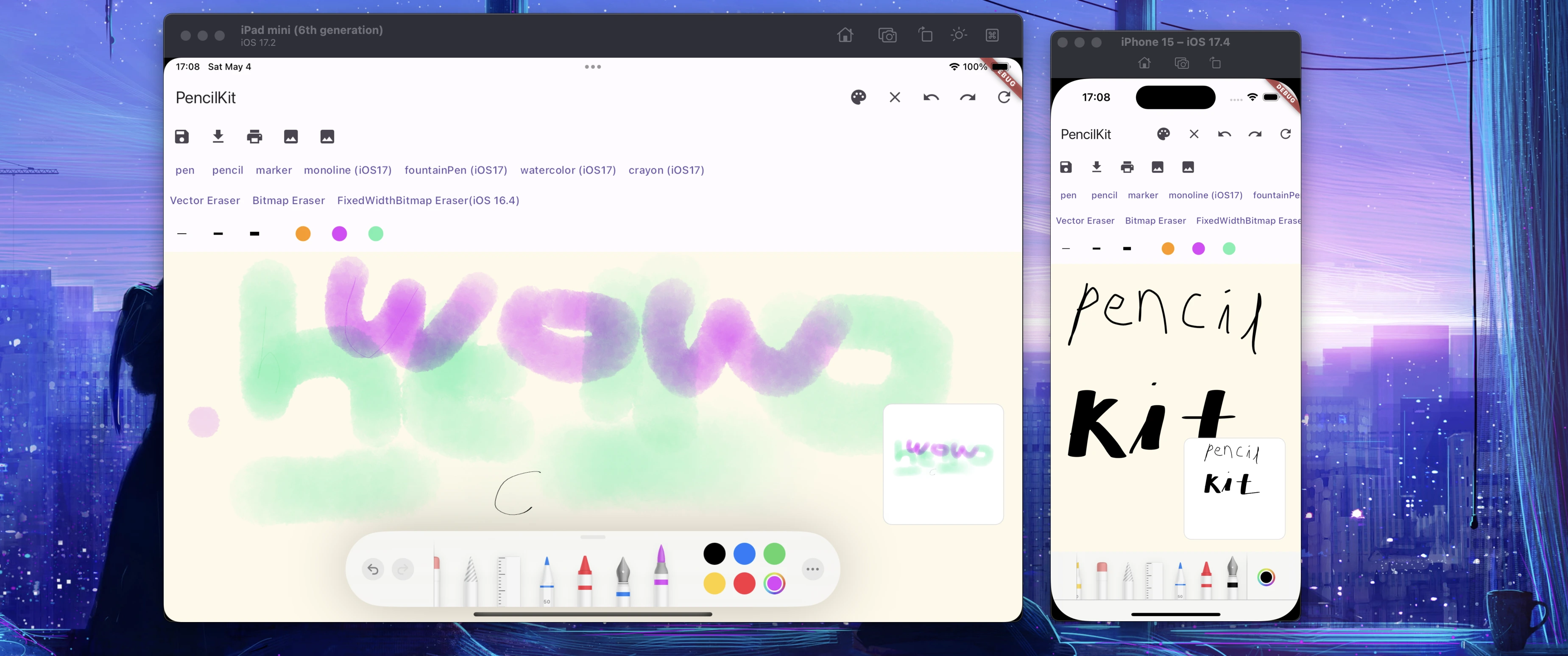
Flutter plugin for using iOS Pencil Kit
Note 📒
- This package only provides iOS implementation. If you try use widget of this package other than iOS, you see a Red warning box.
- iOS Pencil Kit is available from iOS
13.0
Supported Platforms 📱
- iOS
Highlights 🌟
- [x] Drawing
- [x] Show/Hide palette
- [x] Undo/Redo
- [x] Clear
- [x] UI properties(background color, scrollability, isOpaque, etc...)
- [x] Import/Export drawing data
- [x] Get drawing png/jpeg image data as base64
- [x] Manage drawing tools programmatically
Requirements ✅
- iOS: Deployment target >=
9.0
Setup & Usage 🎉
flutter pub add pencil_kit
Available Methods
Methods available for PencilKitController.
| Method | Description | Throws | Etc |
|---|---|---|---|
| clear() | Clear canvas | X | |
| show() | Show Palette | X | |
| hide() | Hide Palette | X | |
| redo() | Redo last drawing action | X | |
| undo() | Undo last drawing action | X | |
| save(): Future<String?> | Save drawing data into file system, can return base 64 data if withBase64Data is true |
O | |
| load(): Future<String?> | Load drawing data from file system, can return base 64 data if withBase64Data is true |
O | |
| getBase64Data(): Future | Get current drawing data as base64 string form | O | |
| loadBase64Data(String base64Data): Future | Load base64 drawing data into canvas | O | |
| getBase64PngData(): Future | Get current drawing data as png base64 string form | O | scale = 0 means use default UIScreen.main.scale |
| getBase64JpegData(): Future | Get current drawing data as jpeg base64 string form | O | scale = 0 means use default UIScreen.main.scale. default compression is 0.93 |
| setPKTool({required ToolType toolType, double? width, Color? color}): Future | Set PKTool type with width and color |
X |
Caution for setPKTool
setPKTool can fail if tool type is not supported by device iOS version
In eraser tools, the width parameter will work only from iOS 16.4 or above iOS version
You should check whether feature is available in user's iOS version with [ToolType.isAvailableFromIos16_4] and [ToolType.isAvailableFromIos17]
Read more about ToolType type definition.
Type definition
/// PKTool type enum for [PencilKitController.setPKTool]
enum ToolType {
  /// pen tool
  pen(false, false),

  /// pencil tool
  pencil(false, false),

  /// marker tool
  marker(false, false),

  /// monoline tool, available from iOS 17.0
  monoline(false, true),

  /// fountainPen tool, available from iOS 17.0
  fountainPen(false, true),

  /// watercolor tool, available from iOS 17.0
  watercolor(false, true),

  /// crayon tool, available from iOS 17.0
  crayon(false, true),

  /// vector eraser tool
  eraserVector(false, false),

  /// bitmap eraser tool
  eraserBitmap(false, false),

  /// fixed width bitmap eraser tool, available from iOS 16.4
  eraserFixedWidthBitmap(true, false),
  ;

  const ToolType(this.isAvailableFromIos16_4, this.isAvailableFromIos17);

  final bool isAvailableFromIos16_4;
  final bool isAvailableFromIos17;
}
PencilKit Widget Parameters
All the available parameters.
| Parameter | Description | |
|---|---|---|
| onPencilKitViewCreated | A callback for platform view created. You can store PencilKitController from argument of this callback. |
|
| hitTestBehavior | iOS UIKitView hitTestBehavior |
|
| unAvailableFallback | A widget for render UnAvailable state. The default is A red box | |
| alwaysBounceVertical | A Boolean value that determines whether bouncing always occurs when vertical scrolling reaches the end of the content. | |
| alwaysBounceHorizontal | A Boolean value that determines whether bouncing always occurs when horizontal scrolling reaches the end of the content view. | |
| isRulerActive | A Boolean value that indicates whether a ruler view is visible on the canvas. | |
| drawingPolicy | The policy that controls the types of touches allowed when drawing on the canvas. This properties can be applied from iOS 14.0 | |
| toolPickerVisibilityDidChange | Tells the delegate that the tool picker UI changed visibility. | |
| toolPickerIsRulerActiveDidChange | Tells the delegate that the ruler active state was changed by the user. | |
| toolPickerFramesObscuredDidChange | Tells the delegate that the frames the tool picker obscures changed. | |
| toolPickerSelectedToolDidChange | Tells the delegate that the selected tool was changed by the user. | |
| canvasViewDidBeginUsingTool | Called when the user starts using a tool, eg. selecting, drawing, or erasing. | |
| canvasViewDidEndUsingTool | Called when the user stops using a tool, eg. selecting, drawing, or erasing. | |
| canvasViewDrawingDidChange | Called after the drawing on the canvas did change. | |
| canvasViewDidFinishRendering | Called after setting drawing when the entire drawing is rendered and visible. |
Contribution
Please read CONTRIBUTING.md and contribute your works! Thank you :)
Example
Check example on pub.dev page or example project repo
Troubleshooting
- I get a
Pencil Kit XXX+ msand it freezes.- Turn off
Graphics HUDmenu in iOS Developer Settings. #22
- Turn off

GitHub 作者
MJ Studio ↗
语言DartSwiftRubyObjective-C
分类
使用的依赖
依赖清单 5 项
- flutter
{"sdk":"flutter"} - plugin_platform_interface
^2.1.8 - flutter_lints开发依赖
^3.0.2 - flutter_test开发依赖
{"sdk":"flutter"} - yaml开发依赖
—
如何选择适合项目的代码仓?
先按使用场景筛选,再比较项目活跃情况,最后到原始仓库核对使用要求。
- 通过仓库名、作者或描述搜索,再按技术分类缩小范围。
- 结合星标、复刻与最近推送比较项目;星标反映社区关注,不代表质量保证。
- 使用前在 GitHub 核对 README、许可证与 Issues。
来源与维护
“A repository is the most basic element of GitHub.”
GitHub Docs — About repositories ↗